HVAC / Air Handlers
Owner's Manual for ACiQ Air Handler Unitary Ducted System
Comprehensive owner's manual for the ACiQ Air Handler Unitary Ducted System. Includes operating modes, maintenance procedures, energy-saving tips, and troubleshooting guides.
Quick answers from the manual
Quick answer
- The ACiQ Air Handler is an indoor unit that provides heating, cooling, and air filtration. It features four operating modes (Fan Only, Auto, Heating, Cooling) and requires regular filter cleaning every two weeks for optimal performance. p. 2, 3, 5
Key actions
- Clean the air filter every two weeks. p. 4, 5
- Perform a pre-season inspection including checking for damaged wires and leaks. p. 5
First start
- The unit features an Auto Start function that stores operating conditions and resumes automatically after a power failure. p. 3
Show 4 more answers Show less
Problems and fixes
Unit does not turn on
Wait 3 minutes for the protection feature to reset.
p. 6, 7
Poor cooling performance
Clean the filter, check for blocked inlets/outlets, close windows/doors, or check refrigerant levels.
p. 7Maintenance and reset
- Always turn off and disconnect power before cleaning or maintenance. p. 4
Technical specifications
| Parameter | Value | Meaning | Pages |
|---|---|---|---|
| Max cleaning water temperature | 104°F (40°C) | Maximum temperature for cleaning the front panel to avoid deformation. | p. 4 |
Where to find it in the PDF
- Table of Contents p. 1
- Operating Modes p. 2
- Maintenance p. 4, 5
- Troubleshooting p. 6, 7
Table of contents
Manual images
Click an image to enlargeQuick Guide from the Manual
This manual provides essential information for the operation and maintenance of the ACiQ Air Handler Unitary Ducted System. Key safety precautions include turning off the unit and disconnecting power before any cleaning or maintenance. Never use water hotter than 104°F (40°C) to clean the front panel, and do not use harsh chemicals or solvents.
Operating Modes
The system features four primary operating modes:
- FAN ONLY: Filters and circulates room air without changing the temperature.
- AUTO: Automatically cools or heats the room based on the user-selected set point. Recommended for single-zone applications only.
- HEATING: Heats and filters the room air. This is the system's priority mode.
- COOLING: Cools, dries, and filters the room air.
Note: Simultaneous heating and cooling is not allowed. If the power fails, the unit will automatically restart under the previous operating conditions once power is restored.
Care and Maintenance
Regular maintenance is crucial for system efficiency:
- Cleaning the Filter: Clean the air filter every two weeks. If the area is dusty, clean it more frequently. Replace the filter if it is heavily clogged.
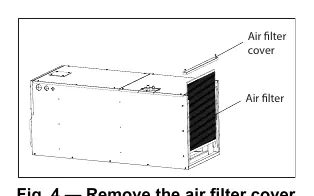
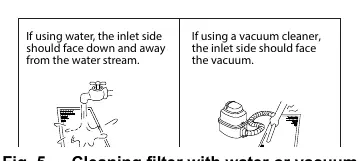
- Cleaning Procedure: Remove the filter cover, remove the filter, and clean it by vacuuming or washing in warm water with mild detergent. Ensure the inlet side faces down when using water. Do not expose the filter to direct sunlight while drying.
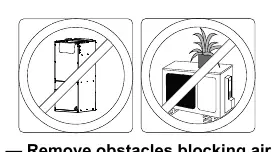
- Pre-Season Inspection: Before frequent use, check for damaged wires, clean all filters, check for leaks, and ensure nothing is blocking the air inlets and outlets.
- Long Periods of Non-Use: Clean all filters, run the FAN function until the unit is completely dry, then turn off the unit and disconnect the power.
Energy Saving Recommendations
- Select a comfortable thermostat setting and avoid frequent adjustments.
- Keep the filter clean to maintain efficiency.
- Use drapes or curtains to block direct sunlight on hot days.
- Use the TIMER function to limit run time.
- Keep doors and windows closed while the system is operating.
- Do not obstruct the air intake or outlet.
Troubleshooting
If the unit does not turn on, note that it has a 3-minute protection feature to prevent overloading; wait three minutes before attempting to restart. If the unit emits white mist, this is often due to a large temperature difference in humid regions or the defrosting process. If issues persist, contact an authorized dealer or service center.
Manufacturer information
ACiQ
Practical help
Common problems
Unit does not turn on when pressing ON/OFF
Wait 3 minutes. The unit has a protection feature to prevent overloading.
Indoor unit emits white mist
This is normal in humid regions due to temperature differences or defrosting.
Poor cooling or heating performance
Check if the filter is dirty, air inlets/outlets are blocked, or if doors/windows are open.
Unit starts and stops frequently
Check for refrigerant leaks, blocked circuits, or incorrect voltage.
Before use
- Ensure the unit is installed by authorized personnel.
- Check for damaged wires.
- Ensure nothing is blocking the air inlets and outlets.
- Verify the filter is clean.
- Check for any visible leaks.
Show more Show less
Specs in practice
- 3-minute protection
- Prevents the unit from overloading by delaying restart for 3 minutes after shutdown.
- Cleaning Temperature
- Do not use water hotter than 104°F (40°C) to clean the front panel.
Images and diagrams
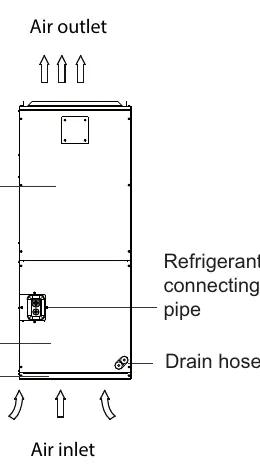
- Fig. 1: Shows the indoor unit components including the blower, coil, filter, and drain hose.
- Fig. 4: Illustrates how to remove the filter cover.
- Fig. 5: Demonstrates the correct orientation for cleaning the filter with water or a vacuum.
- Fig. 12: Shows the importance of keeping air inlets and outlets clear of obstacles.
Model compatibility
- Auto mode is recommended for single-zone applications only.
- Built-in 24V interface allows control with a third-party thermostat.

Manual page author
David Miller
Documentation analyst