HVAC / Air Handlers
Owner's Manual for ACiQ Ducted Air Handler
Comprehensive owner's manual for ACiQ Ducted Air Handler (24K-60K models). Includes safety precautions, operating conditions, maintenance instructions, and troubleshooting guide for models ACiQ-24-AHB, ACiQ-36-AHB, ACiQ-48-AHB, and...
Quick answers from the manual
Quick answer
- This manual covers the operation, maintenance, and safety guidelines for ACiQ Ducted Air Handler units (24K-60K). It includes troubleshooting for common issues like startup delays and performance problems. p. 1, 12, 13
Key actions
- Clean or replace air filters every 30 to 90 days. p. 9, 10
- Disconnect power before cleaning or maintenance. p. 4, 10
First start
- The default temperature on first power-on is 16°C for cooling and 30°C for heating. p. 9
Show 4 more answers Show less
Problems and fixes
Unit does not turn on
Wait 3 minutes for the protection feature to reset.
p. 12Maintenance and reset
- If the unit will be unused for a long time, clean filters and run the FAN function until dry. p. 11
Technical specifications
| Parameter | Value | Meaning | Pages |
|---|---|---|---|
| Static Pressure (18-24K) | 0.10 in-H2O (25Pa) | Allowed static pressure range | p. 7 |
| Static Pressure (30-36K) | 0.15 in-H2O (37Pa) | Allowed static pressure range | p. 7 |
| Static Pressure (48-60K) | 0.20 in-H2O (50Pa) | Allowed static pressure range | p. 7 |
Where to find it in the PDF
- Safety Precautions p. 4, 5, 6, 7
- Operating Conditions p. 8
- Care and Maintenance p. 10, 11
- Troubleshooting p. 12, 13, 14
Table of contents
Manual images
Click an image to enlargeQuick Guide
This manual provides essential information for the safe operation and maintenance of your ACiQ Ducted Air Handler. Always disconnect the power supply before performing any cleaning or maintenance. Ensure that air inlets and outlets are not blocked and that filters are cleaned regularly to maintain efficiency.
Safety Precautions
To prevent injury or property damage, follow these safety guidelines:
- Electrical Safety: Always disconnect power before cleaning. Use only the specified power cord. Ensure the unit is properly grounded. If the power cord is damaged, it must be replaced by a qualified professional.
- Operational Safety: Do not insert objects into air inlets or outlets. Do not use flammable sprays near the unit. Do not operate in wet rooms like bathrooms.
- Installation: Installation must be performed by a licensed professional HVAC installer. Ensure the location can support the unit's weight.
Operating Conditions
For optimal performance, operate the system within the following temperature ranges:
- Cool Mode: Room temperature 16°C - 32°C (60°F - 90°F).
- Heat Mode: Room temperature 0°C - 30°C (32°F - 86°F).
- Dry Mode: Room temperature 10°C - 32°C (50°F - 90°F).
Note: If the outdoor temperature is below 0°C (32°F) for units with an auxiliary electric heater, keep the unit powered at all times to prevent damage.
Care and Maintenance
Regular maintenance is crucial for the longevity of your unit:
- Cleaning: Use a soft, dry cloth for cleaning. Do not use water hotter than 40°C (104°F), volatile cleaners, or combustible agents.
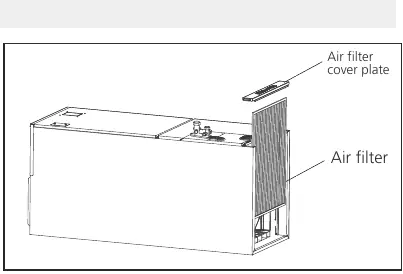
- Filters: Replace or clean air filters every 30 to 90 days, depending on the MERV rating and thickness.
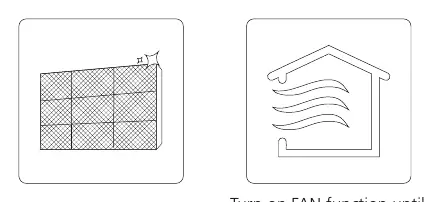
- Long-term Storage: If the unit will be unused for an extended period, clean all filters and run the FAN function until the unit is completely dry.
Troubleshooting
Before contacting a service provider, check the following common issues:
- Unit won't turn on: Check if the 3-minute protection feature is active. Wait three minutes before restarting.
- White mist: This is normal in humid regions due to temperature differences.
- Noises: Hissing sounds are normal refrigerant flow. Squeaking may occur due to plastic expansion/contraction.
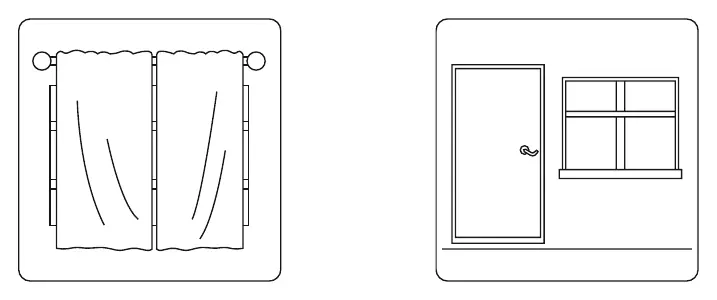
- Poor Performance: Check for dirty filters, blocked inlets/outlets, or open doors/windows.
Manufacturer information
ACiQ
Practical help
Common problems
Unit does not turn on
Wait 3 minutes; the unit has a built-in protection feature to prevent overloading.
Poor cooling performance
Check if air filters are dirty, air inlets/outlets are blocked, or if doors/windows are open.
Unit emits white mist
This is normal in humid regions due to the temperature difference between room air and conditioned air.
Squeaking noises
Normal expansion and contraction of plastic and metal parts due to temperature changes.
Before use
- Ensure the unit is installed by a licensed professional.
- Verify that the power supply is grounded and matches specifications.
- Keep doors and windows closed during operation for efficiency.
- Ensure air inlets and outlets are free from obstructions.
- Check that the drain hose is properly installed.
Show more Show less
Specs in practice
- Static Pressure (18-24K)
- 0.10 in-H2O (25Pa)
- Static Pressure (30-36K)
- 0.15 in-H2O (37Pa)
- Static Pressure (48-60K)
- 0.20 in-H2O (50Pa)
- Fuse Specifications
- Must be identical to original (e.g., T5A/250VAC or T10A/250VAC).
Images and diagrams
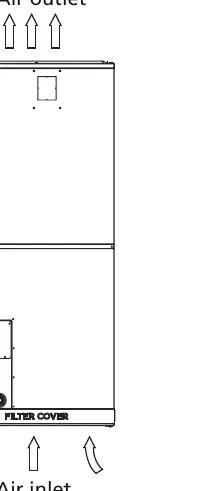
- The unit features an air inlet at the bottom and an air outlet at the top.
- The filter cover plate is located on the side of the unit for easy access.
Model compatibility
- Not intended for use in wet rooms like bathrooms.
- Requires auxiliary heating device if outdoor temperature is extremely low.

Manual page author
David Miller
Documentation analyst