Electronics / Monitors
AcuRite 01412M Indoor Air Quality Monitor User Guide
Quick setup guide for the AcuRite 01412M Indoor Air Quality Monitor, covering placement tips, power-on, time and unit settings, maintenance, and troubleshooting.
Table of contents
Quick guide from the manual
The AcuRite 01412M is designed to track indoor temperature, relative humidity, and PM2.5 particulate matter levels. This guide provides essential steps for proper placement, initial setup, and maintenance to ensure accurate readings.
Placement tips
Proper placement is critical for accurate air quality monitoring:
- Height: Place at sitting or standing level, typically 3 to 6 feet (0.9 to 1.8 m) above the floor.
- Airflow: Ensure at least 2 inches (5.08 cm) of clearance from walls or other solid objects.
- Environment: Avoid direct sunlight, heat sources (vents, stoves), uninsulated surfaces (brick walls), and areas with fluctuating airflow (near windows, doors, fans, or AC vents).
Power on and setup
To start using the device:
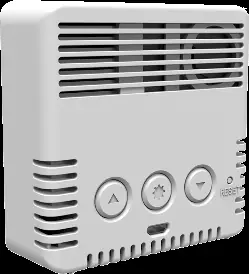
- Insert the Micro USB power cord into the backside of the device and plug the adapter into an electrical outlet.
- Setting time and units: Press and hold the SETTING button for 3 seconds to enter set mode.
- The selected item will blink. Use the arrow buttons to adjust the value.
- Press the SETTING button to save and move to the next preference in this order: 12/24 hour clock, clock hour, clock minute, and temperature units (ºF or ºC).
Brightness control
Press the arrow buttons to adjust the backlight brightness of the display.
Maintenance and care
Clean the device with a soft, damp cloth. Do not use caustic cleaners or abrasives. Ensure the two air inlets remain free of dust; a gentle puff of air can help clear them.
Troubleshooting
If the display is blank, verify the power adapter is plugged into an active outlet and the cable is properly inserted. If readings are inaccurate, review the placement tips above to ensure the device is not near heat sources or in a confined area. After a power loss, you will need to reset the time and temperature units.
Manufacturer information
AcuRite
Practical help
Common problems
Display is blank
Verify the power adapter is plugged into an active outlet and the Micro USB cable is securely connected to the device.
Inaccurate readings
Ensure the device is not placed in direct sunlight, near heat sources, near uninsulated surfaces, or in areas with poor or fluctuating airflow. Check that air inlets are free of dust.
Before use
- Ensure the device is placed 3 to 6 feet above the floor.
- Maintain at least 2 inches of clearance from walls or solid objects.
- Verify the power source is active.
- Register the product online at www.acurite.com/product-registration within 30 days of purchase.
Specs in practice
- Temperature range
- Operating range of -14.2ºF to 122ºF (-9.9ºC to 50ºC).
- Reading update interval
- PM2.5 updates every 5 seconds; temperature and humidity update every 30 seconds.
Images and diagrams
- The rear view shows the location of the SETTING button, Micro USB port, and RESET button.
- The PM2.5 levels table categorizes air quality from 'Good' (0-12.0) to 'Hazardous' (250.5-500.4) based on EPA standards.

Manual page author
Michael Turner
Technical manual editor
Reviews PDF manuals for structure, safety notes, and practical product details so readers can find the right information quickly.