Electronics / Monitors
AcuRite 13131W2 Atomic Alarm Clock User Guide
Quick setup and operation guide for the AcuRite 13131W2 Atomic Alarm Clock, covering battery installation, atomic signal synchronization, alarm settings, and troubleshooting tips.
Table of contents
Manual images
Jump to the sectionQuick guide from the manual
This document provides essential instructions for setting up and using the AcuRite 13131W2 Atomic Alarm Clock. Key tasks include installing batteries, configuring time zone and date settings, and managing alarm functions. Please note that the atomic signal may take several hours to synchronize; manual time setting is recommended immediately after power-up.
Clock Setup
To install or replace batteries:
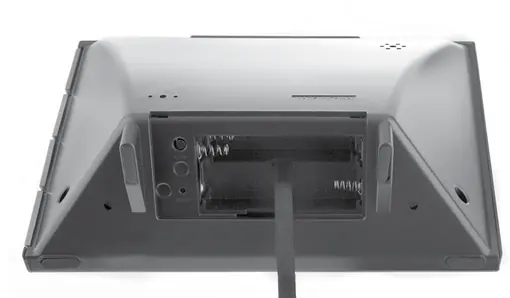
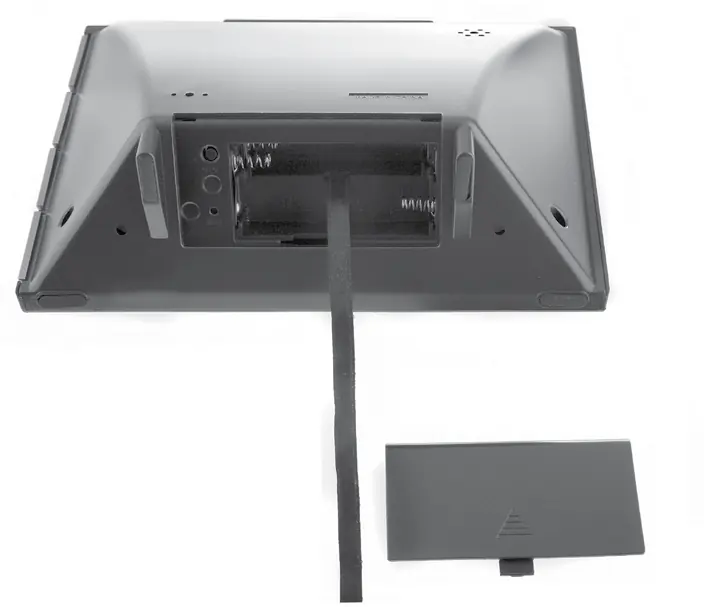
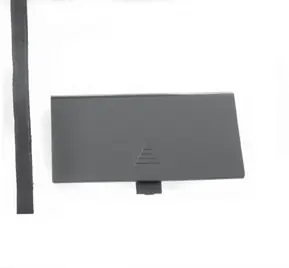
- Remove the battery compartment cover on the back of the unit.
- Insert 3 x AA alkaline batteries, ensuring the polarity (+/-) matches the diagram inside the compartment.
- Replace the battery cover.
Atomic Clock (RCC)
The clock uses a radio-controlled signal (RCC) from the NIST Radio Station WWVB to maintain split-second accuracy and automatically update for Daylight Saving Time. Signal reception is typically strongest at night and during clear weather.
Set the Time & Date
To manually configure the clock:
- Press and hold the SET CLOCK button on the side to enter SET MODE.
- Use the ▲ or ▼ buttons to adjust the flashing value.
- Press and release the SET CLOCK button to save and move to the next preference.
- The setting order is: Time Zone, Auto DST (ON/OFF), Calendar Year, Month, Date, Hour, Minute.
- The unit will exit SET MODE automatically if no buttons are pressed for 45 seconds.
Using the Alarm Clock
To set the alarm time, press and hold the ALARM ON/OFF button for 5 seconds. Adjust the hour and minute using the ▲ or ▼ buttons, confirming each with the ALARM ON/OFF button. To toggle the alarm, press and hold the ALARM ON/OFF button until the alarm icon appears or disappears. The SNOOZE/LIGHT button activates an 8-minute snooze or a 5-second backlight.
Placement Guidelines
- Place in a dry area away from dirt and dust.
- Keep away from heat sources or vents to ensure accurate temperature readings.
- Maintain at least 3 feet (0.9 m) distance from electronic devices like TVs or computers to prevent interference.
- Avoid placing near large metallic items or thick walls to maximize atomic signal reception.
Care & Maintenance
Clean the device with a soft, damp cloth. Avoid caustic or abrasive cleaners. Keep ventilation ports clear of dust and debris.
Manufacturer information
AcuRite
Practical help
Common problems
Clock is too dark or hard to read
Verify batteries are installed correctly or replace them. View the display from slightly above for the optimum angle.
Inaccurate temperature reading
Ensure the clock is placed away from direct sunlight, heat sources, or air vents.
Atomic signal or time syncing issues
Check for nearby electronic interference or metallic objects. Visit the NIST website for additional radio clock troubleshooting.
Before use
- Remove the protective film from the LCD screen.
- Install 3 fresh AA alkaline batteries.
- Ensure the clock is placed away from electronic devices (TV, microwave, etc.).
- Manually set the time and date after initial power-up.
Specs in practice
- Temperature Range
- 32°F to 99°F (0°C to 37°C).
Images and diagrams
- The front panel displays time, date, day of the week, and indoor temperature.
- Side buttons control clock settings, alarm toggling, and backlight/snooze functions.
- The battery compartment is located on the back and includes a reset button.
Model compatibility
- Uses radio-controlled signal (RCC) from NIST station WWVB.
- Supports multiple time zones: PST, MST, CST, EST, AST, HAST, AKST.

Manual page author
Michael Turner
Technical manual editor
Reviews PDF manuals for structure, safety notes, and practical product details so readers can find the right information quickly.