Electronics / Monitors
AcuRite 00592W Remote Thermometer Instruction Manual
Quick guide for the AcuRite 00592W remote thermometer, covering sensor and display setup, battery installation, Intelli-Time clock configuration, and troubleshooting wireless connectivity issues.
Table of contents
Manual images
Jump to the sectionQuick guide from the manual
This document provides instructions for setting up and using the AcuRite 00592W/00592A remote thermometer. Key steps include matching the A-B-C switch on both the sensor and display unit, installing batteries, and configuring the Intelli-Time clock. Ensure both units are within 330 ft (100 m) of each other and away from electronic interference for accurate readings.
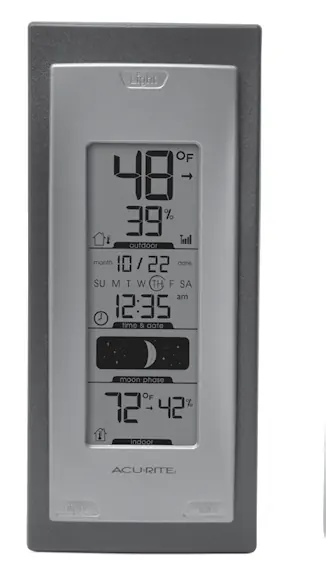
Sensor Setup
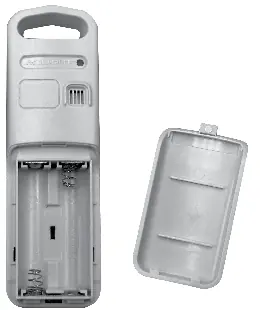
The outdoor sensor requires 2 AA batteries. For temperatures below -4°F (-20°C), use lithium batteries to ensure proper function. Before inserting batteries, ensure the A-B-C switch inside the battery compartment matches the setting on the display unit.
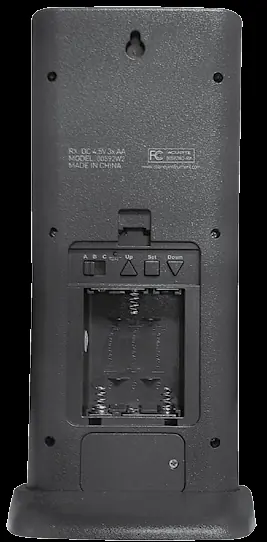
Display Unit Setup
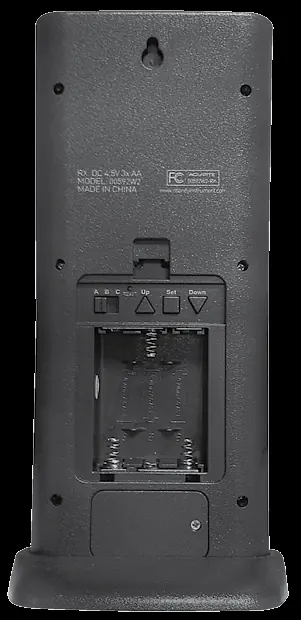
The display unit requires 3 AA alkaline batteries. Locate the A-B-C switch in the battery compartment and set it to the same letter as the outdoor sensor to ensure synchronization. The unit includes a tabletop stand and is wall-mountable.
Intelli-Time Clock
The clock is pre-programmed with the correct time and date. To configure, press and hold the Set button to enter SET MODE. Use the Up/Down buttons to adjust settings in the following order: Time Zone, DST (Daylight Saving Time), Clock Hour, Clock Minute, Calendar Month, Calendar Date, Calendar Year, and Temperature Units (°F or °C).
Placement Guidelines
- Place units out of direct sunlight and away from heat sources or vents.
- Maintain a distance of at least 3 ft (0.9 m) from electronic devices like TVs or microwaves.
- Avoid placing units near large metallic surfaces or thick walls that may limit wireless range.
Troubleshooting
- No outdoor sensor reception: Relocate units closer together, ensure they are away from electronics, and check battery health. Synchronization may take up to 20 minutes.
- Flashing outdoor temperature: Indicates wireless interference. Bring both units indoors, remove batteries, ensure A-B-C switches match, reinstall batteries, and allow 20 minutes for reconnection.
- Display not working: Check battery installation or press the Reset button in the battery compartment.
Care and Maintenance
Clean both the display unit and sensor with a soft, damp cloth. Do not use caustic cleaners or abrasives. Keep ventilation ports on the display unit clear of dust and debris.
Specifications
- Temperature Range: Outdoor: -40°F to 158°F (-40°C to 70°C); Indoor: 32°F to 122°F (0°C to 50°C).
- Humidity Range: Outdoor: 1% to 99%; Indoor: 16% to 98%.
- Wireless Range: 330 ft (100 m).
- Power: Display: 3 x AA alkaline; Sensor: 2 x AA alkaline or lithium.
Manufacturer information
AcuRite
Practical help
Common problems
No outdoor sensor reception (no bars)
Relocate units within 330 ft (100 m), ensure they are 3 ft away from electronics, and verify A-B-C switch synchronization.
Outdoor temperature is flashing or showing dashes
Indicates wireless interference. Bring units indoors, remove batteries, re-sync A-B-C switches, and allow 20 minutes for reconnection.
Inaccurate temperature or humidity readings
Ensure units are placed out of direct sunlight, away from heat sources, vents, and moisture sources.
Before use
- Remove protective film from the LCD screen.
- Set A-B-C switches on both sensor and display to the same letter.
- Install 2 AA batteries in the sensor (use lithium for below -4°F).
- Install 3 AA batteries in the display unit.
- Configure Time Zone and DST settings via the Set button.
Specs in practice
- Wireless Range
- Maximum 330 ft (100 m) depending on home construction materials.
- Data Reporting
- Outdoor data updates every 16 seconds; indoor data updates every 60 seconds.
- Intelli-Time Battery
- CR2032 coin-cell battery maintains time and date settings during power loss.
Images and diagrams
- A-B-C Switch: Must be set to the same letter on both units for synchronization.
- Reset Button: Located on the back of the display unit to restore factory defaults.
- High/Low Buttons: Used to view recorded temperature/humidity extremes since midnight.
Model compatibility
- Use lithium batteries in the outdoor sensor for temperatures below -4°F (-20°C).
- Do not use rechargeable or heavy-duty batteries.

Manual page author
Emily Carter
User documentation editor
Prepares concise manual descriptions and highlights the most useful setup, operation, and maintenance information for readers.