Electronics / Monitors
AcuRite 13019W2 Intelli-Time Alarm Clock User Guide
Quick start guide for the AcuRite 13019W2 Intelli-Time Alarm Clock, covering initial setup, time and date configuration, alarm operation, battery replacement, and troubleshooting steps.
Table of contents
Manual images
Jump to the sectionQuick guide from the manual
This document provides essential instructions for setting up and operating the AcuRite 13019W2 Intelli-Time Alarm Clock. Key features include pre-programmed time and date settings, automatic Daylight Savings Time updates, and a 9-minute snooze function.
Clock Setup
To begin, plug the power cord into a standard power outlet. Remove the protective film from the LCD screen before use.
Set the Time & Date
The clock is pre-programmed with Intelli-Time technology. To configure it for your location:
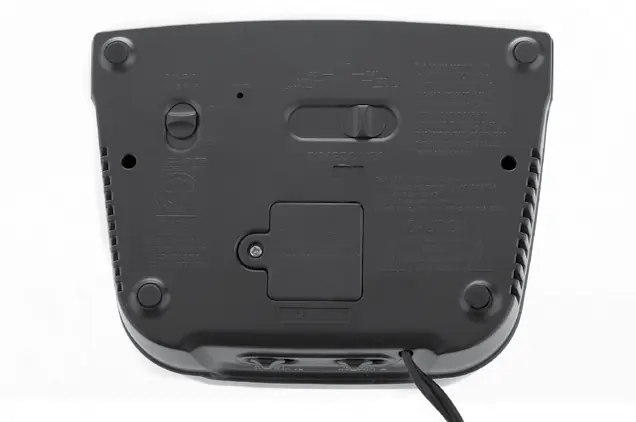
- Select your time zone using the TIME ZONE switch on the bottom of the clock (HAST, AKST, PST, MST, CST, EST, AST).
- Set the DST switch to ON if your area observes Daylight Savings Time.
- Press and hold the TIME SET button for 3 seconds to enter SET MODE.
- Use the + or - buttons to adjust settings. Press TIME SET to save and move to the next preference.
- The order is: Clock Hour (check PM indicator), Clock Minute, Calendar Year, Calendar Month, Calendar Date.
Using the Alarm Clock
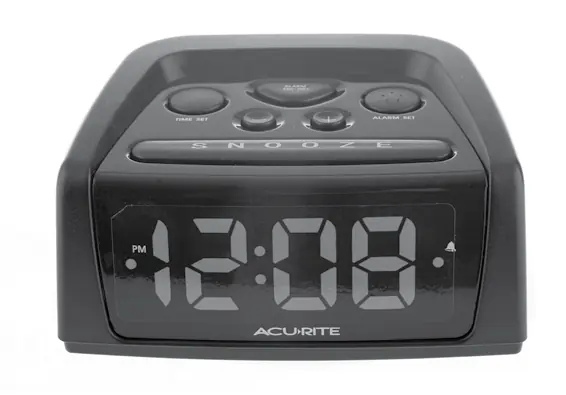
- Set Alarm: Press ALARM SET once to review, or twice to enter ALARM SET MODE. Use + or - to adjust the time.
- Alarm ON/OFF: Press the ALARM ON/OFF button until the ALARM ON icon appears or disappears from the screen.
- Snooze: Press the SNOOZE button when the alarm is sounding to activate a 9-minute delay.
Care & Maintenance
Clean the unit with a soft, damp cloth. Avoid caustic cleaners or abrasives. Keep the device away from dust, dirt, and moisture.
Replace Intelli-Time Clock Battery
The internal battery maintains time and date settings during power outages. To replace it:
- Locate the battery compartment on the back of the unit.
- Unscrew and remove the cover.
- Insert a new CR2032 3V coin cell battery with the positive (+) terminal facing OUT.
- Replace the cover and screw it back in.
Troubleshooting
If the clock display is dark, hard to read, or malfunctioning, press the RESET button on the bottom of the unit to restore factory defaults. Note that you will need to re-enter time and date settings after a reset.
Manufacturer information
AcuRite
Practical help
Common problems
Clock is too dark, hard to read, or doesn't work
Press the RESET button on the bottom of the clock to restore factory settings.
Before use
- Remove the protective film from the LCD screen.
- Plug the power cord into a power outlet.
- Select the correct time zone using the switch on the bottom.
- Set the DST switch to ON if your area observes Daylight Savings Time.
- Verify the PM indicator when setting the time.
Specs in practice
- Intelli-Time Battery
- CR2032 3V coin cell battery used for memory backup.
Images and diagrams
- The back panel contains the TIME ZONE switch, DST switch, RESET button, and the Intelli-Time battery compartment.
- The top panel features the TIME SET, ALARM SET, +, -, and SNOOZE buttons.
Model compatibility
- The device is designed for use with 120V AC power.

Manual page author
David Miller
Documentation analyst
Organizes user manual content into clear summaries, with attention to model details, product context, and everyday usability.