Garden / Outdoor
Instruction Manual for AcuRite 04053CA Outdoor Clock with Temperature and Humidity
Quick guide for the AcuRite 04053CA outdoor clock. Learn how to install batteries, set the time, calibrate temperature and humidity sensors, and maintain your device for accurate readings.
Table of contents
Manual images
Jump to the sectionQuick guide from the manual
This document provides essential instructions for setting up and maintaining your AcuRite outdoor clock. Key procedures include battery installation, time adjustment, and calibration of the integrated thermometer and hygrometer. For the most accurate readings, ensure the clock is not placed in direct sunlight or near heat sources.
Battery installation
To install or replace the battery:
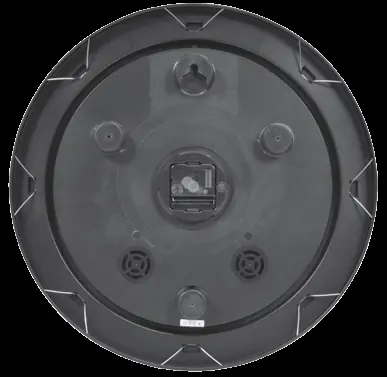
- Remove the weather-resistant cover from the back of the clock.
- Insert 1 x AA alkaline or lithium battery, ensuring correct polarity (+/-) as indicated in the compartment.
- Replace the cover and secure it using the provided screws.
- Note: Use lithium batteries for temperatures below -4°F / -20°C, as cold weather can cause alkaline batteries to malfunction. Do not use rechargeable or heavy-duty batteries.
Setting the time
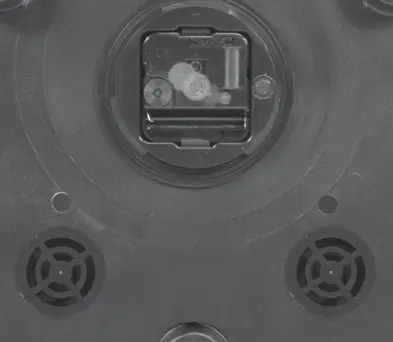
To set the time, locate the adjustment knob on the back of the clock and turn it in either direction until the desired time is reached.
Calibrating temperature and humidity
If the thermometer or hygrometer readings appear inaccurate, follow these steps:
- Compare the clock's readings with a known accurate device.
- Allow both devices to adjust to room temperature for at least three hours.
- If the clock still reads inaccurately, adjust the pointer by turning the calibration knob on the back of the unit in the appropriate direction.
Care and maintenance
- Clean the clock as needed using a soft cloth.
- Avoid using corrosive cleaners or chemicals.
- Remove the battery if the clock will not be used for an extended period.
- Always dispose of old or defective batteries in accordance with local laws and regulations.
Manufacturer information
AcuRite
Practical help
Common problems
Inaccurate temperature or humidity readings
Allow the clock to adjust to room temperature for 3 hours, then use the calibration knob on the back to adjust the pointer.
Clock not functioning in cold weather
Replace alkaline batteries with lithium batteries if the temperature is below -4°F / -20°C.
Before use
- Remove the weather-resistant cover.
- Ensure you have 1 x AA alkaline or lithium battery.
- Check the polarity (+/-) diagram inside the battery compartment.
- Secure the weather-resistant cover with screws after battery installation.
- Select a location away from direct sunlight or heat sources.
Specs in practice
- Battery Type
- 1 x AA alkaline or lithium. Lithium is required for temperatures below -4°F / -20°C.
Images and diagrams
- The back of the clock features a central adjustment knob for setting the time.
- Calibration knobs are located on the back to adjust the thermometer and hygrometer pointers.
- The battery compartment is protected by a removable weather-resistant cover.
Model compatibility
- Not compatible with rechargeable batteries.
- Not compatible with heavy-duty batteries.

Manual page author
David Miller
Documentation analyst
Organizes user manual content into clear summaries, with attention to model details, product context, and everyday usability.