Documents / Warranty Safety
Acurite 00592W2 Wireless Thermometer User Guide
Quick guide for the Acurite 00592W2 wireless thermometer, covering battery installation, sensor placement, Intellitime clock setup, and troubleshooting reception issues.
Table of contents
Manual images
Jump to the sectionQuick guide from the manual
This document provides setup and operational instructions for the Acurite 00592W2 wireless thermometer. Key requirements include using 5 AA batteries total (3 for the main unit, 2 for the sensor) and ensuring the wireless sensor is placed within 330 feet (100 meters) of the main unit. A clear film on the LCD must be removed before use.
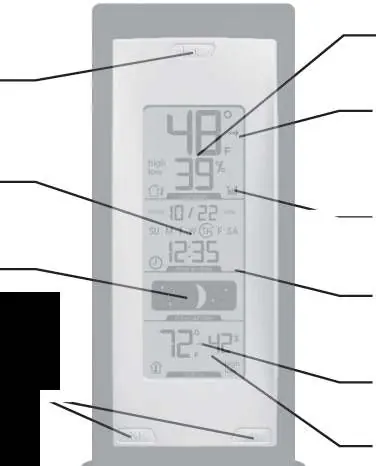
Setup
Battery Installation: Remove the battery compartment covers on both the main unit and the wireless sensor. Insert 3 AA batteries into the main unit and 2 AA batteries into the wireless sensor, observing correct polarity. For outdoor temperatures below -4°F (-20°C), use lithium batteries in the sensor to ensure continued operation.
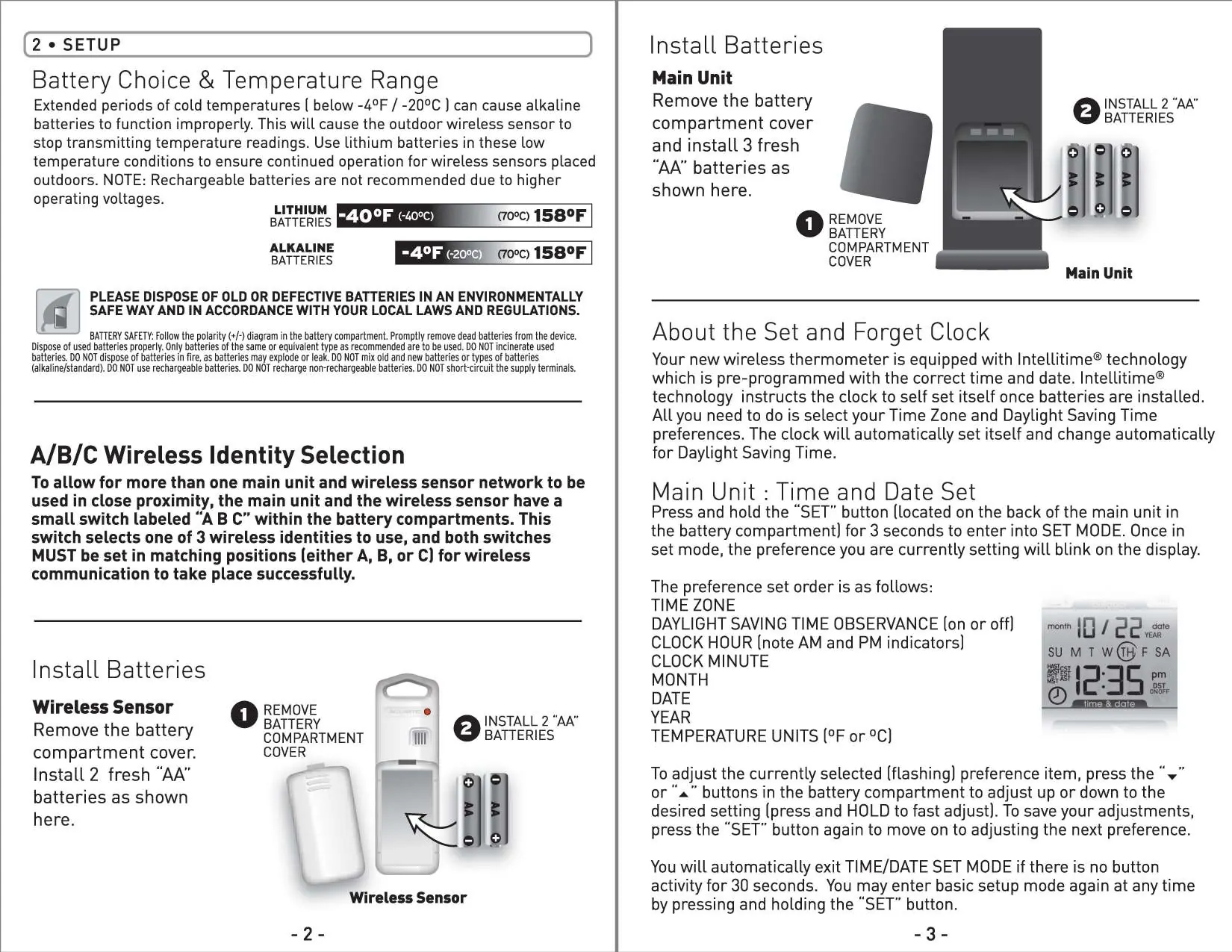
Wireless Identity Selection: If you experience interference, both the main unit and the wireless sensor have an A/B/C switch inside their battery compartments. Ensure both switches are set to the same letter (A, B, or C) for successful communication.
Clock Setup: The device features Intellitime technology, which is pre-programmed with the correct time and date. Once batteries are installed, the clock will self-set. To adjust settings, press and hold the SET button for 3 seconds to enter SET MODE. Use the arrow buttons to adjust Time Zone, Daylight Saving Time, Clock Hour/Minute, Month, Date, Year, and Temperature Units (°F or °C).
Placement
For accurate readings and reliable communication, follow these guidelines:
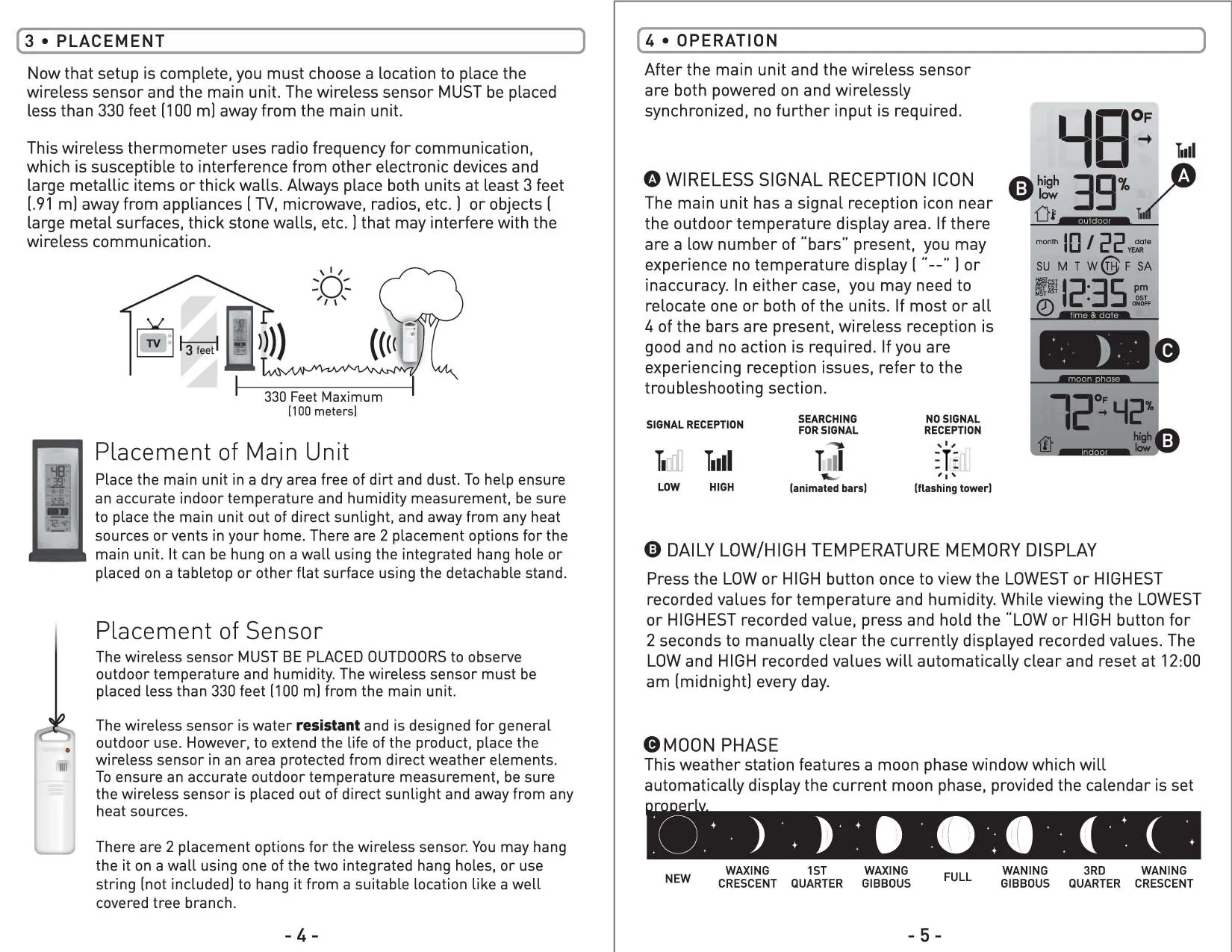
- Place the wireless sensor outdoors, protected from direct weather elements and heat sources.
- Keep both units at least 3 feet (0.91 m) away from appliances like TVs, microwaves, or radios that may cause interference.
- Avoid placing units near large metal surfaces or thick stone walls.
- The main unit can be wall-mounted using the integrated hang hole or placed on a flat surface using the detachable stand.
Operation
Once powered and synchronized, the system operates automatically. The main unit displays indoor/outdoor temperature and humidity, moon phase, and time. Press the LOW or HIGH button to view recorded temperature and humidity extremes. Press and hold the LOW or HIGH button for 2 seconds while viewing a value to manually clear it. Records reset automatically at 12:00 am daily.
Troubleshooting
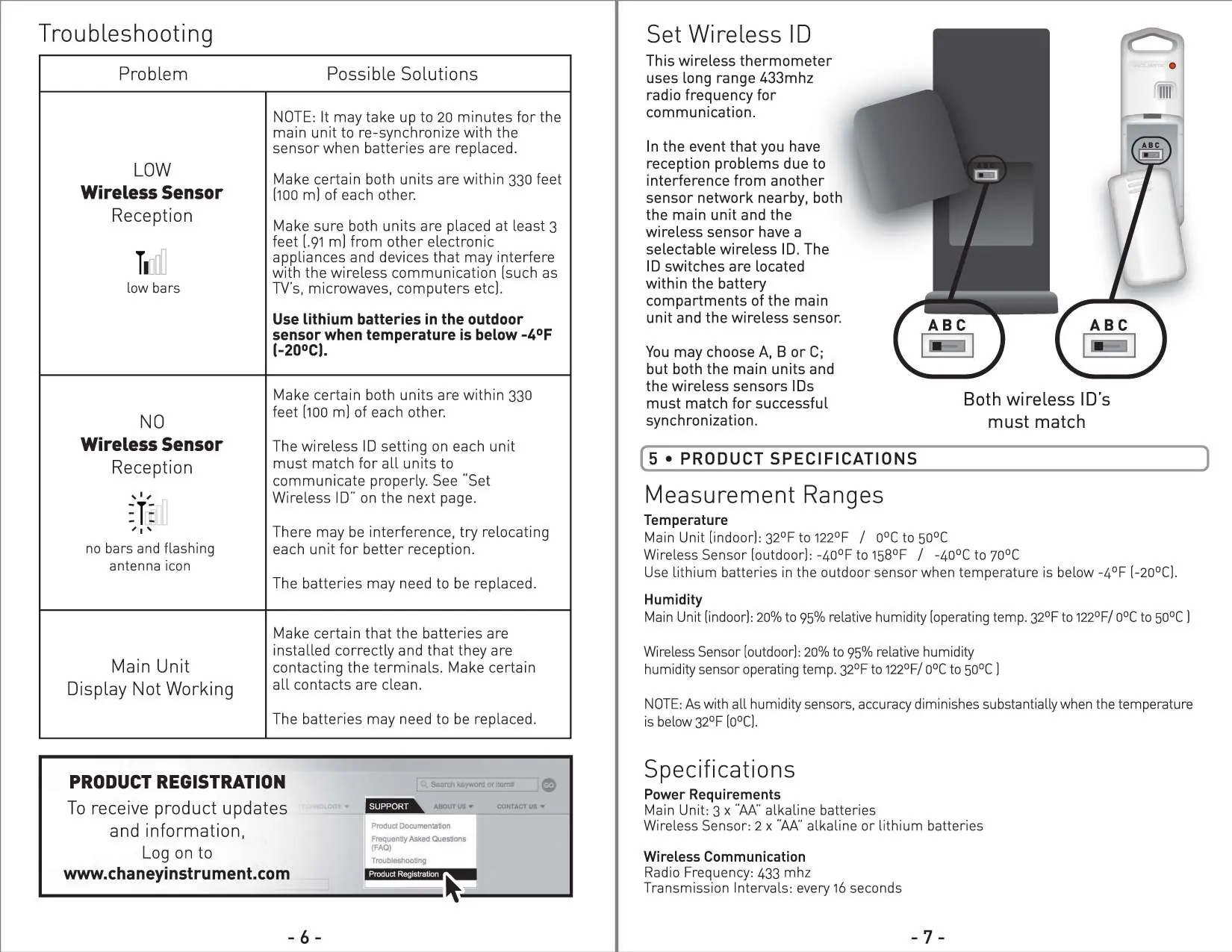
If you experience reception issues (no bars or flashing antenna icon):
- Ensure units are within 330 feet (100 m) of each other.
- Verify that the A/B/C wireless ID switches match on both units.
- Relocate units to reduce interference.
- Replace batteries if necessary. Note that re-synchronization after battery replacement may take up to 20 minutes.
Manufacturer information
AcuRite
Practical help
Common problems
Low wireless sensor reception (low bars)
Ensure units are within 330 feet, at least 3 feet away from electronic interference, and use lithium batteries if the temperature is below -4°F.
No wireless sensor reception (flashing antenna icon)
Check that the A/B/C wireless ID switches match on both units, relocate units, or replace batteries.
Main unit display not working
Verify batteries are installed correctly, contacts are clean, or replace batteries.
Before use
- Remove the clear protective film from the LCD display.
- Install 3 AA batteries in the main unit.
- Install 2 AA batteries in the wireless sensor.
- Ensure A/B/C switches in both battery compartments are set to the same position.
- Place the sensor outdoors within 330 feet of the main unit.
Specs in practice
- Temperature Range (Main Unit)
- 32°F to 122°F (0°C to 50°C)
- Temperature Range (Sensor)
- -40°F to 158°F (-40°C to 70°C)
- Wireless Frequency
- 433 MHz
- Transmission Interval
- Every 16 seconds
Images and diagrams
- The A/B/C switch is located inside the battery compartment of both the main unit and the sensor.
- The SET button for clock configuration is located inside the main unit battery compartment.
- The signal reception icon on the display indicates the strength of the connection to the outdoor sensor.
Model compatibility
- Use lithium batteries in the outdoor sensor when temperatures drop below -4°F (-20°C).
- Humidity sensor accuracy decreases significantly when temperatures are below 32°F (0°C).

Manual page author
Michael Turner
Technical manual editor
Reviews PDF manuals for structure, safety notes, and practical product details so readers can find the right information quickly.