Home / Security
Acurite 00592TXRA2 Temperature and Humidity Sensor Instruction Manual
Quick guide for the Acurite 00592TXRA2 sensor, covering battery installation, A-B-C switch settings, optimal placement for accuracy, and technical specifications.
Table of contents
Quick guide from the manual
This document provides essential setup and usage instructions for the Acurite 00592TXRA2 Temperature and Humidity Sensor. Key tasks include configuring the A-B-C switch to match your companion unit, installing batteries, and selecting an optimal location to ensure accurate data transmission.
Sensor Setup
Before using the sensor, you must configure the wireless communication settings:
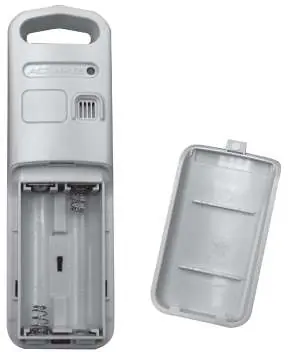
- A-B-C Switch: Located inside the battery compartment. If you are using a companion product that also has an A-B-C switch, ensure both devices are set to the same letter to synchronize correctly.
- Battery Installation: Use 2 x AA alkaline or lithium batteries. Lithium batteries are recommended for temperatures below -4°F (-20°C). Observe the polarity (+/-) diagram inside the compartment.
Sensor Placement
For maximum accuracy and reliable wireless signal, follow these guidelines:
- Location: Place the sensor in an area protected from direct weather elements, such as a covered tree branch. The ideal height is 4 to 8 feet above the ground.
- Range: Ensure the sensor is within 330 ft (100 m) of the companion unit.
- Interference: Avoid placing the sensor near large metal surfaces, thick walls, or electronic devices like TVs, computers, or microwaves that may cause signal interference.
- Sunlight/Heat: Keep the sensor out of direct sunlight and away from any heat sources to prevent inaccurate temperature readings.
Technical Specifications
- Temperature Range: -40°F to 158°F (-40°C to 70°C)
- Humidity Range: 1% - 99% RH
- Wireless Range: 330ft / 100m (depending on construction)
- Operating Frequency: 433MHz
Customer Support
For assistance, contact support at [email protected] or visit the official website at www.Acurite.com for additional resources, including installation videos and replacement parts.
Official resources from the manual
Manufacturer information
AcuRite
Practical help
Common problems
Inaccurate temperature readings
Ensure the sensor is placed out of direct sunlight and away from heat sources.
Wireless signal loss
Check that the sensor is within 330 ft (100 m) of the companion unit and away from large metal objects or electronic interference.
Sensor not pairing with companion unit
Verify that the A-B-C switch inside the battery compartment is set to the same letter as the companion unit.
Before use
- Check that you have 2 x AA batteries (lithium recommended for cold climates).
- Identify the A-B-C switch setting on your companion unit.
- Select a mounting location protected from direct rain and sun.
- Ensure the sensor is not placed near large metal surfaces.
Specs in practice
- Lithium vs Alkaline
- Lithium batteries are required for operation in temperatures below -4°F (-20°C).
Images and diagrams
- The A-B-C switch is located inside the battery compartment.
- The wireless signal indicator flashes when data is being transmitted.
Model compatibility
- Requires a compatible Acurite companion unit with an A-B-C switch.
- Not compatible with rechargeable batteries.

Manual page author
Michael Turner
Technical manual editor
Reviews PDF manuals for structure, safety notes, and practical product details so readers can find the right information quickly.