Electronics / Intercom Systems
Installation and Operation Manual for Aiphone MY-DC/A and MY-DG/A PanTilt Door Station
Comprehensive installation and operation guide for Aiphone MY-DC/A and MY-DG/A PanTilt Door Stations. Includes wiring diagrams, mounting instructions, technical specifications, and troubleshooting tips for optimal performance.
Table of contents
Manual images
Click an image to enlargeQuick guide from the manual
The Aiphone MY-DC/A and MY-DG/A are PanTilt door stations designed for use with the MY Series Video Entry Security system. These units feature a 2-wire connection system, allowing for audio, video, and PanTilt control. The system is designed for semi-flush mounting, though surface mounting is possible for the MY-DC/A model.
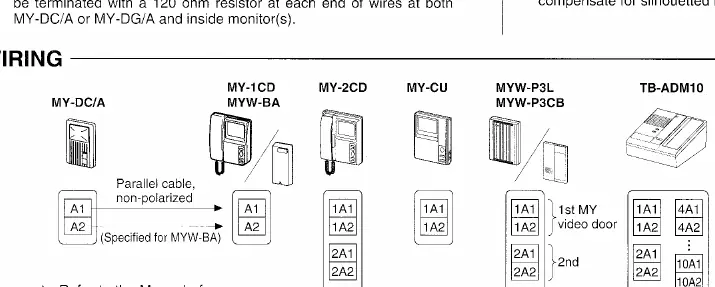
System components and wiring
The system operates on a 2-conductor parallel cable. Coaxial cables or two separate wires should not be used. If replacing an existing doorbell, ensure the old transformer is removed. Extra wires in the installed cable can affect image quality and must be terminated with a 120-ohm resistor at both ends of the wires at both the door station and the monitor(s).
Mounting instructions
Semi-flush mounting:
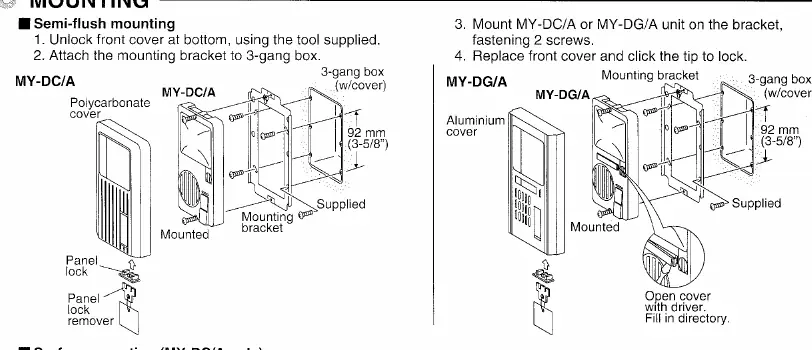
- Unlock the front cover at the bottom using the tool supplied.
- Attach the mounting bracket to a 3-gang box.
- Mount the MY-DC/A or MY-DG/A unit onto the bracket and fasten with 2 screws.
- Replace the front cover and click the tip to lock.
Surface-mounting (MY-DC/A only):
- Mount the MY-R box on the wall or a single-gang box.
- Attach the MY-DC/A unit with 2 mounted screws. The mounting bracket is not used.
Operation
The red LED lights up to indicate a call. When the inside station replies, communication is hands-free. The system includes a backlight button on the monitor to maximize viewing area and view in backlit areas. If the camera image is affected by strong light sources like sunlight or streetlights, the backlight button helps compensate for silhouetted images.
Technical precautions and maintenance
The units are rated to operate at temperatures between -10°C and 60°C. If the temperature drops, the camera lens may fog up, causing a blurry picture; this will resolve once the unit warms up and ventilation clears the moisture. Clean the unit with a soft cloth and neutral household cleanser; do not use abrasive cleaners.
Specifications
- Camera unit: CCD camera
- Scanning lines: 525 lines
- Minimum illumination: 1 Lux at 50cm (20") from camera
- Power source: Powered from monitor unit
Manufacturer information
Aiphone Co., Ltd.
Practical help
Common problems
Silhouetted images on screen
Use the backlight button on the monitor to compensate for strong light sources like sunlight or streetlights.
Foggy or blurry picture
This is likely due to low temperatures causing condensation. Wait for the unit to warm up and ventilation to clear the lens.
Poor image quality
Ensure you are using a 2-conductor parallel cable. Do not use coaxial cables or two separate wires.
Before use
- Verify that you are using a 2-conductor parallel cable for wiring.
- Remove any existing doorbell transformer if replacing an old system.
- Ensure the mounting location is not directly facing strong light sources.
- Check that you have the correct mounting hardware (3-gang box for semi-flush).
- Ensure the 120-ohm resistor is installed if using extra wires in the cable.
Specs in practice
- Minimum illumination: 1 Lux
- The minimum amount of light required for the camera to produce a usable image.
- Operating temperature: -10°C to 60°C
- The safe ambient temperature range for the device to function correctly.
- Scanning lines: 525
- The standard resolution format for this analog video system.
Images and diagrams
- The wiring diagram illustrates the connection between the door station and various monitor configurations using a 2-wire system.
- The mounting diagram details the steps for semi-flush installation using a 3-gang box and the specific tool for the front cover.
Model compatibility
- Requires a 2-conductor parallel cable.
- Not compatible with coaxial cables.
- Designed for use with MY Series Video Entry Security systems.

Manual page author
David Miller
Documentation analyst
Organizes user manual content into clear summaries, with attention to model details, product context, and everyday usability.