Electronics / Intercom Systems
User Manual for Commax DRC-nUC Door Station
Quick guide for the Commax DRC-nUC door station. Learn about installation, wiring diagrams for 2UC-7UC models, operation, and technical specifications.
Table of contents
Manual images
Click an image to enlargeQuick guide from the manual
The Commax DRC-nUC is a master door station unit designed for communication with house units. It is essential to read the safety precautions before use. Do not expose the unit to rain or moisture to prevent fire or electric shock. The unit is designed for flush mounting. If the unit is damaged, exposed to liquid, or exhibits a change in performance, contact qualified service personnel.
Product Overview
The door station consists of the following components:
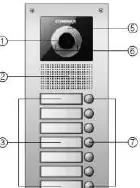
- Camera: Captures video of the visitor.
- Speaker: Audio output for communication.
- Name Card: Space for resident identification.
- Mic: Audio input for communication.
- Lightning Sensor: Detects ambient light conditions.
- Light (White LED): Illuminates the area for the camera.
- Call Button: Initiates the call to the house unit.
Operation
The system operates on a DC 12V power supply. When a visitor presses the call button, the household phone rings. If the user answers, 2-way communication is established. Note that 3-way communication is possible if another user turns on the monitor while a conversation is in progress. Be careful to press the correct call button to avoid calling the wrong household.
Wiring
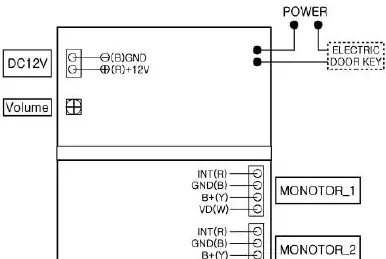
The system uses a 4-wire polarity connection. Wiring diagrams are provided for specific models (DRC-2UC through DRC-7UC). Ensure connections are made correctly to the monitor units and power supply. The system supports duplex communication.
Part List
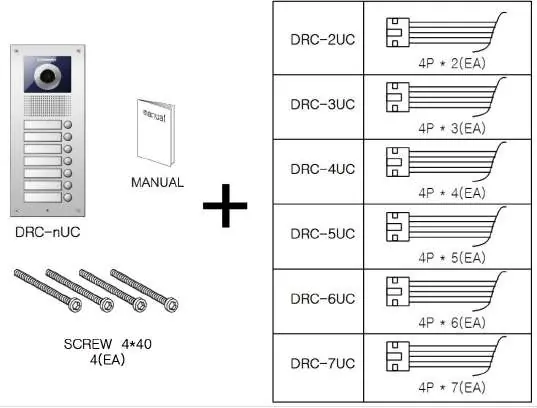
The package includes the door station unit, a manual, and mounting screws (4x40mm). Ensure all parts are present before beginning installation.
Installation
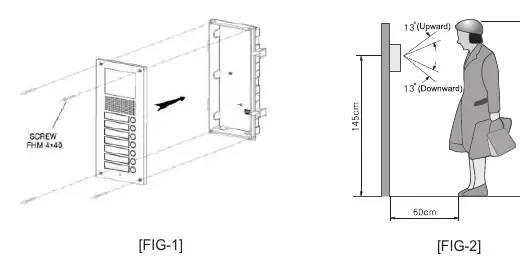
- Fix the back box (bottom case) onto the wall.
- Secure the top case onto the back box using the provided screws.
- Refer to the installation diagrams for the recommended height (145cm) and positioning to ensure optimal camera angle (13° upward/downward).
Specifications
- Voltage: DC 12V
- Power Consumption: 500mA (Max)
- Wiring: 4-wires (Polarity)
- Communication: Duplex
- Camera Angle: Horizontal 85°, Vertical 63°
- Operating Temperature: -10°C to +50°C
- Dimensions: Varies by model (142x250x50mm for 2UC-4UC; 142x315x50mm for 5UC-7UC)
Practical help
Common problems
Unit does not power on
Verify that the DC 12V power supply is correctly connected and active.
Wrong household is called
Ensure the correct call button is pressed; verify button labeling.
Poor image quality
Check if the camera lens is clean and that the area is not obstructed. Ensure the unit is not exposed to excessive moisture.
Before use
- Verify power supply is DC 12V.
- Ensure the unit is not exposed to rain or moisture.
- Check that all 4-wire connections are secure and follow polarity.
- Confirm the model (2UC-7UC) matches your installation requirements.
- Ensure the mounting surface is suitable for flush mounting.
Specs in practice
- Camera Angle
- Horizontal 85° and Vertical 63° field of view.
Images and diagrams
- Wiring diagrams illustrate the connection points for power, electric door keys, and multiple monitors.
- Installation diagrams show the assembly of the back box and top case.
- Positioning diagrams indicate the optimal height and camera tilt angles.
Model compatibility
- Compatible with Commax house units.
- Series includes models DRC-2UC, 3UC, 4UC, 5UC, 6UC, and 7UC.

Manual page author
Michael Turner
Technical manual editor
Reviews PDF manuals for structure, safety notes, and practical product details so readers can find the right information quickly.