Computers / PC Components
User Manual for Akasa 2.5Gigabit PCIe Network Card AK-PCCE25-01
Quick guide for the Akasa 2.5Gigabit PCIe Network Card (AK-PCCE25-01). Includes installation steps, driver setup, and hardware specifications.
Quick answers from the manual
Quick answer
- The Akasa AK-PCCE25-01 is a 2.5GbE PCIe network card. To install, insert the card into a PCIe slot, secure it, and download the driver from the Akasa website. p. 1, 2
Key actions
- Download driver from akasa.com.tw p. 2
- Verify installation in Device Manager (Windows) p. 2
First start
- Insert card into PCIe slot, boot PC, and install downloaded driver. p. 2
Problems and fixes
Driver installation verification
Check Device Manager (Windows) or use 'lsmod | grep r8XX' (Linux).
p. 2Technical specifications
| Parameter | Value | Meaning | Pages |
|---|---|---|---|
| Interface | PCI Express Gen2 | Compatible with x1, x4, x8, x16 slots | p. 1 |
| Data Rates | 10Mbps, 100Mbps, 1Gbps, 2.5Gbps | Network speeds supported | p. 1 |
Where to find it in the PDF
- Features and Specifications p. 1
- Installation and Driver Setup p. 2
Table of contents
Quick guide from the manual
This document provides installation and setup instructions for the Akasa 2.5Gigabit PCIe Network Card (AK-PCCE25-01). The card is designed to upgrade desktop or server networking speeds up to 2.5Gbps. Ensure you have the correct driver installed for your operating system.
Features
- Supports network speeds of 10Mbps, 100Mbps, 1Gbps, and 2.5Gbps.
- Compatible with PCIe Gen2 interface (x1, x4, x8, x16 slots).
- Supports CAT5e and CAT6a cabling.
- Includes optional low-profile bracket for compact cases.
- Fully compliant with IEEE 802.3, 802.3u, and 802.3ab standards.
Card Layout
The card features the following components:
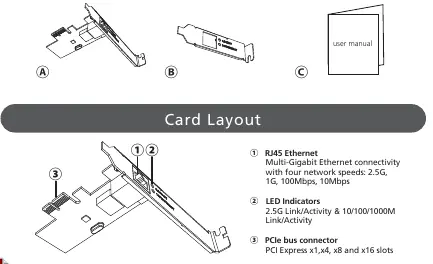
- RJ45 Ethernet Port: Multi-Gigabit connectivity.
- LED Indicators: Displays 2.5G Link/Activity and 10/100/1000M Link/Activity.
- PCIe Bus Connector: Fits into PCIe x1, x4, x8, and x16 slots.
Installation
To install the card:
- Power off your computer and disconnect the power cable.
- Open the computer case and locate an available PCIe slot.
- Insert the network card firmly into the PCIe slot.
- Secure the card bracket to the computer case.
- If using a small form factor case, replace the standard bracket with the included low-profile bracket.
Driver Installation
- Visit http://www.akasa.com.tw.
- Search for AK-PCCE25-01 and download the driver.
- Select the driver corresponding to your operating system.
- Follow the on-screen instructions to complete the installation.
Verification
Windows: Open Device Manager. The "Realtek PCIe 2.5GbE Family Controller" should appear under "Network Adapters".
Linux: Run the command lsmod | grep r8XX in the terminal to verify the driver is present.
Specifications
- Interface: PCI Express Gen2
- Ports: RJ45
- Data Rates: 10Mbps, 100Mbps, 1Gbps, 2.5Gbps
- OS Compatibility: Windows 7/8.x/10, Linux 4.x or later
Official resources from the manual
Practical help
Common problems
Driver not recognized in Device Manager
Ensure the card is fully seated in the PCIe slot and the driver was downloaded from the official Akasa website.
Linux driver verification fails
Run 'lsmod | grep r8XX' in the terminal to confirm the driver module is loaded.
Before use
- Power off the computer and unplug the power cable
- Ensure an available PCIe slot (x1, x4, x8, or x16) is free
- Download the latest driver from http://www.akasa.com.tw
- Check if a low-profile bracket is required for your PC case
Images and diagrams
- Card Layout: Shows the RJ45 port, LED indicators, and PCIe connector.
- Installation: Shows the card being inserted into a PCIe slot.
- Low Profile Bracket: Shows the process of swapping the standard bracket for the low-profile version.
Model compatibility
- Compatible with Windows 7, 8.x, 10
- Compatible with Linux 4.x or later
- Supports CAT5e and CAT6a cabling

Manual page author
Emily Carter
User documentation editor
Prepares concise manual descriptions and highlights the most useful setup, operation, and maintenance information for readers.