Computers / PC Components
User Manual for Akasa AK-PCCU3-09 PCIe Host Card
Quick guide for the Akasa AK-PCCU3-09 PCIe Host Card. Includes installation steps, driver setup for Windows 7, card layout, and technical specifications.
Table of contents
Manual images
Click an image to enlargeQuick guide from the manual
This PCIe host card adds USB Type-C and Type-A connectivity to your PC. It requires a SATA power connection from your power supply unit to ensure stable power delivery to the USB ports. Drivers are required for Windows 7 operation.
Card Layout
The card features the following components:
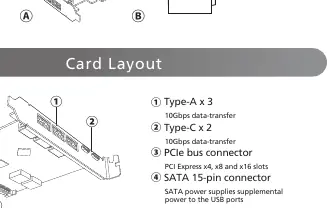
- Type-A ports (3x): Supports 10Gbps data transfer.
- Type-C ports (2x): Supports 10Gbps data transfer.
- PCIe bus connector: Fits into PCIe x4, x8, and x16 slots.
- SATA 15-pin connector: Provides supplemental power to the USB ports.
Installation
To install the driver on Windows 7 (32/64 bit):
- Visit http://www.akasa.com.tw.
- Search for AK-PCCU3-09 and download the driver.
- Double-click Setup.exe.
- Follow the on-screen instructions to finish the installation.
Verification: Open Device Manager. The "ASMedia USB3.1 eXtensible Host Controller" should appear under "Universal Serial Bus controllers".
Important Warnings
If connectors are not apparent on the motherboard, consult your motherboard manual. Connecting the panel to the wrong headers may result in motherboard damage.
Specifications
Interface: PCI Express Gen 3.
Data transmission rates: 10Gbps (USB 3.2 Gen 2), 5Gbps (USB 3.2 Gen 1), 480Mbps (USB 2.0).
OS Compatibility: Windows 7/8.x/10, Mac OS 10.10 or later, Linux 3.5 or later.
Official resources from the manual
Practical help
Common problems
Connectors not apparent on motherboard
Consult your motherboard manual to identify the correct headers.
Driver not working
Verify in Device Manager that 'ASMedia USB3.1 eXtensible Host Controller' appears under 'Universal Serial Bus controllers'.
Before use
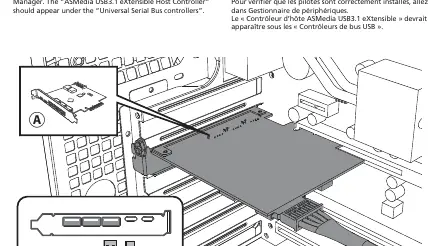
- Ensure an available PCIe slot (x4, x8, or x16) is free.
- Locate a SATA power cable from your power supply unit.
- Download the latest drivers from http://www.akasa.com.tw.
- Power off the PC before installing the card.
Images and diagrams
- 1: Type-A ports (3x) for 10Gbps data transfer.
- 2: Type-C ports (2x) for 10Gbps data transfer.
- 3: PCIe bus connector for motherboard slot.
- 4: SATA 15-pin connector for supplemental power.
Model compatibility
- Compatible with Windows 7/8.x/10.
- Compatible with Mac OS 10.10 or later.
- Compatible with Linux 3.5 or later.

Manual page author
Emily Carter
User documentation editor
Prepares concise manual descriptions and highlights the most useful setup, operation, and maintenance information for readers.