Power / USB Chargers
User Manual for Digitus DN-10135 Gigabit Ethernet Network Card
Quick installation guide for the Digitus DN-10135 2.5G Gigabit Ethernet PCI Express Network Card. Includes hardware installation steps, driver setup for Windows, system requirements, and LED indicator meanings.
Quick answers from the manual
Quick answer
- The Digitus DN-10135 is a 2.5G PCIe network card. Installation involves inserting the card into an available PCIe slot and installing the appropriate driver from the included CD for your specific Windows version. p. 1, 6
Key actions
- Hardware Installation p. 6
- Driver Installation p. 6, 7
Technical specifications
| Parameter | Value | Meaning | Pages |
|---|---|---|---|
| Chipset | Realtek RTL8125B | 2500Base-T Ethernet Controller | p. 4 |
| Operating Temperature | 5 °C to +70 °C | Safe operating range | p. 4 |
Where to find it in the PDF
- Introduction and Features p. 3
- Specifications p. 4
- Hardware Description p. 5
- Installation p. 6, 7
Table of contents
Quick guide from the manual
The Digitus DN-10135 is a 2.5G Gigabit Ethernet PCI Express Network Card designed for high-speed data transmission. It supports 10/100/1000/2500 Mbps networks and is ideal for streaming and gaming applications. The card includes a low-profile bracket for installation in narrow computer housings.
Package contents
- 1 x Gigabit Ethernet PCI Express Network Card 2.5G
- 1 x Low-profile slot bracket
- 1 x Quick Installation Guide (QIG)
- 1 x CD with drivers
System requirements
- Available PCI Express x1, x4, x8, or x16 slot
- Supported Operating Systems: Windows 7, 8, 10, 11 (32/64 bit), Windows Server 2008 R2, 2012 R2, 2016, and Linux Kernel 2.4.20 or later
Hardware description
The card features LED indicators to show the connection status and speed:
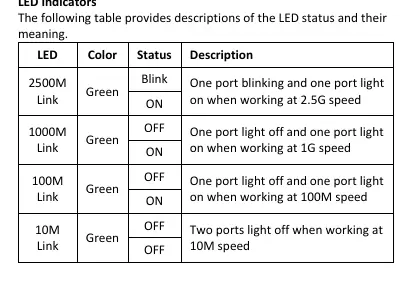
- 2500M Link (Green): Blinking/ON indicates 2.5G speed.
- 1000M Link (Green): ON indicates 1G speed.
- 100M Link (Green): ON indicates 100M speed.
- 10M Link: OFF indicates 10M speed.
Installation
Hardware installation
- Turn off the computer and unplug the power cord.
- Remove the computer cover and the adapter slot cover from the slot that matches your adapter.
- Insert the adapter edge connector into the PCIe slot and secure the bracket to the chassis.
- Replace the computer cover and plug in the power cord.
- Power on the computer.
Driver installation
- Insert the provided CD into your CD-ROM drive.
- Open the CD-ROM drive and locate the driver folder corresponding to your operating system.
- Run the executable file (e.g., Install_Win10_...exe) and follow the on-screen instructions to complete the installation.
Specifications
- Chipset: Realtek RTL8125B
- Interface: PCI Express 2.1
- Standards: IEEE802.3, IEEE802.3u, IEEE802.3ab, IEEE802.3x (flow control), IEEE802.1q (VLAN tagging)
- Operating Temperature: 5 °C to +70 °C
- Operating Humidity: 0% - 95%
- Dimensions: 12 x 7 x 2 cm
- Weight: 39 g
Practical help
Common problems
Card not detected by the system
Ensure the card is firmly seated in the PCIe slot and that the computer is powered on.
Driver installation fails
Verify you are running the correct installer for your specific Windows version (e.g., Win10 vs Win11) from the CD.
Before use
- Verify you have an available PCIe x1, x4, x8, or x16 slot.
- Ensure your operating system is supported (Windows 7/8/10/11, Server 2008/2012/2016, or Linux 4+).
- Power off the computer and disconnect the power cable before opening the case.
- Have a screwdriver ready to secure the bracket to the chassis.
Specs in practice
- 2.5G (4-Speed)
- Supports network speeds of 10, 100, 1000, and 2500 Mbps.
- PCI Express 2.1
- The interface standard required for the card to function.
Images and diagrams
- The package includes a standard bracket and a low-profile bracket for different PC case sizes.
Model compatibility
- Compatible with Windows 7, 8, 10, 11 and various Windows Server editions.
- Compatible with Linux Kernel 2.4.20 and later.

Manual page author
Michael Turner
Technical manual editor
Reviews PDF manuals for structure, safety notes, and practical product details so readers can find the right information quickly.