Power / USB Chargers
User Manual for ALOGIC Matrix 2-in-1 Magnetic Charging Dock
Quick guide for the ALOGIC Matrix 2-in-1 Magnetic Charging Dock. Learn how to set up your wireless charger, understand LED indicators, and troubleshoot common charging issues.
Quick answers from the manual
Quick answer
- The ALOGIC Matrix 2-in-1 Magnetic Charging Dock is a wireless charger for MagSafe compatible devices. Connect it to a 30W USB-C power adapter to begin charging. p. 2
Key actions
- Connect the dock to a power source using the provided USB-C cable. p. 2
First start
- Connect the USB-C cable to the dock and a 30W power adapter, then place your device on the charging surface. p. 2
Problems and fixes
Wireless device does not charge
Move the device slightly on the charging surface to align with the MagSafe outline. Ensure the power adapter is at least 20W.
p. 2Technical specifications
| Parameter | Value | Meaning | Pages |
|---|---|---|---|
| Input | 5V/3A, 9V/3A, 12V/3A | Power input requirements | p. 1 |
Where to find it in the PDF
- Product Overview and Specs p. 1
- Setup and Troubleshooting p. 2
Table of contents
Manual images
Click an image to enlargeQuick guide from the manual
The ALOGIC Matrix 2-in-1 Magnetic Charging Dock is designed for wireless charging of MagSafe compatible devices. To ensure optimal performance, use a USB-C power adapter with at least 30W output. The device features an LED indicator to show charging status and foreign object detection.
Package Contents
- Magnetic Charging Dock
- Alignment Tool
- USB-C Cable
Setup Instructions
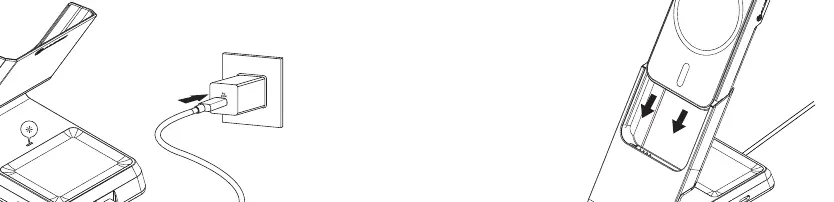
- Connect the included USB-C cable to the USB-C port on the charging dock.
- Connect the other end of the cable to a USB-C power adapter (not included, 30W recommended).
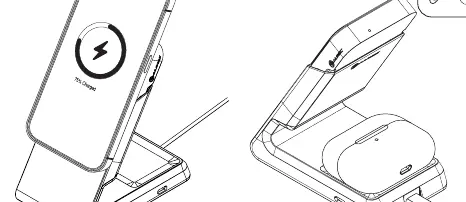
- Place your MagSafe compatible phone or Qi-enabled device on the charging surface. The integrated magnet will align the phone with the charging coil.
LED Indicators

- Solid: Device is connected to power and charging.
- Pulsing: Device is charging or a foreign object is detected.
- Off: Power is off.
Troubleshooting
If your device is not charging, try the following steps:
- Move the device slightly on the charging surface to ensure it is aligned with the MagSafe outline.
- Verify that your power adapter provides at least 20W of power.
- Ensure there are no metal objects on the charging surface, as these can trigger foreign object detection.
Technical Specifications
- Input: 5V/3A, 9V/3A, 12V/3A
- Output: 15W / 10W / 7.5W / 5W
Safety Information
Do not place metal objects on the charging surface. Do not attempt to disassemble the device. Keep the device away from extreme heat and moisture. If the device becomes damaged, discontinue use immediately.
Manufacturer information
ALOGIC
Practical help
Common problems
Device not charging
Ensure the device is aligned with the center of the charging pad. Check that the power adapter provides at least 20W.
LED pulsing
This indicates charging or foreign object detection. Ensure no metal objects are on the charger.
Before use
- Ensure you have a USB-C power adapter (not included, 30W recommended).
- Check that the device is MagSafe compatible or uses a magnetic case.
- Ensure the charging surface is free of metal objects.
Images and diagrams
- The setup diagram shows connecting the USB-C cable to the dock and the power adapter.
- The placement diagram illustrates aligning the phone with the magnetic charging surface.
Model compatibility
- Compatible with MagSafe devices.
- Requires a minimum 20W power adapter for proper operation.

Manual page author
David Miller
Documentation analyst
Organizes user manual content into clear summaries, with attention to model details, product context, and everyday usability.