Electronics / Cables & Adapters
User Manual for ALOGIC USB-C 3-in-1 HDMI Mini Hub
Quick guide for the ALOGIC USB-C 3-in-1 HDMI Mini Hub. Learn how to connect devices, troubleshoot display issues, and use power delivery charging.
Table of contents
Quick guide from the manual
This document provides instructions for the ALOGIC USB-C 3-in-1 HDMI Mini Hub (Model: ULCHDACPD-SGR). It covers the physical setup, connection procedures, display resolution capabilities, and power delivery charging functionality.
Device Overview
The hub features the following ports:
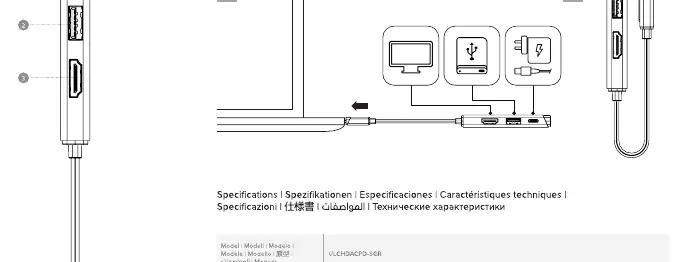
- USB-C Male: Connects to the host computer.
- HDMI Port: Supports up to 4K @ 60Hz (depending on host DP Alt Mode).
- USB-A Port: USB 3.2 Gen 1 (5Gbps) for data transfer.
- USB-C PD Port: Supports up to 100W Power Delivery charging.
Installation and Connection
The device is Plug and Play. Follow these steps to connect:
- Connect the USB-C cable of the hub to the USB-C port on your computer.
- The computer will automatically detect the hub.
- Connect your HDMI display to the HDMI port.
- Connect USB peripherals (keyboard, mouse, flash drive) to the USB-A port.
- Optional: Connect your laptop's original USB-C power adapter to the USB-C PD port on the hub to charge your laptop while using the hub.
Resolution and Display
The HDMI output resolution depends on the DisplayPort (DP) Alt Mode version supported by your host computer:
- DP 1.2: Supports up to 4K @ 30Hz.
- DP 1.4: Supports up to 4K @ 60Hz.
Power Delivery Charging
To charge your laptop through the hub, connect your laptop's original power adapter to the USB-C PD port on the hub. Ensure your laptop supports USB-C Power Delivery charging. The hub will pass through power to the laptop.
Troubleshooting
If you encounter issues, check the following:
- No video output: Ensure the HDMI cable is connected securely. Verify that your computer's USB-C port supports DisplayPort Alt Mode. Try a different HDMI cable.
- Intermittent video: Check all cable connections. Ensure you are using a high-quality cable.
- Laptop not charging: Ensure the original power adapter is connected to the hub's PD port. Verify that the laptop supports USB-C PD charging.
Specifications
- Dimensions: 31 x 11 x 220 mm
- Weight: 37g
- Input: USB-C Male
- Output: 1x HDMI, 1x USB-A (3.2 Gen 1), 1x USB-C (PD)
Manufacturer information
ALOGIC
Practical help
Common problems
No video output on the connected monitor
Verify the host computer's USB-C port supports DisplayPort Alt Mode. Check HDMI cable connections and try a different cable.
Laptop is not charging
Ensure the original power adapter is connected to the hub's USB-C PD port. Confirm the laptop supports USB-C Power Delivery.
Intermittent video signal
Check all cable connections for looseness. Ensure the HDMI cable is of good quality.
Before use
- Ensure your host device has a USB-C port.
- Verify the host device supports DisplayPort Alt Mode for video output.
- Have the original power adapter ready if you intend to use the charging pass-through feature.
- Ensure all cables are securely connected.
Specs in practice
- USB-A 3.2 Gen 1
- Data transfer port supporting speeds up to 5Gbps.
Images and diagrams
- The port layout diagram identifies the USB-C host connector, HDMI port, USB-A port, and the USB-C PD charging port.
- The connection diagram illustrates the sequence of connecting the hub to the computer and peripherals.
Model compatibility
- Video output resolution is limited by the host computer's DP Alt Mode version (DP 1.2 vs DP 1.4).
- Charging functionality requires the host laptop to support USB-C Power Delivery.

Manual page author
David Miller
Documentation analyst
Organizes user manual content into clear summaries, with attention to model details, product context, and everyday usability.