Power / Wireless Chargers
User Manual for Epico 2-in-1 Magnetic Wireless Charger
Get the most out of your Epico 2-in-1 Magnetic Wireless Charger with this comprehensive guide. Learn about technical specifications, proper usage, and essential safety precautions for optimal charging.
Quick answers from the manual
Quick answer
- To use the Epico 2-in-1 Magnetic Wireless Charger, connect the USB-C cable to the charger and a QC 3.0 wall adapter. Once the LED lights up, place your compatible device on the magnetic surface to start charging. p. 1
Key actions
- Connect the USB-C cable to the charger and a QC 3.0 wall adapter. p. 1
First start
- Connect the charger to a power source using a QC 3.0 adapter and place the device on the magnetic surface. p. 1
Problems and fixes
Slow charging
Do not place metal objects between the charger and the device.
p. 1Technical specifications
| Parameter | Value | Meaning | Pages |
|---|---|---|---|
| Input | 5V/2A, 9V/1.2A, 12V/1.5A | Power input requirements | p. 1 |
| Wireless Output | 5W/7.5W/10W/15W | Charging power output | p. 1 |
Where to find it in the PDF
- User Manual p. 1, 2
Table of contents
Quick guide from the manual
The Epico 2-in-1 Magnetic Wireless Charger is designed for efficient wireless charging. To begin using the device, connect the included USB-C cable to the charger and plug the other end into a QC 3.0 wall adapter. Once connected, the LED indicator will light up, signaling that the charger is ready. Place your compatible device on the magnetic surface to initiate charging.
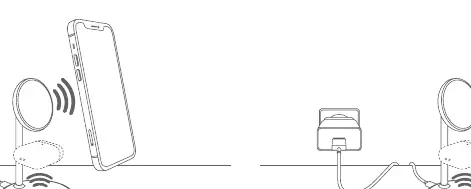
Usage Instructions
Follow these steps to ensure proper operation:
- Connect the USB-C cable to the charger.
- Connect the other end of the cable to a QC 3.0 wall adapter (not included).
- Ensure the LED indicator is illuminated.
- Place your device (e.g., iPhone 12 or later) on the magnetic surface.
- The device will begin charging automatically.
Technical Specifications
- Input: 5V/2A, 9V/1.2A, 12V/1.5A
- Wireless Output: 5W/7.5W/10W/15W
- Material: ABS, PC
- Dimensions: 88 x 45 x 26 mm
- Weight: 28 g
Safety Instructions
To ensure safe operation and prevent damage to your device or the charger, adhere to the following guidelines:
- Do not place metal objects between the charger and the device, as this may slow down or interrupt the charging process.
- Keep the charger away from medical implants (e.g., pacemakers) as it may interfere with their operation.
- Do not expose the charger to water, high humidity, or extreme temperatures.
- Keep the device out of the reach of children.
- Disconnect the charger from the power supply when not in use or during cleaning.
- Do not attempt to open or repair the device yourself.
Manufacturer information
Epico International s.r.o.
Practical help
Common problems
Slow charging or charging interruption
Ensure there are no metal objects between the charger and the device. Verify that you are using a QC 3.0 wall adapter.
Device not charging
Check if the device is properly aligned on the magnetic surface and that the USB-C cable is securely connected to both the charger and the power adapter.
Before use
- Ensure you have a QC 3.0 wall adapter (not included).
- Verify that your device is compatible with magnetic wireless charging.
- Place the charger on a flat, stable surface.
- Ensure the charging area is free of metal objects.
- Check that the USB-C cable is undamaged.
Specs in practice
- Wireless Output
- The power delivered to your device, which may vary based on device compatibility.
Images and diagrams
- The diagram illustrates the charger unit and the connection point for the USB-C cable.
Model compatibility
- Compatible with devices supporting magnetic wireless charging, such as iPhone 12 and later models.

Manual page author
David Miller
Documentation analyst
Organizes user manual content into clear summaries, with attention to model details, product context, and everyday usability.