Power / Wireless Chargers
FIXED MagStand 2-In-1 Wireless Charger User Manual
Quick guide for the FIXED MagStand 2-In-1 Wireless Charger. Learn how to set up your charger, understand LED indicators, and view technical specifications for optimal performance.
Quick answers from the manual
Quick answer
- The FIXED MagStand 2-In-1 is a wireless charger for MagSafe-compatible iPhones and secondary devices. It requires a QC 3.0 adapter for optimal 15W charging. p. 1, 2
Key actions
- Connect the USB-C cable to the charger and a QC 3.0 power adapter. p. 1, 2
Problems and fixes
Flashing blue LED
Foreign object detected (FOD). Remove the object.
p. 1, 2Maintenance and reset
- Clean the stand with a soft cloth. p. 1, 2
Technical specifications
| Parameter | Value | Meaning | Pages |
|---|---|---|---|
| Input | 5V/3A, 9V/3A, 12V/2.5A | Power requirements | p. 1, 2 |
| Output | 15W / 5W | Charging power | p. 1, 2 |
Where to find it in the PDF
- Instructions and Specifications p. 1, 2
Table of contents
Quick guide from the manual
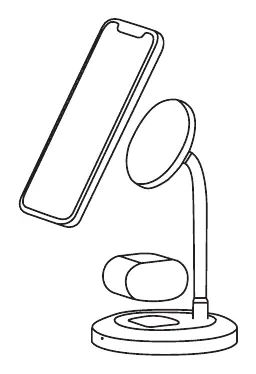
The FIXED MagStand 2-In-1 is a wireless charging stand designed for MagSafe-compatible iPhones and secondary devices like TWS headphones. For maximum charging performance, it is essential to use a power adapter that supports QC 3.0 technology. Ensure your device is placed correctly on the charging surface to initiate charging.
Package contents
- FIXED MagStand 2-In-1 wireless charging stand
- USB-C to USB-C cable
Instructions for use
- Connect the included USB-C cable to the port on the wireless charger.
- Connect the other end of the USB-C cable to a power adapter (QC 3.0 recommended for maximum performance).
- Place your MagSafe-compatible iPhone on the main charging surface; the phone will attach automatically via magnets.
- Place your secondary device (e.g., TWS headphones) on the secondary charging area to begin charging.
LED indicator status
- Purple: Wireless charger is connected to the mains.
- Blue: Charging in progress or fully charged.
- Flashing Blue: Foreign object detected on the charger (FOD).
Technical specifications
- Input: 5V/3A, 9V/3A, 12V/2.5A
- Output: 15W (MagSafe surface), 5W (secondary surface)
- Frequency: 110-205kHz
- Efficiency: ≥ 72%
Safety and care
- Use a soft cloth to clean the stand.
- Do not expose the device to rain, snow, or immerse it in water.
- Do not leave the stand in the car.
- Do not expose the device to direct sunlight or near heat sources.
- Do not disassemble the device; this may void the warranty and cause electric shock.
- Keep out of reach of children.
Practical help
Common problems
Flashing blue LED
A foreign object has been detected on the charger (FOD). Remove the object to resume normal operation.
Slow charging speed
Ensure you are using a QC 3.0 compatible power adapter. Using a standard adapter may result in lower performance.
Device not charging
Check if the device is placed correctly on the charging surface. If the phone is in a thick case, try removing it.
Before use
- Use a QC 3.0 power adapter for maximum performance.
- Ensure the USB-C cable is securely connected to both the charger and the power adapter.
- Verify that your device is MagSafe compatible.
- Keep the charging surface clean and free of metal objects.
Images and diagrams
- The diagram illustrates the stand with the primary MagSafe charging surface and the secondary charging area for earbuds.
Model compatibility
- Designed for MagSafe-compatible iPhones.
- Secondary charging area is suitable for TWS headphones.

Manual page author
Emily Carter
User documentation editor
Prepares concise manual descriptions and highlights the most useful setup, operation, and maintenance information for readers.