Computers / Storage
User Manual for Sabrent HB-TG5P USB-C 10Gbps 5-Port Hub
Quick guide for the Sabrent HB-TG5P USB-C 10Gbps 5-Port Hub. Includes setup instructions, port overview, technical specifications, and troubleshooting tips.
Table of contents
Manual images
Click an image to enlargeQuick Guide
This document provides essential instructions for setting up and using the Sabrent HB-TG5P USB-C 10Gbps 5-Port Hub. Ensure your host device supports DisplayPort Alternate Mode for video output and MST for extended display modes.
Product Overview
The hub features the following components:
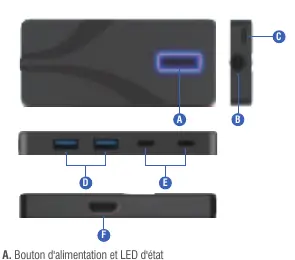
- A: Power button and status LED
- B: Integrated USB Type-C cable (60 cm)
- C: USB Type-C Power Delivery input port (PD 3.0)
- D: Two USB Type-A 10Gbps ports (USB 3.2 Gen 2x1)
- E: Two USB Type-C 10Gbps ports
- F: HDMI 2.0 video output port
Specifications
- USB Ports: 2x USB Type-A 10Gbps, 2x USB Type-C 10Gbps
- Power Delivery: Input up to 90W (PD 3.0)
- Video Output: HDMI 2.0 supporting up to 4K@60Hz
- Compatibility: Windows, macOS, Linux
- Features: HDCP 1.4/2.2/2.3, HDR10/HDR10+/Dolby Vision/HLG support, BC1.2 charging support
Quick Start
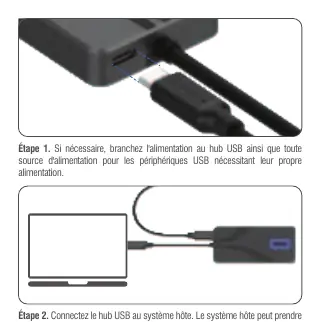
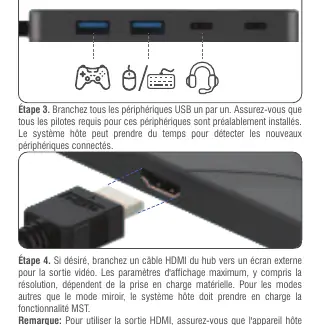
- Power Connection: If necessary, connect external power to the hub and any peripherals requiring their own power source.
- Host Connection: Connect the integrated USB Type-C cable to your host system. Wait a few moments for the system to recognize the hub.
- Peripheral Connection: Connect USB peripherals one by one. Ensure all required drivers are installed on the host system.
- Video Output: Connect an HDMI cable from the hub to an external display. Note that the host device must support DisplayPort Alternate Mode.
Frequently Asked Questions
Power Delivery: The hub is PD 3.0 compliant and can provide up to 100W total, with 10W reserved for the hub and 90W delivered to the host. USB ports support BC1.2 charging at 5V/1.5A (7.5W).
Usage Recommendations: Protect the hub from liquids and extreme temperatures. Avoid bending the integrated cable excessively. The hub supports hot-plugging, but it may take up to 10 seconds to recognize a device.
Video Considerations: HDMI 1.4b, 2.0b, and DP 1.4a are supported with integrated EDID. DP 1.4 hosts can reach maximum resolution, while DP 1.2 hosts are limited to 3840x2160@30Hz. Non-mirror display modes require MST support on the host.
Support
For assistance, comments, or questions, please contact the technical support team via the website at WWW.SABRENT.COM or email [email protected].
Official resources from the manual
Manufacturer information
Sabrent
Practical help
Common problems
Device not recognized immediately
The hub supports hot-plugging, but it may take up to 10 seconds for the host system to recognize the connected peripheral.
Video output not working
Ensure the host device supports DisplayPort Alternate Mode. Without this, the HDMI port will not function.
Extended display modes not working
Ensure the host device supports MST (Multi-Stream Transport) functionality.
Before use
- Verify host device supports DisplayPort Alternate Mode for video.
- Connect external power to the hub if peripherals require it.
- Install necessary drivers for USB peripherals.
- Connect devices one by one to the hub.
- Ensure the hub is kept in a dry environment.
Specs in practice
- Power Delivery (PD 3.0)
- Supports up to 100W total power, with 10W for the hub and 90W for the host device.
- USB 3.2 Gen 2x1
- Provides high-speed data transfer up to 10Gbps.
Images and diagrams
- A: Power button and status LED.
- B: Integrated USB Type-C cable (60 cm).
- C: USB Type-C Power Delivery input port.
- D: Two USB Type-A 10Gbps ports.
- E: Two USB Type-C 10Gbps ports.
Model compatibility
- Compatible with Windows, macOS, and Linux.
- Host must support DisplayPort Alternate Mode for HDMI output.
- Host must support MST for non-mirror display modes.
- DP 1.2 hosts are limited to 3840x2160@30Hz.

Manual page author
Emily Carter
User documentation editor
Prepares concise manual descriptions and highlights the most useful setup, operation, and maintenance information for readers.