Power / Batteries & Chargers
Amazon Basics P20/20AMP/N20 Battery Charger User Manual
Quick guide for the Amazon Basics P20/20AMP/N20 battery charger. Learn how to connect, select charging modes, use the repair function, and understand safety warnings.
Quick answers from the manual
Quick answer
- The Amazon Basics P20/20AMP/N20 is a 9-stage smart charger for 12V and 24V batteries. To use it, connect to AC power, select the battery type mode, and attach the clamps to the battery terminals. p. 1
Key actions
- Connect to AC power p. 1
- Select battery mode p. 1
- Connect to battery p. 1
First start
- Plug into AC outlet, select mode, then connect to battery terminals. p. 1
Problems and fixes
Wrong polarity
Change the connection of the clamps.
p. 1
Defect battery
Check by a mechanic and replace if necessary.
p. 1
Bad connection
Check the connection between the charger and the battery.
p. 1Maintenance and reset
- Unplug the charger from the outlet before doing any maintenance or cleaning. p. 1
Technical specifications
| Parameter | Value | Meaning | Pages |
|---|---|---|---|
| AC Input Voltage | 100-240V~50/60Hz | Standard power input range. | p. 1 |
| Max Charging Current | 20A (12V), 10A (24V) | Maximum output amperage. | p. 1 |
Where to find it in the PDF
- Main Manual Page p. 1
Table of contents
Manual images
Click an image to enlargeQuick guide from the manual
To charge your battery using the Amazon Basics P20/20AMP/N20 charger, follow these steps:

- Connect to AC power: Plug the charger into a standard AC outlet (100-240V).
- Select Mode: Use the mode button to select the appropriate charging mode based on your battery type (Lithium, Lead-acid, or LiFePO4).
- Adjust Current: Select the desired charging current gear (3A/5A, 10A/5A, or 20A/10A).
- Connect to Battery: Connect the charger clamps to the battery terminals. The charger will automatically recognize the battery voltage (12V or 24V) and begin the charging process.
Product Overview
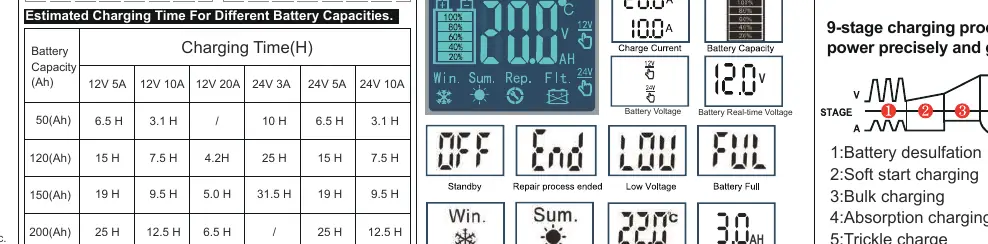
The charger features a 9-stage charging program designed to optimize battery power. It includes an LCD screen that displays voltage, current, battery power, and temperature. The device has an auto-memory function, meaning it will return to the last used mode when reconnected.
Charging Modes
- Lithium: For 12V or 24V Lithium batteries, specifically those with a Battery Management System (BMS).
- Lead-acid: For ordinary lead-acid or maintenance-free batteries (AGM, GEL, SLA, WET, DEEP CYCLE, EFB, Calcium).
- LiFePO4: For charging 12V or 24V LiFePO4 batteries.
- Repair Mode: An advanced recovery mode for repairing and storing old, idle, damaged, stratified, and sulfated batteries. The maximum repair time is 24 hours. Note: This mode is only for lead-acid batteries and cannot repair severely damaged ones.
Safety Warnings
- The charger is not waterproof.
- Do not attempt to charge totally dead batteries.
- Ensure proper ventilation to prevent flames and sparks.
- Do not place the charger on the battery while charging.
- Remove personal metal items (rings, bracelets, necklaces, watches) before charging.
- Unplug the charger from the outlet before performing any maintenance or cleaning.
- Always ensure someone is watching while charging.
Technical Specifications
- Input Voltage: 100-240V AC, 50/60Hz
- Max Charging Current: 20A (12V), 10A (24V)
- Minimum Start Voltage: 2V
- Max Input Power: 280W
- Dimensions: 158 x 90 x 50 mm
- Net Weight: 470g
Practical help
Common problems
Wrong polarity
Change the connection of the clamps.
Defect battery
Let the battery be checked by a mechanic and replace if necessary.
Bad connection
Check the connection between the charger and the battery.
Before use
- Verify the battery chemistry is compatible (Lithium, Lead-acid, LiFePO4).
- Ensure the battery is not totally dead.
- Check that the charger and plug/clips are not damaged or cracked.
- Remove metal jewelry before handling the battery.
- Ensure the charging area is well-ventilated.
Specs in practice
- Max Charging Current
- Up to 20A for 12V batteries and 10A for 24V batteries.
- Minimum Start Volt
- The battery must have at least 2V for the charger to detect and begin charging.
Images and diagrams
- The LCD screen shows real-time voltage, current, and battery charge percentage.
- The mode button cycles through battery types.
- The current switch allows manual adjustment of charging amperage.
Model compatibility
- Supports 12V and 24V systems.
- Compatible with AGM, GEL, EFB, MF, FLOODED, VRLA, SLA, WET, and LiFePO4 battery types.

Manual page author
David Miller
Documentation analyst
Organizes user manual content into clear summaries, with attention to model details, product context, and everyday usability.