Automotive / Jump Starters
User Manual for Amazon Basics Jump Starter A9
Quick guide for the Amazon Basics Jump Starter A9. Includes jump-starting procedures, mandatory start steps, LED indicator meanings, and technical specifications.
Quick answers from the manual
Quick answer
- The Jump Starter A9 is a portable battery pack for 12V vehicles. Ensure it is charged above 50% before use. If standard starting fails, use the RST (Force Start) button on the jumper cables. p. 2, 4, 5
Key actions
- Jump starting a vehicle p. 2, 3
- Using the flashlight p. 7
First start
- Charge the device fully before first use and check battery level by pressing the power button. p. 2
Problems and fixes
Cannot jump start
Check clamp connections, ensure >50% charge, or use RST button.
p. 8Maintenance and reset
- Use the RST (Force Start) button if normal jump start fails. p. 4, 5
Technical specifications
| Parameter | Value | Meaning | Pages |
|---|---|---|---|
| Capacity | 20000mAh | Total battery capacity | p. 7 |
| Peak Current | 2000A | Maximum starting current | p. 7 |
Where to find it in the PDF
- Jump Starting Procedure p. 2, 3
- Mandatory Start Steps p. 4, 5
- Technical Specifications p. 7
Table of contents
Manual images
Click an image to enlargeQuick guide from the manual
The Amazon Basics Jump Starter A9 is designed to jump-start 12V vehicles with engines up to 8.0L Gas or 6.5L Diesel. Important: Ensure the jump starter is charged to over 50% before attempting to jump-start a vehicle. If the standard jump-start procedure fails, use the "Mandatory start" (RST) function.
What is included
- Jump Starter A9
- Jumper Cables
- USB A to USB C Cable
- Wall Adapter
- Cigarette Lighter Adapter
- Portable Bag
At a glance
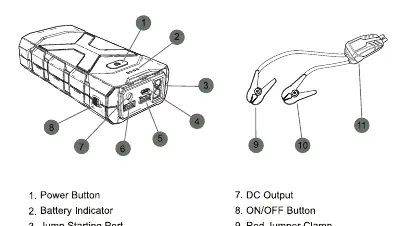
The device features a power button, battery indicator, jump starting port, Type-C input, QC 3.0 output, USB-A output, and DC output. The jumper cables include a smart clamp plug, red clamp (positive), and black clamp (negative).
Jump starting your car
- Turn on the jump starter and ensure it is over 50% charged.
- Insert the jumper cables into the jump starting port; the cable indicator light will flash red/green alternately.
- Connect the red clamp to the positive (+) terminal and the black clamp to the negative (-) terminal of the car battery. The indicator light should turn green.
- Start your car.
- After a successful start, promptly remove the clamps from the car battery and store them.
Mandatory start steps
If the car fails to start with normal steps, use the Force Start (RST) button:
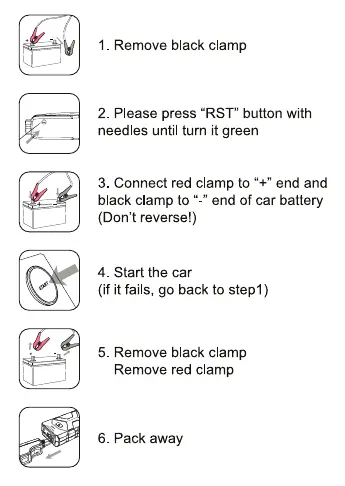
- Remove the black clamp.
- Press the "RST" button on the smart clamp plug using a needle until the light turns green.
- Connect the red clamp to the positive (+) end and the black clamp to the negative (-) end of the car battery.
- Start the car. If it fails, repeat from step 1.
- Remove the black clamp, then the red clamp.
- Pack away the device.
LED indicator guide
- Solid red light: Battery voltage too low or too high. Check jump starter power.
- Red/green flashing: Ready to work.
- Solid red light with long beep: Short circuit. Disconnect cables.
- Solid red light with short beeps: Clamps connected incorrectly. Check polarity.
- Solid red light after green: Failed to start within 30s. Disconnect and wait 30s before reconnecting.
Using the flashlight
Long press the power button for 3 seconds to turn the flashlight on. Press again to cycle through Strobe, SOS, and Off modes.
Technical specifications
- Capacity: 20000mAh
- Peak Current: 2000A
- Starting Current: 1000A
- Compatible Vehicles: Up to 8.0L Gas or 6.5L Diesel
- Working Temperature: -20°C to 65°C
Troubleshooting
If the device fails to jump start, ensure clamps are connected correctly, the unit is charged to at least 3 bars, or try the Mandatory Start procedure. If the flashlight or indicator lights do not work, recharge the unit via the USB cable.
Practical help
Common problems
Cannot jump start
Ensure battery level is >50%, check clamp connections, or use the Force Start (RST) button.
Flashlight not working
Recharge the jump starter using the USB cable.
No indicator light
Press the power on/off button to activate power bank mode.
Before use
- Ensure the jump starter is charged to over 50%
- Check that battery clamps and cables are intact
- Ensure the battery connector is clean
- Verify red clamp is connected to positive (+) terminal
- Verify black clamp is connected to negative (-) terminal
Specs in practice
- Peak Current
- 2000A - Maximum power available for starting engines.
- Compatible Vehicle
- Up to 8.0L Gas or 6.5L Diesel engines.
Images and diagrams
- 1: Power Button
- 3: Jump Starting Port
- 9: Red Jumper Clamp
- 10: Black Jumper Clamp
- 11: Smart Clamp Plug
Model compatibility
- Compatible with 12V vehicles
- Supports up to 8.0L Gas engines
- Supports up to 6.5L Diesel engines

Manual page author
Emily Carter
User documentation editor
Prepares concise manual descriptions and highlights the most useful setup, operation, and maintenance information for readers.