Automotive / Jump Starters
User Manual for Amazon Basics 2-in-1 Stick Vacuum Cleaner
Comprehensive user guide for the Amazon Basics 2-in-1 Stick Vacuum Cleaner. Includes setup, operation, cleaning, maintenance, and troubleshooting instructions for models VSC02A16T-EU and VSC02A16T-UK.
Quick answers from the manual
Quick answer
- This is a 2-in-1 stick vacuum cleaner for dry household use. It features a 300W motor, HEPA filtration, and includes a crevice tool and swivel brush. p. 1, 10
Key actions
- Empty the dust container when it is 2/3 full. p. 7
- Clean the HEPA and motor filters regularly. p. 8
First start
- Remove all packaging, check for damage, and ensure the voltage matches your local supply. p. 4
Problems and fixes
Appliance does not switch on
Check power connection and fuse (UK only).
p. 9Technical specifications
| Parameter | Value | Meaning | Pages |
|---|---|---|---|
| Power input | 300 W | Power consumption | p. 10 |
Where to find it in the PDF
- Appliance Description p. 5
- Operation p. 6, 7
- Cleaning and Maintenance p. 7, 8
- Specifications p. 10
Table of contents
Manual images
Click an image to enlargeQuick guide from the manual
The Amazon Basics 2-in-1 Stick Vacuum Cleaner is designed for dry household vacuuming on hard floors, low-pile carpets, and furniture. Before first use, ensure all packaging is removed and the appliance is checked for transport damage. Always ensure the dust container and filters are correctly installed before operation. Empty the dust container when it is 2/3 full to maintain suction performance.
Appliance description
The vacuum cleaner consists of the following main components:
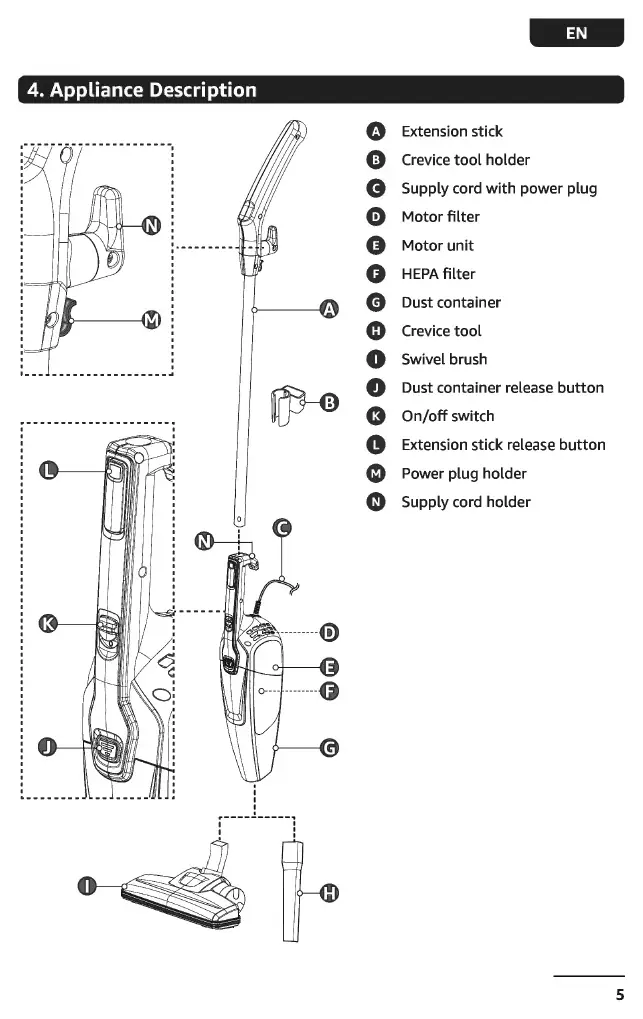
- Extension stick (A)
- Crevice tool (H)
- Swivel brush (I)
- Motor unit (E)
- Dust container (G)
- HEPA filter (F)
- Motor filter (D)
- On/off switch (K)
Operation
The appliance can be used as an upright vacuum or a hand-held vacuum.
Attaching accessories
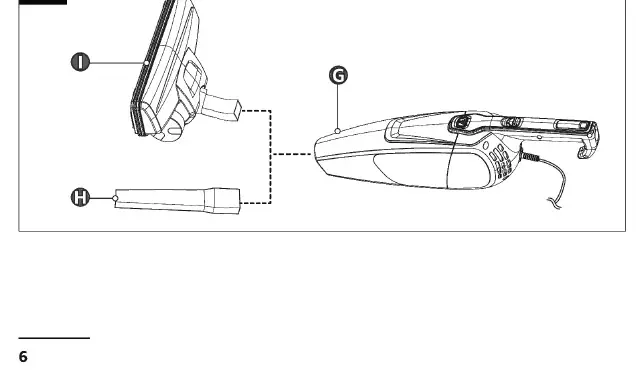
- To use as a hand-held vacuum, attach the crevice tool (H) or swivel brush (I) directly to the suction opening of the dust container (G).
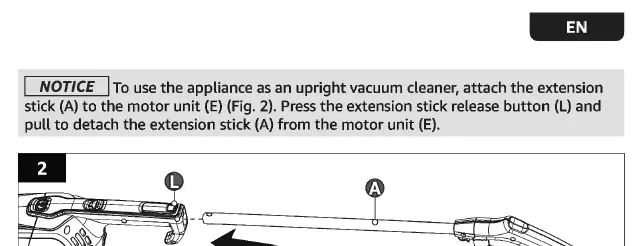
- To use as an upright vacuum, attach the extension stick (A) to the motor unit (E).
Switching on/off
Set the on/off switch (K) to the I position to turn the appliance on. Set it to the O position to turn it off.
Cleaning and maintenance
Regular maintenance is essential for optimal performance.
Cleaning the dust container
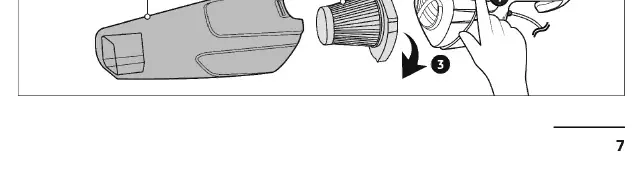
- Press the dust container release button (J) to detach the container from the motor unit.
- Dispose of the contents.
- Clean the container with water and mild detergent, then dry thoroughly.
Cleaning the filters
- Detach the dust container and remove the HEPA filter (F).
- Slide the motor filter (D) out of the motor air inlet.
- Tap both filters to remove debris. Use a soft brush for stubborn dirt.
- Rinse both filters with cold water and allow them to dry completely for at least 24 hours before reinstalling.
Storage
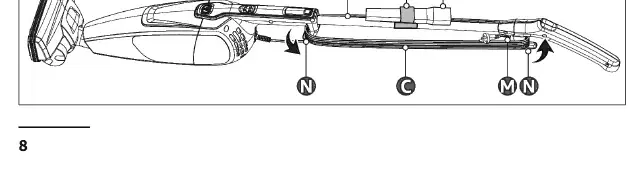
Clip the crevice tool holder (B) onto the extension stick (A) to store the crevice tool (H). Wind the supply cord (C) around the cord holder (N) and secure the plug on the plug holder (M). Store in a dry area away from children and pets.
Troubleshooting
If the appliance does not switch on, check if the plug is connected to the socket. For UK models, check the fuse in the plug. If suction power is weak or the appliance is noisy, empty the dust container and clean or replace the filters.
Technical specifications
- Model number: VSC02A16T-EU, VSC02A16T-UK
- Power input: 300 W
- Suction power: >10 kPa
- Noise level: 80 dB(A)
- Cord length: approx. 6 m
- Net weight: approx. 1.8 kg
Practical help
Common problems
Appliance does not switch on
Check if the plug is connected to the socket. For UK models, check the fuse in the plug.
Weak suction power
Switch off the appliance, check for blockages, empty the dust container, and clean or replace the filters.
Excessive noise
Empty the dust container and clean or replace the HEPA or motor filter.
Dust or debris leaks from the dust container
Clean the dust container and filters. Ensure the swivel brush or crevice tool is securely connected.
Before use
- Remove all packaging materials.
- Check the appliance for transport damages.
- Verify that the power supply voltage matches the rating label on the appliance.
- Ensure the dust container and filters are properly installed.
Specs in practice
- Suction power
- >10 kPa
Images and diagrams
- Page 5: Overview of all appliance parts.
- Page 6: How to attach the crevice tool and swivel brush.
- Page 7: How to attach/detach the extension stick.
- Page 7: How to detach the dust container.
- Page 8: How to clean the HEPA and motor filters.
Model compatibility
- Intended for dry vacuuming only.
- Suitable for hard floors, low-pile carpets, and furniture.
- Not recommended for cleaning carpeted stairs or upholstery with the extension stick.

Manual page author
Emily Carter
User documentation editor
Prepares concise manual descriptions and highlights the most useful setup, operation, and maintenance information for readers.