Home Appliances / Small Kitchen Appliances
User Manual for Amazon Basics 2-Slice Waffle Maker
Quick guide for the Amazon Basics 2-Slice Waffle Maker. Includes setup, operation, cleaning, troubleshooting, and waffle recipes.
Quick answers from the manual
Quick answer
- The Amazon Basics 2-Slice Waffle Maker is designed for household use. Preheat until the green indicator lights up, pour batter into the center, and cook for 1.5 to 5 minutes. p. 5
Key actions
- Preheating p. 5
First start
- Remove all packaging, check for damage, and clean the appliance before first use. p. 4
Problems and fixes
Appliance does not switch on
Check power connection and outlet.
p. 6
Waffles undercooked or burnt
Thermostat or heating element may be faulty; contact repair center.
p. 6Technical specifications
| Parameter | Value | Meaning | Pages |
|---|---|---|---|
| Rated voltage | 120 V~, 60 Hz | Power requirement | p. 6 |
| Rated current | 700 W | Power consumption | p. 6 |
Where to find it in the PDF
- Appliance Description p. 4
- Operation p. 5
- Cleaning and Maintenance p. 6
Table of contents
Manual images
Click an image to enlargeQuick guide from the manual
The Amazon Basics 2-Slice Waffle Maker is designed for household use in dry indoor areas. Before use, ensure the appliance is clean and placed on a stable surface. The appliance preheats automatically when plugged in, indicated by the red light, and is ready when the green light turns on. Cooking time typically ranges from 1.5 to 5 minutes.
Appliance Description
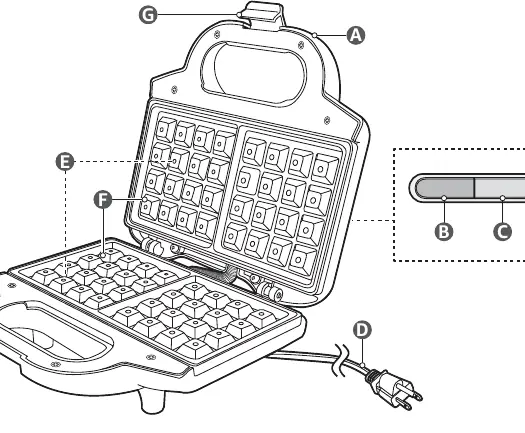
- A: Handle
- B: Red indicator
- C: Green indicator
- D: Power cable with plug
- E: Heating element (under cooking surface)
- F: Cooking surface
- G: Latch
Before First Use
- Remove all packaging materials and keep them away from children.
- Check the appliance for any transport damage.
- Clean the cooking surfaces before the first use.
- Ensure the power supply voltage matches the appliance rating label.
- The appliance may emit a slight smell or smoke during the first use; this is normal and safe.
Operation
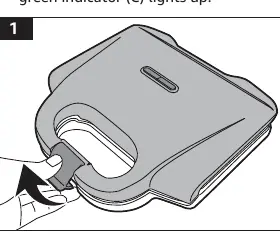
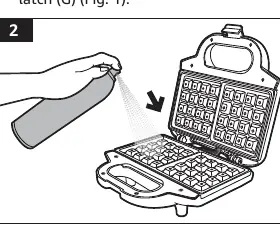
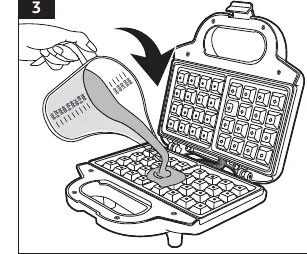
- Connect the power plug to a suitable outlet. The red indicator lights up to show preheating.
- When the green indicator lights up, the appliance is preheated.
- Unlock the latch and open the appliance.
- Lightly spray or apply cooking oil to the cooking surfaces.
- Pour waffle batter into the center of the bottom cooking surface. Do not overfill, as batter may leak.
- Close the appliance and secure the latch.
- Cook for 1.5 to 5 minutes. The green indicator may cycle on and off during cooking; this is normal.
- When done, open the appliance and remove waffles using wooden or silicone cookware.
- Place waffles on a wire rack to cool.
Cleaning and Maintenance
- Safety: Always unplug the appliance and let it cool down completely before cleaning. Never immerse the appliance in water or other liquids.
- Cleaning: Wipe the cooking surfaces with a soft, slightly damp cloth. Do not use corrosive detergents, wire brushes, or abrasive scourers.
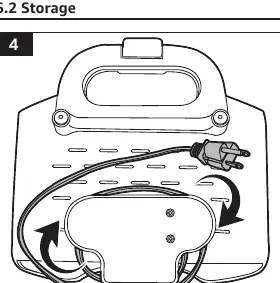
- Storage: Wind the power cable around the storage area at the back of the appliance. Store in a dry area.
Troubleshooting
- Appliance does not switch on: Check if the plug is connected to the outlet and verify the outlet has power.
- Green indicator keeps shutting off: This is normal; the heating element cycles to maintain temperature.
- Waffles undercooked or burnt: The thermostat or heating element may be faulty. Contact a qualified repair center.
Specifications
- Rated voltage: 120 V~, 60 Hz
- Rated current: 700 W
- Net weight: Approx. 2.7 lbs (1.2 kg)
- Dimensions: Approx. 9.1 x 3.7 x 9.1 inches (23 x 9 x 23 cm)
Recipes and Tips
The manual includes recipes for Traditional Waffles and Crispy Waffles. Tips include using thick batter, not piling waffles on top of each other to prevent softening, and using high-quality flour.
Practical help
Common problems
Appliance does not switch on
Check if the plug is connected to the socket outlet. Use a voltage tester to verify if the socket outlet is powered.
Green indicator keeps shutting off
This is normal. The heating element automatically switches on and off to maintain a temperature that is not too hot or cold.
Waffles are undercooked or burnt
The thermostat or heating element may be faulty. The appliance must be sent to a qualified repair center.
Before use
- Remove all packaging materials.
- Check the appliance for transport damages.
- Clean the appliance before first use.
- Ensure the power supply voltage matches the appliance rating label.
Specs in practice
- Rated voltage
- 120 V~, 60 Hz
- Rated current
- 700 W
Images and diagrams
- B: Red indicator
- C: Green indicator
- D: Power cable with plug
- E: Heating element
- F: Cooking surface
Model compatibility
- Intended for household use only.
- Use in dry indoor areas only.

Manual page author
Michael Turner
Technical manual editor
Reviews PDF manuals for structure, safety notes, and practical product details so readers can find the right information quickly.