Power / Power Banks
User Manual for Anker PowerCore III Sense 20K Power Bank
A comprehensive user guide for the Anker PowerCore III Sense 20K power bank. Learn how to charge your devices, recharge the power bank, use trickle-charging mode, and check battery levels.
Quick answers from the manual
Quick answer
- To check the battery, press the button once. To charge devices, plug them into the USB ports. To recharge the power bank, use the USB-C port. To activate trickle-charging for low-power devices, press the button twice. p. 1, 2
Key actions
- Check battery level p. 1
- Activate trickle-charging p. 1
- Exit trickle-charging p. 2
Problems and fixes
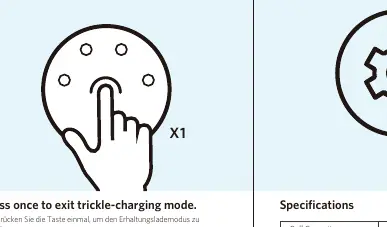
Exit trickle-charging mode
Press the button once.
p. 2Technical specifications
| Parameter | Value | Meaning | Pages |
|---|---|---|---|
| Cell Capacity | 20000mAh | Total battery capacity | p. 2 |
| PD Input | 5V=3A, 9V=2A, 15V=1.2A | Input power requirements | p. 2 |
Where to find it in the PDF
- Operating Instructions p. 1
- Specifications and Warranty p. 2
Table of contents
Manual images
Click an image to enlargeQuick guide from the manual
The Anker PowerCore III Sense 20K is a high-capacity portable charger. This guide provides instructions on how to check the battery level, charge your mobile devices, recharge the power bank itself, and utilize the trickle-charging mode for low-power accessories.
Checking the Battery Level
To check the remaining battery level of your PowerCore, press the button on the device. The LED indicators will display the current charge status:
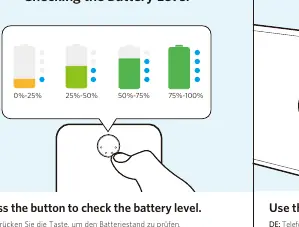
- 0%-25%
- 25%-50%
- 50%-75%
- 75%-100%
Charging Phones and Tablets
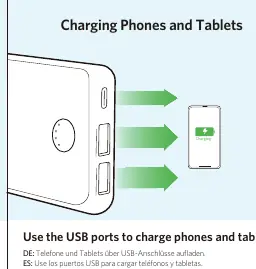
Use the USB ports on the PowerCore to charge your phones, tablets, and other compatible devices. Simply connect your device to the power bank using a suitable USB cable.
Recharging Your PowerCore
To recharge the PowerCore, connect it to a power source via the USB-C port.
Trickle-Charging Mode
Trickle-charging mode is designed to safely charge low-power accessories, such as earphones.
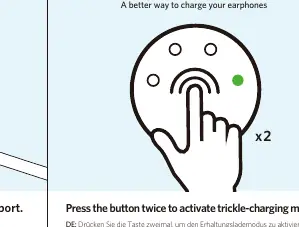
- To activate: Press the button twice.
- To exit: Press the button once.
Specifications
The PowerCore III Sense 20K features the following technical specifications:
- Cell Capacity: 20000mAh
- PD Input: 5V=3A, 9V=2A, 15V=1.2A
- PD Output: 5V=3A, 9V=2.22A
- Standard Output: 5-6V=3A, 6-9V=2A, 9-12V=1.5A
- Total Output: 5V=3A
Warranty and Support
This product comes with an 18-month limited warranty and lifetime technical support. For FAQs and further assistance, visit anker.com/support or contact Anker support via email at [email protected].
Official resources from the manual
Manufacturer information
Anker
Practical help
Common problems
Power bank is not charging devices.
Ensure the USB cable is securely connected to both the PowerCore and the device.
Trickle-charging mode is not activating.
Ensure you press the button twice quickly to activate the mode.
Before use
- Check the battery level by pressing the button.
- Ensure you have a compatible USB-C cable for recharging the power bank.
- Verify that your device is compatible with the output ports.
Specs in practice
- Cell Capacity
- The total energy storage capacity of the power bank (20000mAh).
Images and diagrams
- The button serves multiple functions: checking battery level, activating trickle-charging, and exiting trickle-charging mode.
- The USB-C port is dedicated to recharging the PowerCore.
Model compatibility
- Trickle-charging mode is specifically for low-power accessories like earphones.

Manual page author
Emily Carter
User documentation editor
Prepares concise manual descriptions and highlights the most useful setup, operation, and maintenance information for readers.