Power / Power Banks
User Manual for Anker 323 Magnetic Wireless Charger (2-in-1 Stand) A2543
Quick guide for the Anker 323 Magnetic Wireless Charger (2-in-1 Stand) A2543. Learn about LED indicators, charging compatibility, safety instructions, and technical specifications.
Quick answers from the manual
Quick answer
- The Anker 323 Magnetic Wireless Charger (A2543) is a 2-in-1 stand. Connect it to a Quick Charge 2.0/3.0 or Power Delivery adapter. It supports 5W, 7.5W, and 10W output. Do not use 5V/1A chargers or PC USB ports. p. 3
Key actions
- Connect to a compatible wall adapter (QC 2.0/3.0 or PD). p. 3
First start
- Plug the charger into a compatible wall adapter. The LED will turn solid white for 4 seconds and then turn off, indicating it is connected to power. p. 3
Problems and fixes
LED flashing
Metal objects detected or incompatible AC adapter connected. Switch to a Quick Charge 2.0/3.0 or Power Delivery adapter.
p. 3Technical specifications
| Parameter | Value | Meaning | Pages |
|---|---|---|---|
| Input | 5V=3A / 9V=2A / 12V=2A | Power input requirements | p. 4 |
| Output | 5W / 7.5W / 10W | Wireless charging output | p. 4 |
Where to find it in the PDF
- LED Indicators and Usage p. 3
- Specifications p. 4
Table of contents
Quick Guide
The Anker 323 Magnetic Wireless Charger (2-in-1 Stand) is designed for convenient wireless charging. To ensure optimal performance, connect the device to a compatible wall adapter and ensure your phone case is MagSafe compatible.
LED Indicator Status
The LED indicators provide information about the charging status:
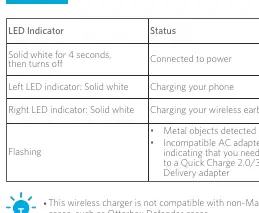
- Solid white for 4 seconds, then turns off: Connected to power.
- Left LED indicator: Solid white: Charging your phone.
- Right LED indicator: Solid white: Charging your wireless earbuds.
- Flashing: Metal objects detected or an incompatible AC adapter is connected. Switch to a Quick Charge 2.0/3.0 or Power Delivery adapter.
Usage Instructions
- Compatibility: This wireless charger is only compatible with MagSafe-compatible phone cases. It is not compatible with non-MagSafe cases, such as the Otterbox Defender.
- Power Requirements: Connect the charger to a Quick Charge 2.0/3.0 or Power Delivery wall adapter. Do not connect to a 5V/1A wall charger or a computer USB port, as this may affect charging performance.
- Placement: Do not place foreign objects (metal pads, magnetic cards, keys, coins, NFC cards) between your device and the charger surface. These can cause overheating, demagnetization, or reduced charging speed.
- Temperature: High temperatures reduce charging speed. It is recommended to charge in environments below 35°C (95°F).
Safety Instructions
- Avoid dropping the device.
- Do not disassemble.
- Do not expose to liquids.
- Use original or certified cables for the safest and fastest charge.
- This product is suitable for moderate climates only.
- The maximum ambient temperature during use must not exceed 40°C.
- Do not place open flame sources, such as candles, on the product.
- Clean only with a dry cloth or brush.
Technical Specifications
- Input: 5V=3A / 9V=2A / 12V=2A
- Output: 5W / 7.5W / 10W (7.5W for iPhone)
- Operating Temperature: -10°C to 40°C
- TX/RX Frequency Range: 110-205KHz (EU and UK only)
Support
For FAQs and more information, please visit anker.com/support.
Official resources from the manual
Manufacturer information
Anker
Practical help
Common problems
LED indicator is flashing
Metal objects are detected on the surface, or the connected AC adapter is incompatible. Switch to a Quick Charge 2.0/3.0 or Power Delivery adapter.
Slow charging speed
Ensure you are not using a 5V/1A wall charger or a computer USB port. Use a compatible Quick Charge 2.0/3.0 or Power Delivery adapter.
Device not charging
Check if your phone case is MagSafe compatible. Non-MagSafe cases (e.g., Otterbox Defender) are not supported.
Before use
- Use a Quick Charge 2.0/3.0 or Power Delivery wall adapter.
- Ensure the phone case is MagSafe compatible.
- Keep the charging surface free of metal objects (keys, coins, magnetic cards).
- Ensure the ambient temperature is below 35°C (95°F).
Specs in practice
- Operating Temperature
- The device should be operated within the range of -10°C to 40°C.
Model compatibility
- Compatible with MagSafe devices.
- Not compatible with non-MagSafe cases (e.g., Otterbox Defender).

Manual page author
Michael Turner
Technical manual editor
Reviews PDF manuals for structure, safety notes, and practical product details so readers can find the right information quickly.