Power / USB Chargers
User Manual for Anker 747 Charger (GaNPrime 150W)
Quick guide for the Anker 747 Charger (GaNPrime 150W). Learn how to use your charger, understand output specifications, and follow safety guidelines for optimal performance.
Table of contents
Manual images
Click an image to enlargeQuick guide from the manual
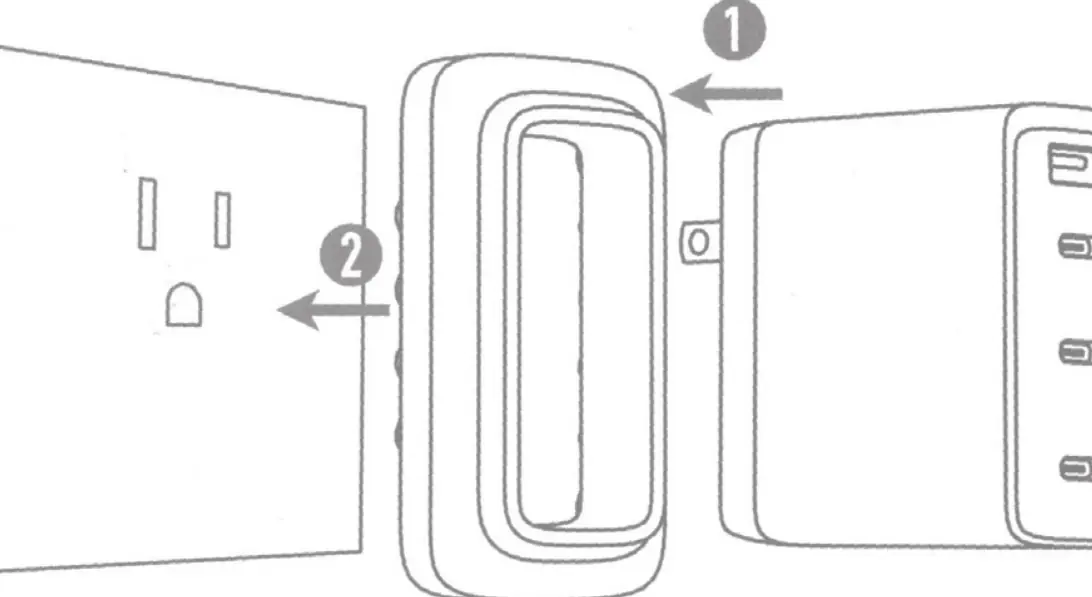
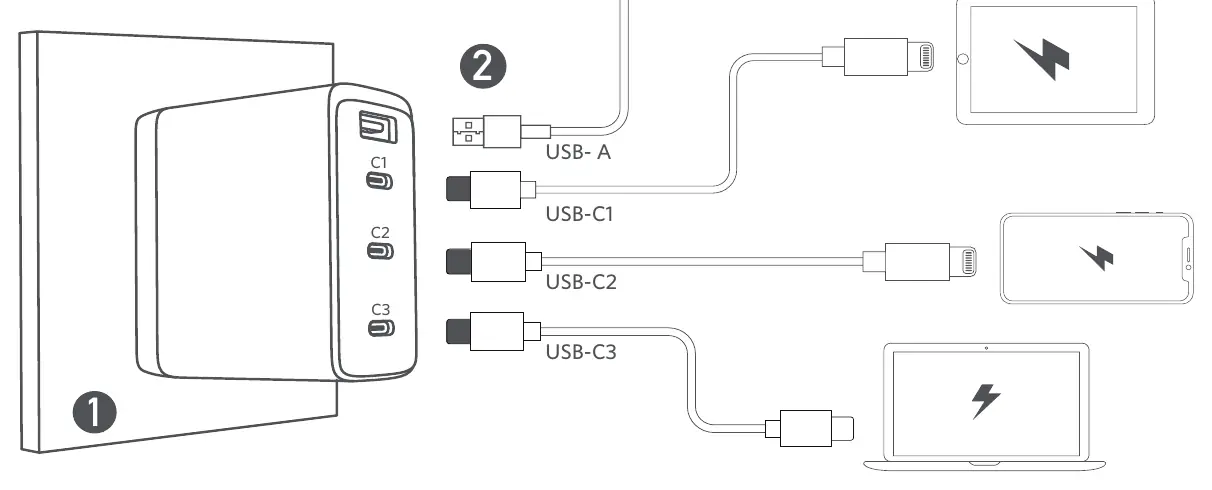
The Anker 747 Charger (GaNPrime 150W) is designed for charging IT equipment. To use the device, plug the charger directly into a standard AC wall outlet. Connect your devices to the charger using certified cables, such as Anker cables or MFi-certified cables, to ensure the fastest and safest charging experience.
Safety instructions
- Indoor use only: The product is designed for indoor use.
- IT equipment only: Use this charger exclusively with IT equipment.
- Fire safety: Do not place naked flame sources, such as candles, on the product.
- Damage: If the plug is broken, the product must be disposed of. Do not attempt to repair the power supply yourself.
- Cleaning: Use only a dry cloth or brush to clean the product.
- Accessibility: Ensure the wall socket is easily accessible and located near the equipment.
Using your charger
The charger features four ports: one USB-A port and three USB-C ports (C1, C2, C3). The charger intelligently distributes power based on the number of devices connected. For optimal performance, use high-quality, certified cables.
Specifications
Input: 100-240V~ 2.3A 50-60Hz
Output combinations:
- Single Port: USB-C1 supports up to 100W. USB-A supports up to 22.5W.
- Two Ports: Various combinations support up to 150W total output.
- Three Ports: Various combinations support up to 150W total output.
- Four Ports: Total output is 150W Max.
ActiveShield 2.0: The charger includes an intelligent safety mechanism that monitors temperature and adjusts power output. If the ambient temperature is between 26-35°C (78.8-95°F) with a high output load, you may notice fluctuations in output power; this is normal operation to safeguard your devices.
Customer service
Anker provides lifetime technical support. For FAQs and more information, visit anker.com/support. You can also contact support via email at [email protected] or [email protected] (for Middle East and Africa).
Official resources from the manual
Manufacturer information
Anker
Practical help
Common problems
Charger not working
Check if the AC plug is damaged. If the plug is broken, the product must be disposed of.
Slow charging speed
Ensure you are using an Anker cable, the device's original cable, or another certified cable (such as MFi).
Output power fluctuates
This is normal behavior when the ambient temperature is between 26-35°C. The ActiveShield 2.0 system is adjusting output to protect your devices.
Before use
- Ensure the wall outlet is easily accessible.
- Verify the device is IT equipment.
- Use certified cables for the fastest charging.
- Keep the charger away from naked flames.
- Ensure the operating environment is within 0°C to 25°C for optimal performance.
Specs in practice
- ActiveShield 2.0
- A safety feature that monitors temperature and adjusts output to prevent overheating.
- Input 100-240V
- The charger is compatible with international voltage standards.
Images and diagrams
- The charger plugs directly into a wall outlet.
- The front panel features one USB-A port and three USB-C ports labeled C1, C2, and C3.
Model compatibility
- Designed for IT equipment only.
- Recommended operating temperature: 0°C to 25°C.

Manual page author
Emily Carter
User documentation editor
Prepares concise manual descriptions and highlights the most useful setup, operation, and maintenance information for readers.