Lighting / Fixtures
User Manual for Aputure LS 1200D Pro LED Light
Quick guide for the Aputure LS 1200D Pro LED Light. Learn about setup, DMX control, power options, and maintenance for this professional studio lighting fixture.
Table of contents
Manual images
Click an image to enlargeQuick guide from the manual
The Aputure LS 1200d Pro is a high-power LED lighting fixture designed for professional studio use. Before operation, ensure the protective cover is removed. The light supports multiple control methods including on-board controls, the Sidus Link App, DMX, LumenRadio, and Ethernet. Always ensure the fixture is connected to a grounded outlet and allow it to cool completely before storage.
Components List
Ensure all items are present before use:
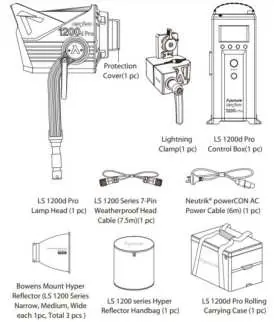
- Lamp Head
- Control Box
- Lightning Clamp
- 7-Pin Weatherproof Head Cable (7.5m)
- Neutrik powerCON AC Power Cable (6m)
- Bowens Mount Hyper Reflector (Narrow, Medium, Wide)
- Hyper Reflector Handbag
- Rolling Carrying Case
Product Overview
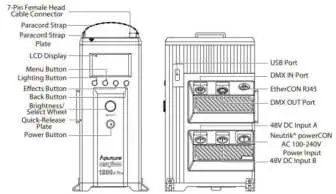
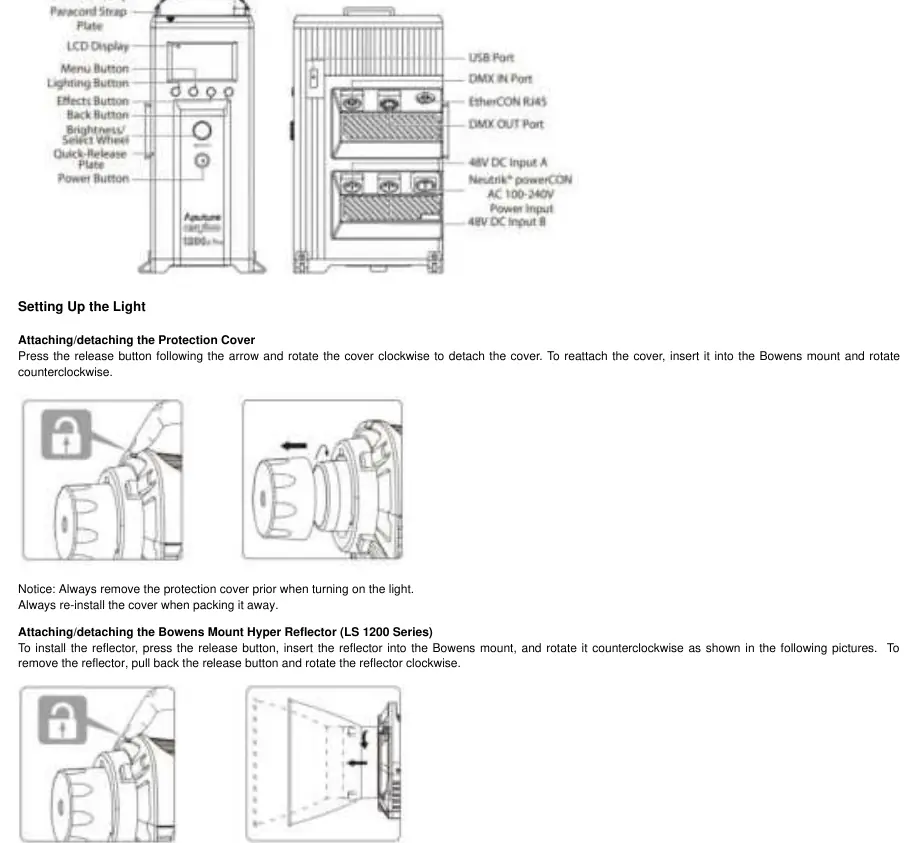
The system consists of a Lamp Head and a Control Box. The Lamp Head features a Bowens mount, a release button for accessories, a cable relief hook, and a 28mm Junior Pin for mounting. The Control Box houses the LCD display, menu navigation buttons, and various input/output ports including DMX, USB, Ethernet, and power inputs.
Installation
To set up the light, attach the Lightning Clamp to a light stand or yoke. Mount the control box onto the clamp using the quick-release baseplate. Connect the Lamp Head to the Control Box using the provided 7-Pin Weatherproof Head Cable. To install the reflector, insert it into the Bowens mount and rotate counterclockwise until locked.
Powering the Light
The fixture can be powered via AC (100-240V) or DC. For DC power, the unit supports single-way (720W) or dual-way (720W + 720W) power supplies. If using dual-way DC power, ensure the A/B power supply is balanced. If unbalanced, the control box will issue a warning and suspend output after a 30-second countdown to prevent damage.
Operation & Control
Use the Select Wheel to adjust light intensity (0-100%) and navigate the menu. The menu provides access to DMX Mode, Lead-Follow Mode, Dimming Curves, Fan Mode, Studio Mode, Frequency Selection, and Custom FX. The light supports various lighting effects including Paparazzi, Fireworks, Faulty Bulb, Lightning, TV, Pulsing, Strobe, and Explosion.
Connecting to DMX
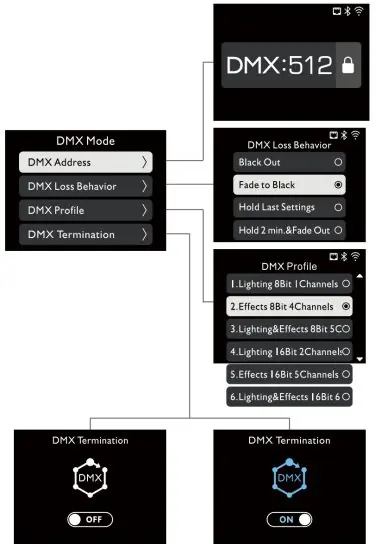
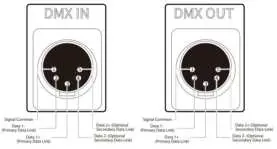
To control the light via DMX, connect the DMX controller's output to the LS 1200d Pro's controller input. Match the DMX channel on your controller with the light (default is 001). You can configure DMX Loss Behavior (Blackout, Fade to Black, Hold last setting, or Hold 2 min & Fade Out) to determine how the light reacts if the signal is lost.
Maintenance & Safety
Clean the product only with a dry microfiber cloth. Do not immerse the fixture in water. While the unit is rated for dust and light rain, malfunctions caused by water ingress are not covered by the warranty. If the overheat symbol appears, adjust the Fan Mode to Smart or High.
Manufacturer information
Aputure
Practical help
Common problems
Overheat warning symbol appears
Adjust the Fan Mode to Smart or High to increase cooling.
DMX signal lost
Configure DMX Loss Behavior in the menu to choose between Blackout, Fade to Black, Hold last setting, or Hold 2 min & Fade Out.
DC power supply imbalance
If using dual DC power, ensure both sources are balanced. If unbalanced, reduce brightness immediately to avoid damage.
Light does not turn on immediately
If Studio Mode is enabled, you may need to press the power switch to turn the lamp on.
Before use
- Remove the protective cover from the lamp head.
- Ensure the light is connected to a grounded outlet.
- Verify the lamp head is securely locked onto the stand using the fastening knob.
- Check that the 7-Pin head cable is securely connected.
- Verify all accessories are present and undamaged.
Specs in practice
- Output Power
- Maximum 1200W output.
- Operating Temperature
- Safe operating range is -20°C to 45°C.
- Weatherproofing
- Rated for dust and light rain; avoid heavy water exposure.
- Control Methods
- Supports On-board, Sidus Link App, DMX, LumenRadio, and Ethernet.
Images and diagrams
- Lamp Head: Identifies Bowens mount, release button, and cable connector.
- Control Box: Shows layout of buttons, LCD screen, and connection ports.
- DMX Wiring: Details the pinout configuration for DMX IN and OUT ports.
Model compatibility
- Compatible with standard Bowens mount accessories.
- Supports Sidus Link App for wireless control via iOS or Android.
- Compatible with DMX512 controllers.

Manual page author
Michael Turner
Technical manual editor
Reviews PDF manuals for structure, safety notes, and practical product details so readers can find the right information quickly.