Electronics / Video Lighting
User Manual for Aputure 2-Bay Battery Power Station
Access the official user manual for the Aputure 2-Bay Battery Power Station. This guide provides essential instructions on operation, battery mounting, technical specifications, and safety guidelines.
Quick answers from the manual
Quick answer
- To operate the power station, mount your batteries, connect the XLR cable to your fixture, and set the function switch to the '-' position. The green indicator light confirms power output. p. 1
Key actions
- Powering on the unit p. 1
- Powering off the unit p. 1
Technical specifications
| Parameter | Value | Meaning | Pages |
|---|---|---|---|
| Battery Input | 14.4V | Input voltage requirement | p. 1 |
| Battery Output | 48V, 10A, Max 480W | Output power specifications | p. 1 |
Where to find it in the PDF
- Product Manual p. 1
Table of contents
Manual images
Click an image to enlargeQuick guide from the manual
The Aputure 2-Bay Battery Power Station is designed to provide power to lighting fixtures using V-Mount or Gold Mount batteries. To operate, attach your batteries to the mounting plates, connect the XLR Head Cable to your fixture, and set the function switch to the '-' position. The green indicator light confirms that the unit is outputting power. Set the switch to the '0' position to close the output.
Product description
This power station supports V-Mount or Gold Mount input interfaces and features two-way simultaneous output. It is capable of a maximum operating current of 10A and is intended for use with photographic lighting equipment.
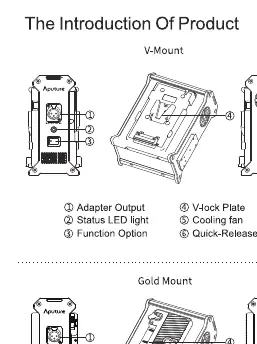
Operation
Follow these steps to power your equipment:
- Ensure the batteries are securely mounted on the V-Mount or Gold Mount plates.
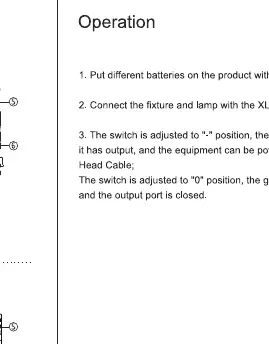
- Connect the fixture to the power station using the XLR Head Cable.
- Toggle the function switch to the '-' position. The green indicator light will turn on, indicating active power output.
- To stop power output, toggle the switch to the '0' position.
Safety and attention
Please observe the following precautions to ensure safe operation:
- Inspect the package upon arrival; do not use if the product is damaged.
- Do not dismantle the product housing to avoid unexpected trouble.
- Prevent the product from being deformed, as this may lead to damage to electrical parts.
Technical parameters
- Battery Input: 14.4V
- Battery Output: 48V, 10A, Max 480W
- Operation Temperature: -10°C to 40°C
- Size (Gold Mount): 175*130*88mm
- Size (V-Mount): 175*130*98mm
- Weight: ~1.3kg
Packing list
- 3-Pin Male to 3-Pin Female XLR Head Cable (3m) x 1
- 2-Bay Battery Power Station x 1
- Product Manual x 1
Manufacturer information
Aputure
Practical help
Common problems
No power output to the fixture
Ensure the function switch is set to the '-' position and the green indicator light is illuminated.
Battery not connecting
Verify that the battery is correctly aligned and locked onto the V-Mount or Gold Mount plate.
Before use
- Inspect the package for any damage upon receipt.
- Verify you have the correct battery mount type (V-Mount or Gold Mount).
- Ensure the XLR Head Cable is securely connected to both the power station and the fixture.
- Check that the ambient temperature is within the operating range of -10°C to 40°C.
Specs in practice
- Battery Input
- The required input voltage for the power station is 14.4V.
- Battery Output
- Provides 48V, 10A, with a maximum power capacity of 480W.
- Operation Temperature
- The device is rated to function safely between -10°C and 40°C.
Images and diagrams
- The V-Mount diagram identifies the Adapter Output, Status LED light, Function Option switch, V-Lock plate, Cooling fan, and Quick-Release plate.
- The Gold Mount diagram identifies the same components adapted for the Gold Mount battery system.
Model compatibility
- Compatible with V-Mount or Gold Mount batteries.
- Requires 3-Pin Male to 3-Pin Female XLR Head Cable for fixture connection.

Manual page author
David Miller
Documentation analyst
Organizes user manual content into clear summaries, with attention to model details, product context, and everyday usability.