Electronics / Video Lighting
User Manual for amaran 150c LED Light
Quick guide for the amaran 150c RGBWW COB LED light. Learn how to set up, operate, adjust CCT/HSI modes, use the Sidus Link app, and maintain your lighting fixture.
Table of contents
Manual images
Click an image to enlargeQuick Guide from the Manual
The amaran 150c is a 150W full-color RGBWW COB LED light. This guide provides essential steps for setup, operation, and maintenance. Always remove the protective cover before turning on the light and before using the reflector. Ensure the fixture is connected to a grounded outlet and avoid blocking the ventilation.
Safety Instructions
- Always remove the protective cover before use.
- Do not operate the fixture if the cord is damaged.
- Do not touch hot surfaces.
- Do not disassemble the fixture; contact support if repair is required.
- Use only original Aputure cable accessories.
- Do not use in wet conditions to avoid electric shock.
Components List
Ensure the following items are included in the standard kit:
- amaran 150c light fixture
- Power Adapter
- Hyper Reflector
- Power Cable
Installation
Detaching and Attaching the Protection Cover
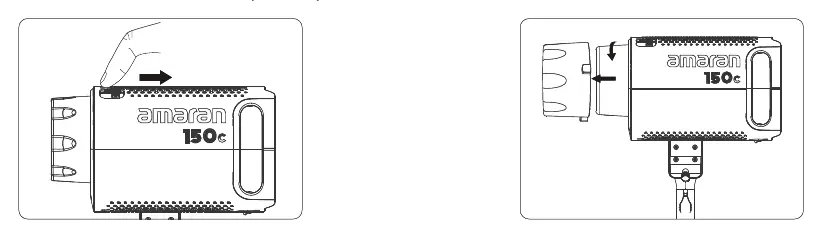
Push the handle of the lever in the direction of the arrow shown on the unit and rotate the cover to pull it out. Reverse the rotation to re-install the cover.
Attaching and Detaching the Reflector
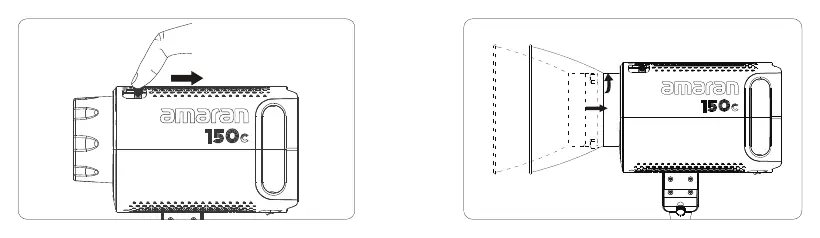
Push the lever handle according to the arrow direction and rotate the reflector into the mount. Rotate in the opposite direction to release and pull out the reflector.
Setting up the Light
Adjust the lamp body to the desired height on your tripod, tighten the tie-down to secure it, adjust the angle, and tighten the lock handle.
Soft Light Umbrella Installation
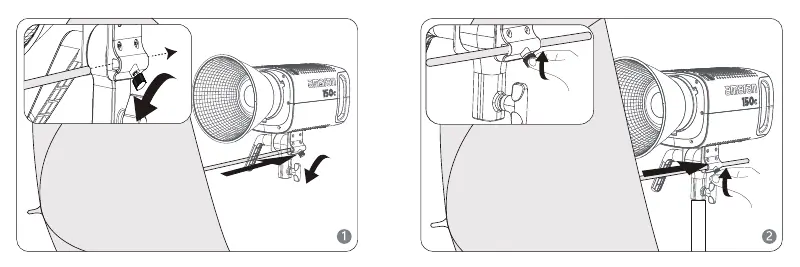
Insert the soft light handle into the umbrella hole and lock it using the locking knob.
Power Supply
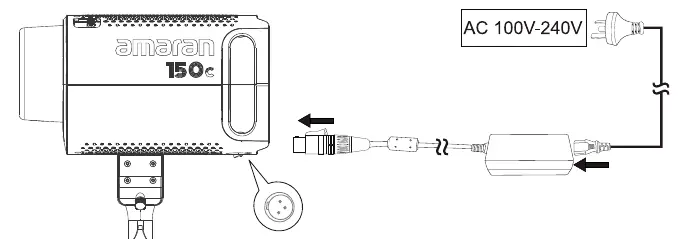
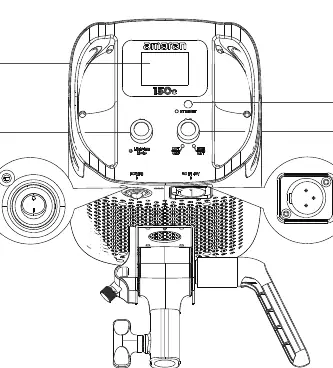
Connect the power cable to the power adapter and then to the DC-in connector on the light. Connect the power adapter to an AC outlet (100V-240V). To remove the power cord, press the button on the DC interface and the spring-loaded lock button on the power cord.
Operations
Power ON/OFF
Press the power button to turn the light on or off.
Manual Control
Use the INT knob to adjust intensity (0.0 - 100.0%). Press the CTR knob to select parameters like CCT, G/M, HUE, or SAT, then rotate the CTR knob to adjust the value.
- CCT Mode: Adjust Correlated Color Temperature (2500K - 7500K) and Green/Magenta shift (-1.0 to +1.0).
- HSI Mode: Adjust Hue (1° - 360°) and Saturation (0.0 - 100.0%).
Bluetooth Settings
Long press the Bluetooth reset button to reset the connection. The LCD will display "BT Reset" and show progress. The screen will indicate "Success" or "Failed" upon completion.
Over-temperature Protection
If the internal temperature exceeds the safety threshold, a thermometer symbol appears on the display. The light will turn off after 5 seconds and the fan will stop. Power must be reconnected to return to normal operation.
Sidus Link App
Download the Sidus Link app from the iOS App Store or Google Play Store to control the light wirelessly, access FX lighting effects, and perform firmware updates.
Manufacturer information
Aputure
Practical help
Common problems
Light turns off automatically with a thermometer icon on the display.
The unit has overheated. It will shut down after 5 seconds. Power must be reconnected to reset the system.
Bluetooth connection is not working.
Long press the Bluetooth reset button on the unit. Wait for the LCD to show 'Success' after the reset process.
Before use
- Remove the protective cover from the COB chipset.
- Ensure the light is mounted securely on a tripod.
- Verify the power cable is connected to a grounded outlet.
- Check that the Hyper reflector is locked in place if needed.
- Ensure the ventilation is not blocked.
Specs in practice
- Operating Temperature
- The fixture is designed to operate between -10°C and +40°C.
Images and diagrams
- The Bowens mount release button is located on the side of the light head for quick accessory changes.
- The INT knob controls brightness, while the CTR knob is used to navigate and adjust color settings.
- The soft light umbrella hole is located on the mounting bracket.
Model compatibility
- Compatible with Sidus Link App for remote control and firmware updates.
- Supports standard Bowens mount accessories.

Manual page author
Michael Turner
Technical manual editor
Reviews PDF manuals for structure, safety notes, and practical product details so readers can find the right information quickly.