Home Appliances / Small Kitchen Appliances
User Manual for Arzum GIRGIR AR 4087 Stick Vacuum Cleaner
Quick guide for the Arzum GIRGIR AR 4087 2-in-1 stick vacuum cleaner. Learn how to assemble, operate, empty the dust bin, and maintain your device safely.
PDF source: TR · summary: English
Quick answers from the manual
Quick answer
- The Arzum GIRGIR AR 4087 is a 2-in-1 stick vacuum. Assemble it by connecting the tubes and nozzle to the main body. Operate using the ON/OFF switch. Empty the dust bin after every use to maintain performance. p. 4, 10
Key actions
- Emptying the dust bin p. 5, 11
- Cleaning the filter p. 5, 11
First start
- Assembly p. 4, 10
Show 3 more answers Show less
Maintenance and reset
- Empty dust bin after each use p. 5, 11
Technical specifications
| Parameter | Value | Meaning | Pages |
|---|---|---|---|
| Voltage | 230V ~ 50/60 Hz | Operating voltage | p. 7, 13 |
| Power | 550W | Power consumption | p. 7, 13 |
Where to find it in the PDF
- Parts Diagram p. 2, 8
- Assembly and Operation p. 4, 10
- Maintenance p. 5, 11
Table of contents
Manual images
Click an image to enlargeQuick Guide
The Arzum GIRGIR AR 4087 is a 2-in-1 stick vacuum cleaner designed for household use. Before first use, ensure the voltage matches your local power supply. Always unplug the device before performing any maintenance, such as emptying the dust bin or cleaning the filter. Do not use the vacuum to clean up flammable liquids, sharp objects, or cigarette ash.
Device Overview
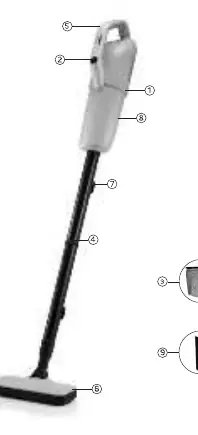
- 1: Main body
- 2: On/Off button
- 3: Motor protective filter
- 4: 2-piece tubes
- 5: Grip handle
- 6: Sweeping nozzle
- 7: Cable winding latches
- 8: Dust bin
- 9: Crevice tool
Assembly and Operation
Assembly:
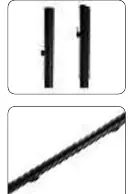
- Connect the two pieces of the tube together.
- Insert the assembled tube into the main body.
- Attach the sweeping nozzle to the other end of the tube.
Operation:
- Plug the device into a power outlet.
- Press the ON/OFF button on the main body to start the vacuum.
- When finished, press the button to the OFF position and unplug the device.
- You can wind the power cable around the cable winding latches for storage.
Maintenance and Cleaning
To maintain optimal performance, empty the dust bin after each use.
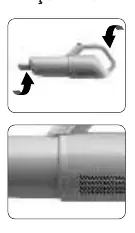
Emptying the Dust Bin:
- Turn off and unplug the vacuum.
- Detach the sweeping nozzle and tubes from the main body.
- Hold the main body and the bottom of the dust bin, then turn in the direction of the lock icon to detach.
- Remove the motor protection filter and empty the dust bin contents into the trash.
- The dust bin can be washed with water, but ensure it is completely dry before reattaching.
Cleaning the Motor Protection Filter:
- After emptying the dust bin, whisk or manually remove any leftover dust from the filter and filter screen.
Safety Instructions
- Do not use the appliance if the cord or plug is damaged.
- Keep the appliance away from water; never immerse it in liquid.
- This appliance can be used by children aged 8 and above under supervision.
- Do not use extension cords that provide insufficient current.
- Always unplug the device when not in use.
Technical Specifications
- Voltage: 230V ~ 50/60 Hz
- Power: 550W
Manufacturer information
Arzum Elektrikli Ev Aletleri San. ve Tic. A.Ş.
Practical help
Common problems
Vacuum does not start
Ensure the device is plugged in and the ON/OFF switch is in the ON position.
Loss of suction power
Empty the dust bin and clean the motor protection filter.
Damaged power cord
Do not operate the device. Contact Arzum Authorized Service for repair.
Before use
- Verify that the local voltage matches the device specifications (230V).
- Ensure the motor protection filter is correctly installed.
- Check that the dust bin is empty.
- Inspect the power cord and plug for any signs of damage.
- Ensure the device is not being used to vacuum liquids or flammable materials.
Show more Show less
Images and diagrams
- The device consists of a main body, a 2-piece tube, and a sweeping nozzle.
- The dust bin is located on the main body and can be detached by twisting.
- Cable winding latches are provided on the handle/body for convenient storage.
Model compatibility
- For household use only; not intended for industrial or commercial purposes.

Manual page author
Emily Carter
User documentation editor