Power / Power Banks
User Manual for AUKEY 20000mAh Power Bank PB-N61
Comprehensive user guide for the AUKEY 20000mAh Power Bank (PB-N61). Includes instructions on how to charge the power bank, charge your devices, understand LED indicators, and maintain the battery for longevity.
Quick answers from the manual
Quick answer
- The AUKEY PB-N61 is a 20000mAh power bank. To charge it, use the Micro-USB input port. To charge your devices, use the USB output ports (Output 1 is 1A, Output 2 is 2A). p. 3, 4
Key actions
- Charge the power bank fully before first use. p. 4
- Charge the power bank at least once every 3 months. p. 4
First start
- Connect the included Micro-USB cable to a charger and the power bank's input port to charge it fully. p. 4
Show 3 more answers Show less
Maintenance and reset
- Charge the unit at least once every 3 months to maintain battery health. p. 4
Technical specifications
| Parameter | Value | Meaning | Pages |
|---|---|---|---|
| Capacity | 20000mAh / 74Wh | Total battery capacity | p. 4 |
| Input | DC 5V 2A | Charging input | p. 4 |
| Output 1 | DC 5V 1A | Standard output | p. 4 |
| Output 2 | DC 5V 2A | Fast output | p. 4 |
Where to find it in the PDF
- Product Diagram p. 3
- Specifications p. 4
Table of contents
Quick Guide
The AUKEY PB-N61 is a 20000mAh portable power bank designed to charge mobile devices. Before first use, ensure the power bank is fully charged. To charge the power bank, connect a Micro-USB cable to the input port. To charge your devices, connect them to one of the two USB output ports.
Product Overview
The power bank features a simple interface:
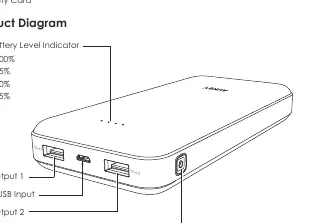
- LED Battery Level Indicator: Displays remaining charge (25%, 50%, 75%, 100%).
- USB Output 1: Provides 5V 1A output.
- USB Output 2: Provides 5V 2A output.
- Micro-USB Input: Used to recharge the power bank.
- Power Button: Press to check the remaining battery level.
Getting Started
Charging the Power Bank
- Connect the included Micro-USB charging cable to a USB charger or charging port.
- Connect the other end to the Micro-USB input port on the power bank.
- Unplug the power bank once the LED indicators show it is fully charged.
Charging Your Device
- Connect your device's charging cable to your device's charging port.
- Connect the other end to the appropriate USB output port on the PB-N61.
- Unplug your device when it is fully charged.
- Press the power button to check the remaining battery level if needed.
Product Care & Maintenance
- Keep the power bank away from liquids and extreme heat.
- Do not charge your devices while the power bank itself is being charged.
- Charge the PB-N61 at least once every 3 months to maintain battery health.
- Dispose of the battery according to local environmental laws.
Technical Specifications
- Model: PB-N61
- Capacity: 20000mAh / 74Wh
- Battery Type: Lithium-ion
- Charging Time: 13 hours
- Input: DC 5V 2A
- USB Output 1: DC 5V 1A
- USB Output 2: DC 5V 2A
Warranty & Support
For questions, support, or warranty claims, contact the AUKEY support team via email. Please include your Amazon order number and the product model number (PB-N61) in your correspondence. Note that AUKEY only provides after-sales service for products purchased directly from AUKEY.
Manufacturer information
AUKEY
Practical help
Common problems
Power bank is not charging devices
Ensure the cable is securely connected to the output port and the device. Press the power button to ensure the power bank is active.
Charging the power bank takes too long
The power bank requires approximately 13 hours to fully charge. Ensure you are using a 5V/2A charger for optimal input speed.
Before use
- Fully charge the power bank before the first use.
- Verify you have the included Micro-USB cable.
- Check your device's charging requirements to choose the correct output port (1A or 2A).
Show more Show less
Specs in practice
- Capacity (20000mAh)
- The total energy storage of the battery, sufficient for multiple charges of most smartphones.
- Output 1 (5V 1A)
- Standard charging speed, suitable for smaller devices or standard smartphones.
- Output 2 (5V 2A)
- Faster charging speed, recommended for tablets or devices that support higher current.
Images and diagrams
- The LED indicators show the current battery level: 1 light (25%), 2 lights (50%), 3 lights (75%), 4 lights (100%).
- The power button is located on the side and is used to wake the device to check the battery level.
Model compatibility
- Compatible with devices that charge via USB.
- Requires a 5V/2A power source for the fastest recharge of the power bank itself.

Manual page author
Emily Carter
User documentation editor