Power / Power Banks
User Manual for Aukey Basix Plus 20000mAh Power Bank PB-N74S
Quick guide for the Aukey Basix Plus 20000mAh Power Bank (PB-N74S). Learn how to charge the power bank, charge your devices, use the low-current mode, and understand LED indicators.
Quick answers from the manual
Quick answer
- The Aukey PB-N74S is a 20000mAh power bank. Charge it by connecting to a USB power source. It supports low-current charging for devices like fitness trackers. p. 1
Key actions
- Charging the power bank: Connect to a USB power source. p. 1
- Charging a device: Connect your device to the USB-A or USB-C output ports. p. 1
- Low-current mode: Press and hold the power button for 5 seconds. p. 1
First start
- Charge the power bank fully before first use. p. 1
Show 4 more answers Show less
Problems and fixes
Low-current mode not activating
Press and hold the power button for 5 seconds until the LED indicators flash.
p. 1Maintenance and reset
- Recharge the power bank at least once every 3 months. p. 1
Technical specifications
| Parameter | Value | Meaning | Pages |
|---|---|---|---|
| Capacity | 20000mAh | Total energy storage | p. 1 |
| USB-C Input | 5V 3A / 9V 2.22A / 12V 1.67A | Fast charging input | p. 1 |
| USB-C Output | 5V 3A / 9V 2.22A / 12V 1.67A | Fast charging output | p. 1 |
| USB-A Output | 5V 3A / 9V 2A / 12V 1.5A | Standard/Fast charging output | p. 1 |
Where to find it in the PDF
- Product Overview and Instructions p. 1
Table of contents
Quick guide from the manual
The Aukey Basix Plus 20000mAh Power Bank (PB-N74S) is designed to charge various USB-powered devices. Before using the power bank for the first time, ensure it is fully charged. The device features multiple input ports (Lightning, Micro-USB, USB-C) and output ports (USB-A, USB-C) to accommodate different charging cables.
Product Diagram
The power bank includes the following ports and controls:
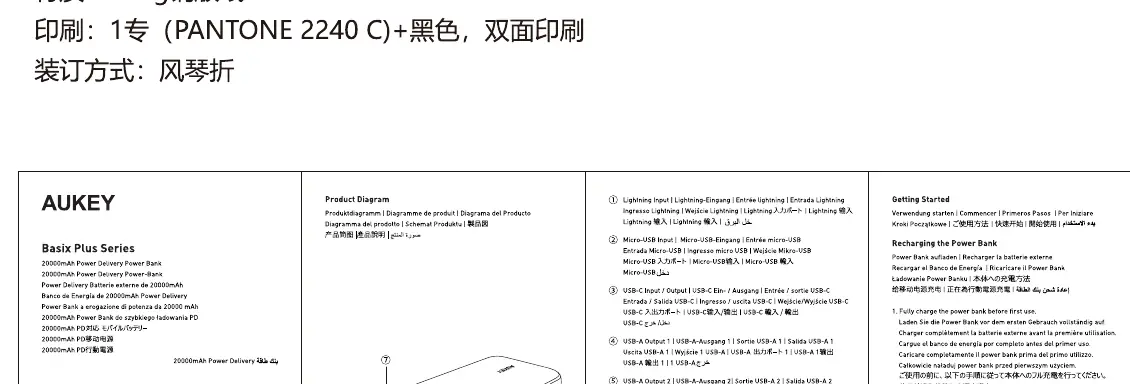
- Lightning Input: For charging the power bank.
- Micro-USB Input: For charging the power bank.
- USB-C Input/Output: For charging the power bank or your device.
- USB-A Output 1 & 2: For charging your devices.
- Power Button: Used to check battery level, activate/deactivate the power bank, and toggle low-current mode.
- LED Indicators: Display the remaining battery level.
Getting Started
To charge the power bank, connect it to a USB power source using a compatible cable (Lightning, Micro-USB, or USB-C). The LED indicators will blink to show the charging progress. Once fully charged, all four LED indicators will remain solid.
Charging Your Device
Connect your device to one of the USB-A or USB-C output ports on the power bank. Charging should begin automatically. If it does not, press the power button once to start the charging process.
Low-Current Charging Mode
This mode is suitable for charging low-power devices like fitness trackers or wireless headphones.
- To Activate: Press and hold the power button for 5 seconds. The LED indicators will flash sequentially.
- To Deactivate: Press and hold the power button for 2 seconds.
LED Status Indicator
The LED indicators show the remaining battery capacity:
- 25%: One LED solid.
- 51%: Two LEDs solid.
- 76%: Three LEDs solid.
- 100%: Four LEDs solid.
Safety and Maintenance
- Keep the power bank away from extreme heat and liquids.
- Do not disassemble or modify the device.
- Recharge the power bank at least once every 3 months to maintain battery health.
Manufacturer information
AUKEY
Practical help
Common problems
Power bank not charging
Ensure the cable is securely connected to a working USB power source.
Low-current mode not activating
Press and hold the power button for exactly 5 seconds until the LED indicators flash.
Before use
- Charge the power bank fully before first use.
- Check that your charging cable is compatible with the power bank's input ports (Lightning, Micro-USB, or USB-C).
Show more Show less
Specs in practice
- USB-C Input/Output
- Supports fast charging up to 22.5W.
Images and diagrams
- 1: Lightning Input
- 2: Micro-USB Input
- 3: USB-C Input/Output
- 4: USB-A Output 1
- 5: USB-A Output 2
Model compatibility
- Compatible with most USB-powered devices.
- Low-current mode is suitable for devices like fitness trackers or wireless headphones.

Manual page author
Emily Carter
User documentation editor