Power / Power Banks
User Manual for Aukey PB-Y23 20000mAh Power Bank
Quick guide for the Aukey PB-Y23 20000mAh Power Bank. Learn how to charge your devices, use the low-current mode, and understand the LED indicators.
Quick answers from the manual
Quick answer
- The Aukey PB-Y23 is a 20000mAh power bank with Power Delivery 2.0 and Quick Charge 3.0. It features multiple inputs (Micro-USB, Lightning, USB-C) and outputs (USB-A, USB-C). To charge devices, connect them to the output ports. To charge the power bank, use one of the input ports. p. 3, 5
Key actions
- Charge the power bank p. 5
- Charge a device p. 5
- Activate Low-Current Mode p. 6
First start
- Fully charge your power bank before first use. p. 5
Show 4 more answers Show less
Problems and fixes
Low-powered device not charging in standard mode
Use Low-Current Charging Mode by double-pressing the power button.
p. 6Maintenance and reset
- Recharge the PB-Y23 at least once every 3 months. p. 6
Technical specifications
| Parameter | Value | Meaning | Pages |
|---|---|---|---|
| Capacity | 20000mAh / 74Wh | Total battery capacity | p. 4 |
| Total Power Output | 18W | Maximum power delivery | p. 4 |
Where to find it in the PDF
- Product Diagram p. 3
- Specifications p. 4
Table of contents
Quick guide from the manual
The Aukey PB-Y23 is a 20000mAh universal power bank equipped with Power Delivery 2.0 and Qualcomm Quick Charge 3.0 technology. It is designed to charge a wide range of devices efficiently. Before first use, please fully charge the power bank.
Product Diagram
The power bank features multiple input and output ports:
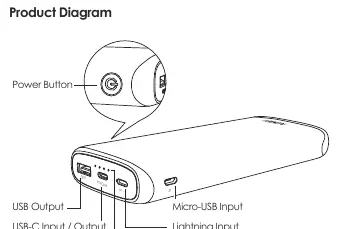
- Power Button: Used to check the battery level and toggle the Low-Current Charging Mode.
- Inputs: Micro-USB, Lightning, and USB-C (In/Out).
- Outputs: USB-A and USB-C (In/Out).
- LED Indicators: Four lights indicate the remaining battery level (25%, 50%, 75%, 100%).
Getting Started
Charging the Power Bank
- Connect the included USB-A to C cable (or a Micro-USB/Lightning cable) to a USB charger or charging port.
- Connect the other end to the corresponding input port on the power bank.
- Unplug the power bank once it is fully charged.
Charging Your Device
- Connect your device's charging cable to the device's charging port.
- Connect the other end to a USB output port on the PB-Y23.
- Unplug your device when fully charged.
- Press the power button to check the remaining battery level.
Low-Current Charging Mode
This mode is customized for low-current devices (below 60mA), such as fitness trackers or wireless headphones, which may not charge in standard mode.
- Activate/Deactivate: Double-press the power button. The LED indicators will flash sequentially while in this mode.
- Automatic Switch: The power bank will automatically switch back to standard charging mode after 2 hours.
Product Care & Use
- Keep the power bank away from liquids and extreme heat.
- Do not charge your devices while the power bank is recharging.
- Recharge the PB-Y23 at least once every 3 months.
- The power bank does not support simultaneous charging via Micro-USB, Lightning, and USB-C inputs.
Warranty & Customer Support
For questions, support, or warranty claims, contact the support team via email. Please include your Amazon order number and product model number (PB-Y23).
Amazon US orders: [email protected] EU orders: [email protected] CA orders: [email protected] JP orders: [email protected]
Manufacturer information
AUKEY
Practical help
Common problems
Low-powered device (e.g., fitness tracker) not charging
Switch to Low-Current Charging Mode by double-pressing the power button.
Power bank not charging
Ensure you are not attempting to charge via multiple input ports simultaneously.
Before use
- Fully charge the power bank before first use.
- Ensure you have a compatible cable (USB-A to C, Micro-USB, or Lightning).
- Check if your device supports USB PD or Quick Charge 3.0 for optimal charging speeds.
Show more Show less
Specs in practice
- Total Power Output
- 18W
- Low-Current Mode
- Optimized for devices drawing less than 60mA.
Images and diagrams
- The power bank has three input ports: Micro-USB, Lightning, and USB-C.
- The power bank has two output ports: USB-A and USB-C.
- The LED indicators show battery level: 4 lights = 100%, 3 = 75%, 2 = 50%, 1 = 25%.
Model compatibility
- Supports USB Power Delivery 2.0.
- Supports Qualcomm Quick Charge 3.0.
- Backward compatible with Quick Charge 2.0/1.0 devices.

Manual page author
Michael Turner
Technical manual editor