Toys / RC Models & Drones
Quick Start Guide for Autel Robotics EVO Nano Series Drone
Get started with your Autel Robotics EVO Nano series drone. This guide covers app installation, charging, aircraft preparation, remote control setup, power-on procedures, and basic flight controls.
Quick answers from the manual
Quick answer
- To start using your Autel Robotics EVO Nano series drone, download the Autel Sky App, fully charge the batteries and remote, unfold the aircraft, connect your phone, and power on the remote followed by the aircraft. p. 2, 3, 4, 5
Key actions
- Power on the remote control p. 5
- Power on the aircraft p. 5
- Start motors (Mode 2) p. 6
First start
- Download app, charge devices, unfold aircraft, insert SD card, connect phone, power on. p. 2, 3, 4, 5
Show 1 more answers Show less
Where to find it in the PDF
- Preparation p. 2, 3, 4
- Flight Operations p. 5, 6, 7
Table of contents
Manual images
Click an image to enlargeQuick Start Guide
This guide provides the essential steps to prepare and operate your Autel Robotics EVO Nano series drone. Please ensure you read all documentation before your first flight.
App Download
Download the Autel Sky App to your mobile device. The app is required for flight operations and camera control.
Charging
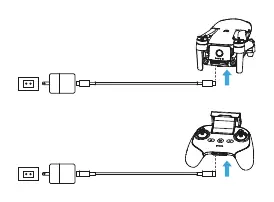
Before flying, ensure the aircraft batteries and the remote control are fully charged. Connect the charging cable to the aircraft and the remote control respectively.
Preparing the Aircraft
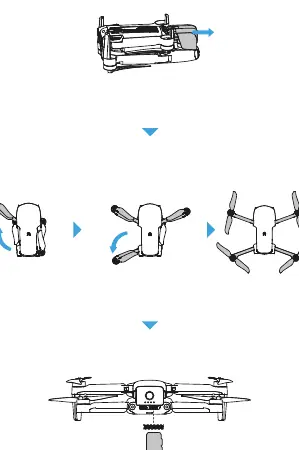
- Unfold the aircraft arms.
- Insert the microSD card into the slot on the aircraft.
Preparing the Remote Control
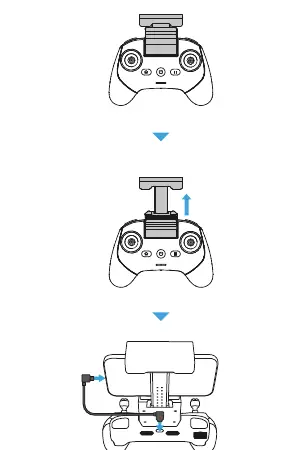
- Extend the phone holder on the remote control.
- Connect your mobile device to the remote control using the provided cable.
Powering On
Follow this sequence to power on your equipment:
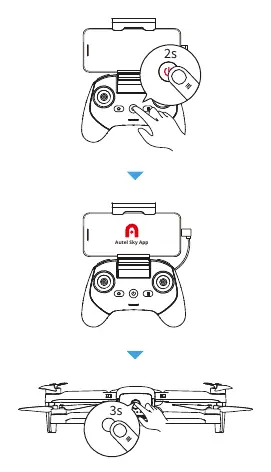
- Remote Control: Press and hold the power button for 2 seconds.
- Aircraft: Press and hold the power button for 3 seconds.
Ensure the Autel Sky App is running on your connected mobile device.
Flight Controls (Mode 2)
The following controls apply to Mode 2 configuration:
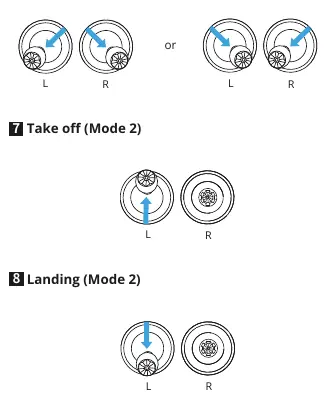
- Start Motors: Move both joysticks inward or outward to the bottom corners.
- Take Off: Push the left joystick up.
- Landing: Pull the left joystick down.
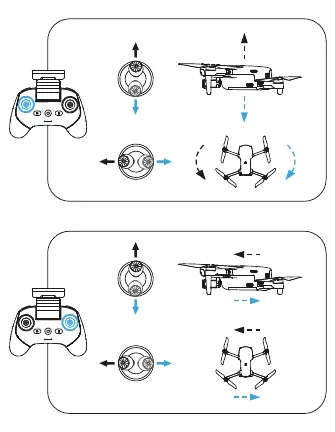
- Joystick Controls: The left joystick controls throttle (up/down) and yaw (left/right). The right joystick controls pitch (forward/backward) and roll (left/right).
Practical help
Before use
- Download and install the Autel Sky App
- Fully charge the aircraft batteries
- Fully charge the remote control
- Unfold the aircraft arms
- Insert a microSD card into the aircraft
Images and diagrams
- Joystick controls illustrate Mode 2 configuration: Left stick for throttle/yaw, Right stick for pitch/roll.
- Power-on sequence requires holding buttons for 2 seconds (remote) and 3 seconds (aircraft).
Show more Show less
Model compatibility
- Requires Autel Sky App for operation

Manual page author
Emily Carter
User documentation editor