Industrial / Commercial Refrigeration
User Manual for Avantco Horizontal Open Air Merchandisers
Comprehensive user guide for Avantco Horizontal Open Air Merchandisers. Includes installation guidelines, temperature control instructions, maintenance procedures, and troubleshooting steps for models 193HAC28B through 193HAC75W.
Quick answers from the manual
Quick answer
- This manual covers the setup, operation, and maintenance of Avantco Horizontal Open Air Merchandisers. Key requirements include a dedicated electrical circuit, 6 inches of rear clearance, and operation in environments below 75°F and 55% relative humidity. p. 1, 4, 5
Key actions
- Clean the condenser coil at least once per month. p. 8
- Adjust temperature via the controller behind the front panel. p. 6
First start
- If transported on its side, let the unit stand upright for at least 24 hours before plugging it in. p. 4
Problems and fixes
Compressor not running
Check power cord, circuit breaker, thermostat setting, or wait for defrost cycle to finish.
p. 9Maintenance and reset
- Disconnect power before cleaning any parts. p. 7, 8
Technical specifications
| Parameter | Value | Meaning | Pages |
|---|---|---|---|
| Temperature Range | 33°F - 40°F | Factory set cycle range. | p. 5 |
Where to find it in the PDF
- Warnings p. 3
- Installation p. 4, 5
- Temperature Controls p. 5, 6
- Maintenance p. 8
Table of contents
Manual images
Click an image to enlargeQuick guide from the manual
This manual provides essential instructions for the setup, operation, and maintenance of Avantco Horizontal Open Air Merchandisers. The unit is designed for indoor use in a temperature-controlled environment (below 75°F and 55% relative humidity). Failure to follow these environmental guidelines may void the warranty.
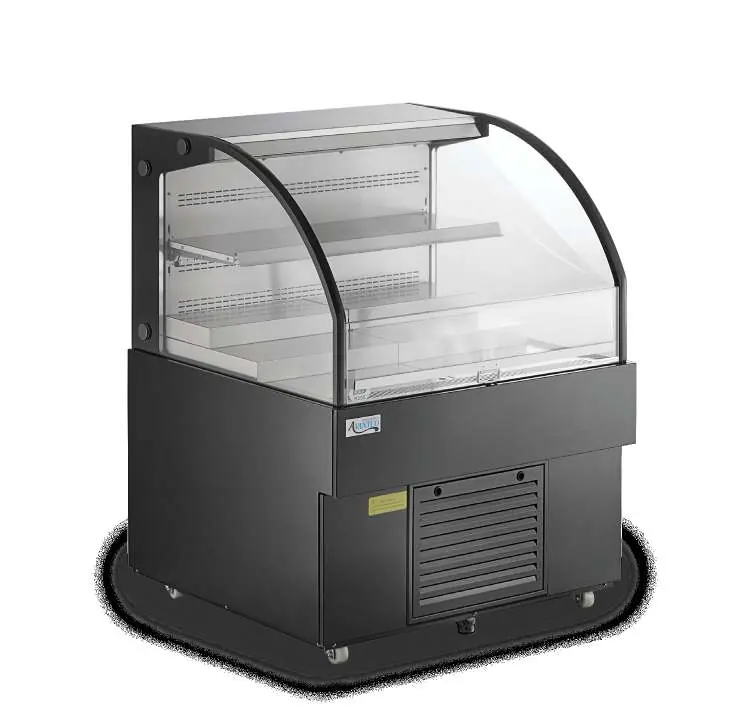
Installation
Proper installation is critical for performance and safety:

- Acclimation: If the unit was transported on its side, let it stand upright for at least 24 hours before plugging it in.
- Surface: Install on a strong, level surface to prevent noise and malfunctions.
- Clearance: Maintain at least 6 inches of clearance at the back of the unit for proper ventilation.
- Electrical: Use a dedicated circuit. Do not use extension cords. Ensure the unit is properly grounded.
- Environment: Avoid direct sunlight, open doorways, air vents, and high-humidity areas.
Temperature Controls
The refrigerator is factory-set to cycle between 33°F and 40°F. The controller is located behind the front panel. To adjust:
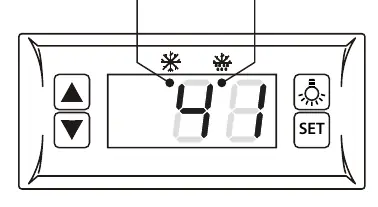
- Carefully remove the front panel.
- Press the SET button to display the current set temperature.
- Use the arrow buttons to modify the value.
- Press SET again to save and exit.
- Replace the front panel.
Use & Caution
- Loading: Do not block the air duct/fan at the top. Ensure at least 4 inches of clearance from the evaporator.
- Safety: Do not store flammable or explosive materials inside. Do not sit or stand inside the unit.
- Cleaning: Always disconnect power before cleaning.
Defrost System
The unit features an automatic defrost system. If a drain is available, connect the condensation drainage pipe to it. If no drain is available, the pipe can be hung up to allow water to evaporate in the pan, though this may increase energy consumption. In high-humidity environments (above 55%), connecting to a drain is necessary to prevent overflow.
Maintenance
Regular maintenance ensures efficient operation:
- Condenser Coil: Clean at least once per month. Disconnect power, remove the front/base cover, and use a soft brush or vacuum to remove dust and lint. Straighten bent fins with a fin comb.
- Interior: Clean with warm water and mild soap. Avoid abrasive cleaners, steel wool, or bleach.
- Fan Blades: Clean with a soft cloth; cover the motor to prevent moisture damage.
Troubleshooting
If the unit is not cooling or the compressor is not running, check if the power cord is plugged in, the circuit breaker is tripped, or if the unit is in a defrost cycle. If the cabinet temperature is fluctuating, ensure the condenser coil is clean and there is proper airflow (6" clearance at the back).
Manufacturer information
Avantco Equipment
Practical help
Common problems
Compressor not running
Check if the power cord is plugged in, the circuit breaker is tripped, or if the unit is in a defrost cycle.
Unit is not cooling
Ensure the unit is turned on, the defrost cycle is not running, or contact a technician if refrigerant is leaking.
High cabinet temperature
Check for frosted evaporator coils, blocked airflow, or high ambient temperature/humidity.
Condensation on cabinet/floor
Ensure relative humidity is below 55% or check if the drainage pipe is connected properly.
Before use
- Let the unit stand upright for at least 24 hours if transported on its side.
- Ensure the surface is level.
- Verify the environment is below 75°F and 55% relative humidity.
- Ensure 6 inches of clearance at the back of the unit.
- Connect to a dedicated, grounded electrical circuit.
- Install all accessories (shelves, clips) before plugging in.
Specs in practice
- Operating Temperature
- Factory set to cycle between 33°F and 40°F.
- Humidity Limit
- Designed for environments up to 55% relative humidity.
- Ambient Temperature Limit
- Do not use in areas over 90°F; performance is optimized below 75°F.
Images and diagrams
- The temperature controller is located behind the front panel.
- The condenser coil is located at the bottom behind the panel.
Model compatibility
- Indoor use only.
- Do not use extension cords.
- Requires a dedicated circuit.

Manual page author
Emily Carter
User documentation editor
Prepares concise manual descriptions and highlights the most useful setup, operation, and maintenance information for readers.