Music / Instruments
Axiom SCV-1 Stereo Chorus Vibrato Pedal User Guide
Quick guide for the Axiom SCV-1 analog chorus/vibrato pedal. Learn about control settings, power requirements, and technical specifications for your BBD effect pedal.
Table of contents
Quick guide from the manual
The Axiom Stereo Chorus-Vibrato SCV-1 is a 100% analog, bucket-brigade (BBD) based pedal. It is designed to produce a wide range of modulation effects, from subtle to deep. The pedal features true bypass and independent control over left and right channels, allowing for true stereo operation, including 'motionless' chorus, pure vibrato, or wet/dry configurations.
Control functions
The pedal features eight primary controls to shape the modulation effect:
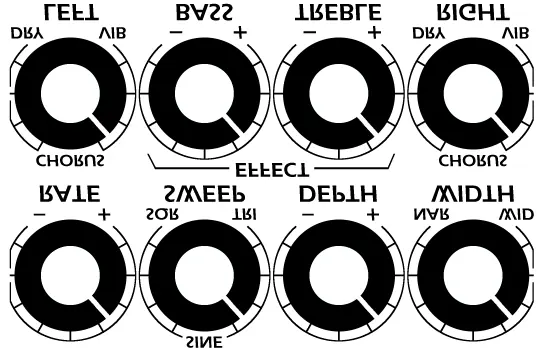
- RATE: Adjusts the sweep rate of the modulation. Turn clockwise to increase speed.
- SWEEP: Gradually changes the shape of the modulation waveform from square to sine to triangular.
- DEPTH: Controls the range of the modulation, from narrow to wide.
- WIDTH: Adjusts the base delay time of the modulation (from less than 1ms to 20ms). Increasing this makes the effect more intense and dramatic.
- LEFT: Adjusts the modulation effect in the left channel, moving from dry to chorus or vibrato.
- RIGHT: Adjusts the modulation effect in the right channel, moving from dry to chorus or vibrato.
- BASS: Increases modulation applied to low frequencies. Useful for tailoring the sound for bass, rhythm, or lead guitar.
- TREBLE: Increases modulation applied to high frequencies. Useful for tailoring the sound for clean, distorted, or acoustic guitars.
Technical specifications
Ensure your power supply meets the following requirements for optimal performance:
- Power Connection: 2.1 mm, center negative (9 Vdc standard).
- Voltage: 9 Vdc (via adapter or battery).
- Current Draw: 38 mA (maximum).
- Input Impedance: 900 kOhm (minimum).
- Dimensions: 4.7" x 3.9" x 1.3".
- Weight: 1.4 lbs (without 9V battery).
Practical help
Common problems
Effect sounds too subtle or not present
Check the LEFT and RIGHT knobs to ensure they are not set fully to 'DRY'. Adjust the DEPTH and WIDTH knobs to increase the intensity of the modulation.
Pedal does not power on
Verify the power supply is 9V DC, center negative, and provides at least 38mA. If using a battery, ensure it is fresh.
Before use
- Ensure the power supply is 9V DC, center negative.
- Check that the input impedance of your signal chain is compatible (900 kOhm minimum).
- Set the SWEEP knob to the desired waveform shape (Square, Sine, or Triangle).
- Adjust LEFT and RIGHT knobs to balance the wet/dry mix for your stereo setup.
- Verify the battery is installed if not using an external power adapter.
Specs in practice
- 9 Vdc, center negative
- The standard polarity for guitar pedals; using the wrong polarity can damage the unit.
Images and diagrams
- The control layout features two rows of knobs. The top row controls the modulation characteristics (Rate, Sweep, Depth, Width).
- The bottom row controls the channel-specific mix (Left, Bass, Treble, Right).
Model compatibility
- Designed for use with standard 9V DC power adapters.
- Compatible with bass, rhythm, and lead guitar setups via Bass and Treble tone controls.

Manual page author
David Miller
Documentation analyst
Organizes user manual content into clear summaries, with attention to model details, product context, and everyday usability.