General / Accessories
User Manual for Electro-Harmonix RING THING Single Sideband Modulator
Quick guide for the Electro-Harmonix RING THING. Learn how to use the four modulation modes, save presets, connect an expression pedal, and troubleshoot common issues.
Table of contents
Manual images
Jump to the sectionQuick guide from the manual
The Electro-Harmonix RING THING is a versatile modulation pedal featuring four distinct modes: Ring Modulation (RM), Upper Band Modulation (UB), Lower Band Modulation (LB), and Pitch Shift (PS). To get started, ensure you are using the supplied 9.6V DC 200mA power supply with a center-negative plug. Connect your instrument to the INST Input jack and your amplifier to the MONO/L output jack. The pedal features nine programmable presets and supports external expression pedal control for advanced sound shaping.
Connection Setup
Follow these steps to connect your equipment:
- Connect an unbalanced instrument cable from your instrument to the INST Input jack on the right side of the pedal.
- Connect an unbalanced instrument cable from the MONO/L output jack on the left side to your amplifier input.
- Plug the supplied AC adapter into a wall outlet and connect it to the 9V power jack.
- Power on your amplifier.
Modes of Operation
The Ring Thing offers four modes, selectable via the MODE knob:
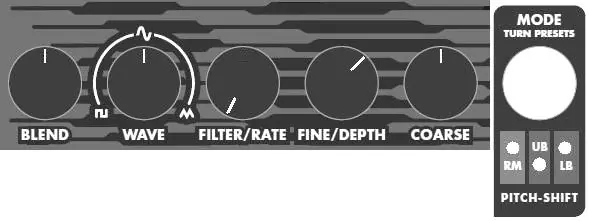
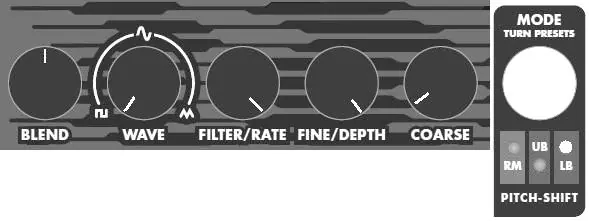
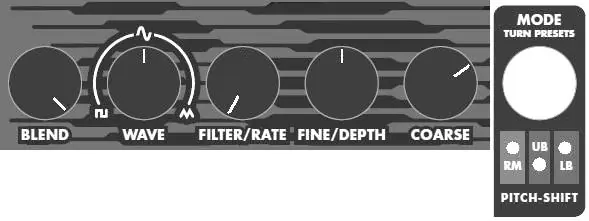
- Ring Modulation (RM): A standard ring modulator with a sweepable filter and five modulation waveforms.
- Upper Band Modulation (UB): Splits the signal, outputting the upper sideband from the MONO/L jack and the lower sideband from the R jack.
- Lower Band Modulation (LB): Splits the signal, outputting the lower sideband from the MONO/L jack and the upper sideband from the R jack.
- Pitch Shift (PS): Shifts incoming notes up or down by the same factor, preserving harmonic relationships.
Controls and Indicators
The pedal features several knobs that function differently depending on the selected mode:
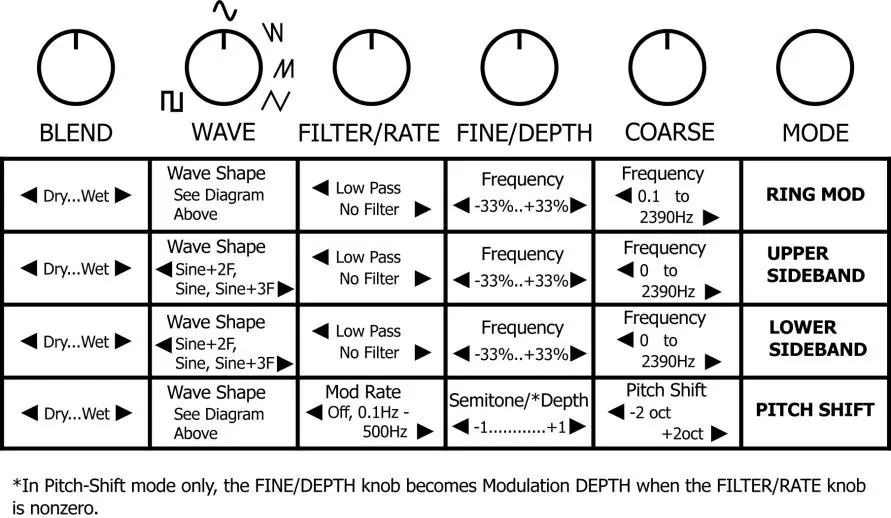
- BLEND: Sets the wet/dry mix.
- WAVE: Selects the modulation waveform (Square, Sine, Ramp Down, Ramp Up, Triangle) or adds harmonics in sideband modes.
- FILTER/RATE: Acts as a low-pass filter in RM/UB/LB modes or controls modulation rate in Pitch Shift mode.
- FINE/DEPTH: Fine-tunes frequency or controls modulation depth.
- COARSE: Tunes frequency over a wide range or sets pitch shift amount.
- MODE Knob: A rotary encoder used to select modes and scroll through presets.
Presets
The Ring Thing allows you to save and recall up to 9 presets:
- Saving: Create your sound, turn the MODE knob to the desired preset number, and press and hold the MODE knob for 3 seconds until the LEDs stop blinking.
- Loading: Use the MODE knob to select the preset number, then press and release the PRESET/TUNE footswitch.
- Unloading: Turn the MODE knob clockwise until no LEDs are lit to return to the current knob settings.
Advanced Features
Expression Pedal: Connect a compatible expression pedal to the EXP jack. In RM/UB/LB modes, the FINE knob must be set fully counter-clockwise to enable expression control. In Pitch Shift mode, it controls the pitch shift amount.
External Oscillator: You can use an external signal as a carrier or modulator by plugging it into the MOD input jack and setting the WAVE knob fully counter-clockwise.
Auto-Tune: In RM, UB, or LB modes, play a single note and press and hold the PRESET/TUNE footswitch for 1 second to automatically tune the internal modulator to that note.
Troubleshooting
If you are not hearing the effect or experiencing unexpected behavior:
- Ensure the BLEND knob is set to 50% or higher.
- Check that the FILTER/RATE knob is not turned to full counter-clockwise.
- If using an expression pedal, ensure the FINE knob is set correctly for the mode.
- If a preset has been modified, the PRESET LED will blink rapidly; press the PRESET footswitch to revert to the saved settings.
Technical Specifications
- Sample Rate: 46.93 kHz
- A/D and D/A Conversion: 24 bits
- Processed Audio: 32 bits
- Power Requirements: 9V DC, 190mA, center negative
Practical help
Common problems
No sound or effect not audible
Ensure the BLEND knob is set to 50% or higher and the FILTER/RATE knob is not turned fully counter-clockwise.
Expression pedal not controlling the effect
In RM/UB/LB modes, the FINE knob must be set fully counter-clockwise to enable expression pedal functionality.
Preset LEDs blinking rapidly
This indicates a preset has been loaded but modified. Press the PRESET/TUNE footswitch to revert to the saved preset.
External oscillator not working
Ensure the WAVE knob is set fully counter-clockwise. If set above this position, the external modulator is disabled.
Before use
- Use only the supplied 9.6V DC 200mA power supply (center negative).
- Ensure instrument cables are unbalanced.
- For expression pedals, use a Tip-Ring-Sleeve (TRS) plug.
- Verify the pedal is in the correct mode using the MODE knob.
- Check that the STATUS LED is lit to ensure the pedal is in effect mode.
Specs in practice
- Bit Resolution
- 24-bit A/D and D/A conversion ensures high-quality signal conversion.
- Input Impedance
- 2 MΩ for both INST and MOD inputs, suitable for standard instrument signals.
Images and diagrams
- The knob functions table on page 8 provides a quick reference for how BLEND, WAVE, FILTER/RATE, FINE/DEPTH, and COARSE knobs behave in each of the four modes.
Model compatibility
- Compatible with expression pedals such as M-Audio EX-P, Moog EP-2, Roland EV-5, or Boss FV-500L.
- Accepts control voltage between 0V and 5V via the EXP jack.
- Accepts Boss-style AC adapters (9V DC, center negative).

Manual page author
Emily Carter
User documentation editor
Prepares concise manual descriptions and highlights the most useful setup, operation, and maintenance information for readers.