Power / Batteries & Chargers
Cordless Ash Vacuum Cleaner Batavia BT-CAVC001
Quick guide for the Batavia BT-CAVC001 cordless ash vacuum cleaner. Learn how to safely operate, clean the filter, and maintain your device for optimal performance.
Quick answers from the manual
Quick answer
- The Batavia BT-CAVC001 is a cordless ash vacuum cleaner designed for domestic use to remove cold ash from fireplaces, stoves, and barbecues. It operates on an 18V battery system. p. 1, 9
Key actions
- Empty the ash tank and clean the filter after every use to maintain suction power. p. 9
First start
- Ensure the battery is charged, insert it into the battery slot, and press the ON/OFF button. p. 9
Problems and fixes
Loss of suction
Empty the tank and clean the filter.
p. 9Technical specifications
| Parameter | Value | Meaning | Pages |
|---|---|---|---|
| Rated voltage | 18 V DC | Operating voltage | p. 10 |
Where to find it in the PDF
- Overview p. 3, 4
- Technical Data p. 10
Table of contents
Quick guide from the manual
The Batavia BT-CAVC001 is a cordless ash vacuum cleaner designed for domestic use. It is intended for vacuuming cold ash from fireplaces, stoves, and barbecues. Important: Only vacuum dry and cold materials. The device requires a compatible 18V battery (BT-CLB001 or BT-CLB002) and a charger (BT-CLC001), which are not included.
Product Overview
The device consists of the following main components:
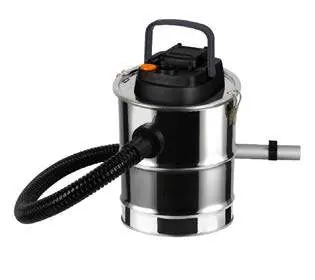
- Carrying Handle
- Battery Slot
- Blow Flange
- ON/OFF Switch
- Suction Flange
- Suction Hose
- Aluminium Tube
- Flat Nozzle
- Clamp
- Ash Tank
- Filter
Safety Instructions
To ensure safe operation, observe the following:
- Do not vacuum hot, burning, or glowing objects (e.g., coal, hot ash, cigarettes).
- Do not vacuum liquids, large objects, sharp objects, or dangerous materials like asbestos.
- Do not use the device if the filter is not correctly inserted.
- Do not use the device on wet surfaces or outdoors.
- Keep the suction hose free from blockages to prevent motor overheating.
- This device is not designed for continuous professional use.
Operation
Before use, ensure the battery is sufficiently charged. Insert the battery into the slot and press the ON/OFF button to start. To switch off, press the button again. When using the suction hose, ensure it is not bent, as this can damage the hose and reduce suction power. The hose should form a natural curve during operation.
Maintenance and Cleaning
Clean the filter after every use. Empty the ash tank when suction power decreases. To clean the filter, switch off the device, remove the battery, and carefully tap the filter to remove ash. For best results, clean the filter outdoors using a hand broom or compressed air.
Storage
Clean the device before storing. Check all parts for damage. Store the device indoors in a dry place, protected from dust, dirt, and extreme temperatures.
Technical Data
- Rated voltage: 18 V DC
- Motor power: 140 W
- Max. airflow: 11 l/s
- Tank capacity: 12 l
- Max. dust capacity: 8 l
- Sound level: 75 dB(A)
Manufacturer information
Batavia
Practical help
Common problems
Loss of suction power
Empty the ash tank and clean the filter. Ensure the suction hose is not bent or blocked.
Motor overheating
Check if the suction opening is blocked by large particles or debris.
Before use
- Ensure the battery is fully charged.
- Check that the filter is correctly inserted.
- Verify the ash tank is empty.
- Ensure the suction hose is not bent or damaged.
Specs in practice
- Rated voltage
- 18 V DC
- Tank capacity
- 12 liters
- Max. dust capacity
- 8 liters
Images and diagrams
- 1: Carrying Handle
- 2: Battery Slot
- 4: ON/OFF Switch
- 5: Suction Flange
Model compatibility
- Compatible with Batavia MAXXPACK 18V batteries (BT-CLB001, BT-CLB002).
- Requires Quick Charger BT-CLC001.

Manual page author
Emily Carter
User documentation editor
Prepares concise manual descriptions and highlights the most useful setup, operation, and maintenance information for readers.