Power / Batteries & Chargers
Operating Instructions for Batavia MAXXPACK 18V Battery
Quick guide for the Batavia MAXXPACK 18V battery system. Learn how to charge, insert, remove, and safely maintain your 18V battery packs (BT-CLB005, BT-CLB006).
Quick answers from the manual
Quick answer
- The Batavia MAXXPACK 18V battery system should be charged at ambient temperatures between 10°C and 40°C using the provided charger. It is recommended to charge the battery after each use. p. 11, 14
Key actions
- Insert the battery into the machine by pushing it forward until it clicks into place. p. 12
- Charge the battery by plugging the charger into an outlet and sliding the battery onto the charger. p. 13
First start
- The battery must be charged before using it for the first time. p. 12
Problems and fixes
Battery does not slide in easily
Do not force it. Remove the battery and check that the top of the battery and the slot are clean and undamaged, and that contacts are not bent.
p. 12, 13Technical specifications
| Parameter | Value | Meaning | Pages |
|---|---|---|---|
| Rated Voltage | 18 V | Operating voltage | p. 15 |
Where to find it in the PDF
- Overview and Components p. 2, 3
- Safety Instructions p. 8, 9, 10, 11
- Operation and Charging p. 11, 12, 13, 14
- Technical Data p. 15
Table of contents
Quick guide from the manual
This document provides operating instructions for the Batavia MAXXPACK 18V battery system, including models BT-CLB005 (2.0 Ah) and BT-CLB006 (4.0 Ah). It covers essential safety, charging procedures, and maintenance to ensure optimal performance and longevity of your battery packs.
Safety Instructions
- General: Never attempt to open the battery. Do not expose the battery to water, heat, or extreme cold.
- Charging: Charge only at ambient temperatures between 10°C and 40°C using the provided charger. Do not charge damaged batteries.
- Handling: Avoid dropping the battery on hard surfaces or subjecting it to mechanical stress. Keep away from metal objects that could short-circuit the contacts.
- Leakage: If battery fluid leaks, wipe it off carefully with a cloth. Avoid skin and eye contact. If contact occurs, rinse immediately with water and seek medical attention.
Operation
Lithium-ion batteries do not have a "memory effect" and do not require periodic full discharge. It is recommended to charge them after each use.
Removing and Inserting the Battery
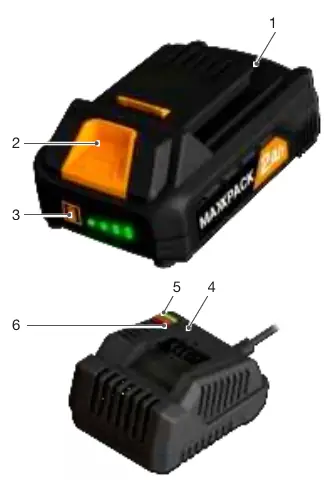
- Removing: Push the battery release button (2) and pull the battery (1) out of the machine.
- Inserting: Ensure the battery exterior is clean and dry. Slide the battery (1) into the machine until it clicks into place. Do not force the battery if it does not slide easily; check for obstructions or bent contacts.
Charging the Battery
- Plug the charger into an electrical outlet. The green LED (5) will light up.
- Slide the battery (1) onto the charger (4).
- Charging begins: The green LED (5) illuminates and the red LED (6) flashes.
- Fully charged: The green LED (5) remains illuminated.
Battery Charge Level
The battery features a built-in charge indicator. Press the button (3) to check the level. The right LED indicates a high charge, while the left LED indicates a low charge, signaling that the battery requires charging soon.
Maintenance and Storage
- Let hot batteries cool down before charging.
- Allow 15 minutes for the battery to cool after charging before use.
- Do not store batteries on the charger.
- For long-term storage, store batteries in a high charge state, disconnected from the tool.
- Battery capacity naturally reduces over time; this is normal and not a fault.
Disposal
Batteries must not be disposed of in domestic waste. As a consumer, you are legally obligated to dispose of batteries at a designated collection point or retail outlet to ensure environmentally friendly disposal.
Manufacturer information
Batavia
Practical help
Common problems
Battery does not slide onto machine or charger easily
Do not force the battery. Remove it and check that the battery and machine/charger slots are clean, undamaged, and that the contacts are not bent.
Tool stops operating suddenly
This may indicate a low battery charge level. Always ensure the battery pack has a sufficient charge level before use.
Before use
- Charge the battery before first use.
- Ensure the battery exterior is clean and dry.
- Check that the battery and machine/charger are aligned correctly.
- Ensure ambient temperature is between 10°C and 40°C.
Specs in practice
- Rated Voltage
- 18V DC operating voltage.
Images and diagrams
- Page 2 illustrates the battery components: (1) Battery, (2) Release button, (3) Charge indicator button, (4) Charger, (5) Green LED, (6) Red LED.
Model compatibility
- Use only the charger provided with the appliance/tool.
- Use power tools only with specifically designated battery packs.

Manual page author
David Miller
Documentation analyst
Organizes user manual content into clear summaries, with attention to model details, product context, and everyday usability.