Tools / Saws
User Manual for Batavia BT-RBP001 12V Cordless Water Pump
Quick guide for the Batavia BT-RBP001 12V Cordless Water Pump. Includes setup, battery charging, operation, maintenance, and technical specifications.
Table of contents
Manual images
Click an image to enlargeQuick guide from the manual
This manual provides instructions for the Batavia 12V Cordless Water Pump (Model BT-RBP001). This device is designed for pumping clear water from rainwater butts or collection tanks for garden irrigation. It is not intended for continuous operation, industrial use, or pumping salt water, corrosive, flammable, or explosive liquids.
Charging the battery
Before first use, the battery must be fully charged.
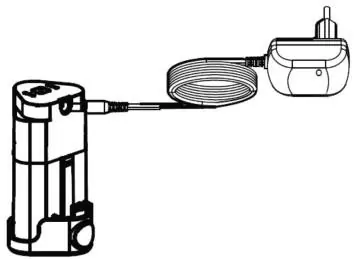
- Connect the battery charger to a wall socket; the LED will light up green.
- Connect the battery to the charger; the LED will light up red to indicate charging.
- Charging takes approximately 6 hours. When fully charged, the LED turns green.
- Disconnect the charger from the unit and the mains after charging.
Assembly
- Check the pump for any damage before use.
- Place the sealing washer on the pump housing and screw the nut onto the housing.
- Attach a hose (not included) to the quick connection of the shut-off valve.
- Use the optional extension tube if extra length is required.
Operation
- Place the pump on a flat surface inside the water container. Ensure the pump cannot move during operation.
- Ensure the suction opening is not blocked. If necessary, place the pump on a brick.
- Open the shut-off valve.
- Insert the battery into the compartment. Push the ON/OFF switch to position 'I' to start and 'O' to stop.
- Remove the battery when not in use.
Using the clamp
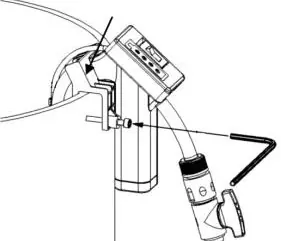
If necessary, fix the pump to the rain barrel using the included clamp. Tighten the screw with a size 5 hex key to prevent the pump from tipping over.
Maintenance and cleaning
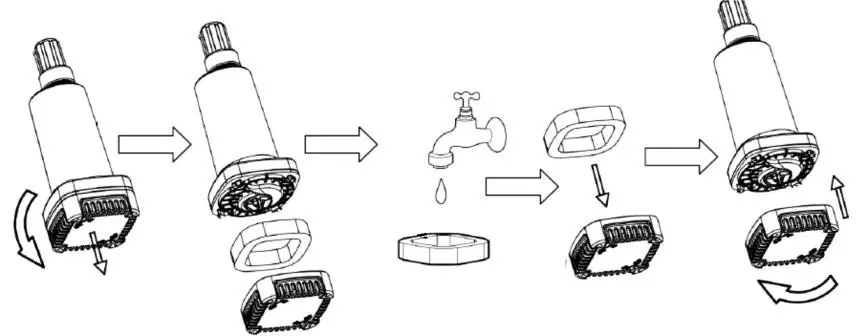
- Remove the battery before any maintenance or cleaning.
- Clean the housing with a lightly moistened cloth. Do not use aggressive chemicals or sharp objects.
- To clean the filter, unscrew the filter cover by turning it counter-clockwise. Clean the filter with clear water and reattach.
- Store the pump in a dry, dust-free, and frost-free place, out of reach of children.
Technical data
- Rated voltage: 12 VDC
- Rated power: 50 W
- Max. pump rate: 1500 l/h
- Max. pump height: 11 m
- Max. submersion depth: 1 m
- Max. particle size: 1 mm
- Max. fluid temperature: 35°C
Manufacturer information
Batavia
Practical help
Common problems
Pump does not start
Check if the battery is fully charged and correctly inserted into the compartment.
Low water flow
Check if the filter or suction opening is clogged with debris (sand, mud). Clean the filter.
Pump tips over in the barrel
Use the included clamp and tightening screw to secure the pump to the edge of the barrel.
Before use
- Charge the battery fully (approx. 6 hours).
- Inspect the pump and cord for any transport damage.
- Ensure the water source is clear water only (no salt, chemicals, or solids > 1mm).
- Verify water temperature is below 35°C.
- Ensure the pump is placed on a flat, stable surface.
Specs in practice
- Max. pump rate
- 1500 l/h - The maximum volume of water the pump can move per hour.
- Max. pump height
- 11 m - The maximum vertical distance the pump can push water.
- Submersion depth
- 1 m - The maximum depth the pump can be submerged in water.
- Particle size
- 1 mm - The maximum size of solid particles the pump can handle without damage.
Images and diagrams
- Fig A: Overview of all components including the pump, battery, charger, and clamp.
- Fig B: Battery charging setup.
- Fig C: Assembly of the pump housing and sealing washer.
- Fig D: Correct placement of the pump in a water barrel.
- Fig F: Securing the pump to the barrel using the clamp.
Model compatibility
- Designed for clear water only.
- Not suitable for salt water, corrosive, or explosive liquids.
- Not suitable for continuous operation (e.g., garden ponds).
- Use only the included battery and charger.

Manual page author
David Miller
Documentation analyst
Organizes user manual content into clear summaries, with attention to model details, product context, and everyday usability.