Computers / PC Components
User Manual for be quiet! Dark Power 13 Power Supply
Comprehensive user guide for the be quiet! Dark Power 13 power supply series. Includes installation instructions, safety features, troubleshooting tips, and technical specifications for 1000W, 850W, and 750W models.
Table of contents
Manual images
Click an image to enlargeQuick Guide from the Manual
The be quiet! Dark Power 13 is a high-performance power supply unit. Before installation, ensure you read the safety instructions carefully. Use only the provided original cables to avoid defects. If the unit has been stored in a cold environment, allow it to warm up to room temperature for one hour before use to prevent condensation.
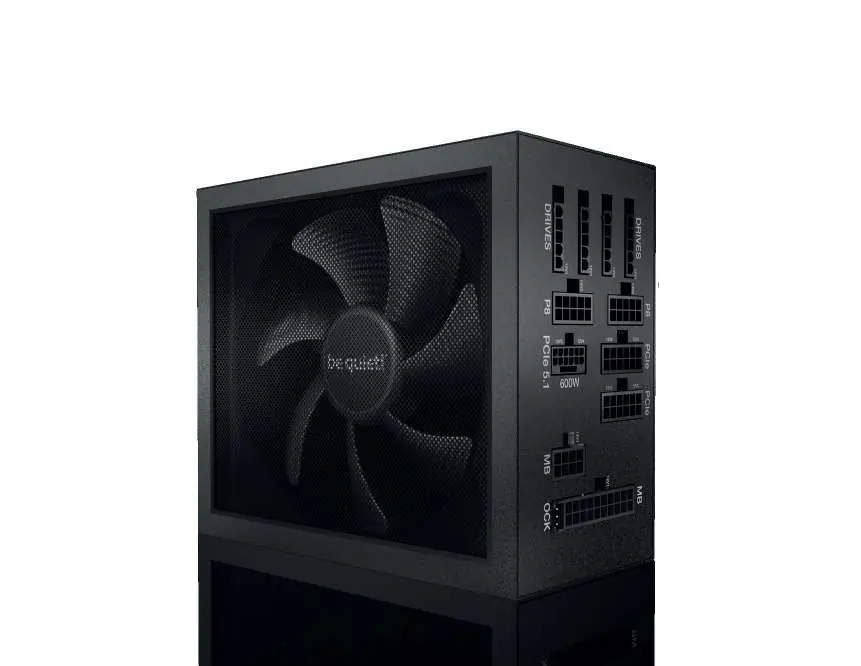
Installation
- Disconnect your PC from all power sources.
- Remove the old power supply by disconnecting all cables from the motherboard and other components.
- Place the new Dark Power 13 unit into the PC case and secure it with the four provided screws.
- Connect the 20/24-pin connector to the motherboard. If using a 24-pin connection, ensure the extra 4 pins are positioned correctly.
- Connect the 12V-P4 or P8 connector to the motherboard.
Overclocking Key
The Overclocking Key combines individual 12V rails into a single 12V rail. You can enable this function permanently using the provided jumper directly on the PSU, or use the switch on the provided slot cover. Important: Only toggle the Overclocking Key when the power supply is switched off. Do not connect any other devices, such as fans, to the Overclocking Key connector.
Safety Functions
The unit includes several safety features to protect your system:
- OCP (Over Current Protection): Shuts down the PSU if the load on individual lines exceeds the limit.
- UVP (Under Voltage Protection): Shuts down the PSU if voltage drops below a specific limit.
- OVP (Over Voltage Protection): Shuts down the PSU if voltage is too high.
- SCP (Short Circuit Protection): Prevents damage during a short circuit.
- OTP (Temperature Protection): Shuts down the PSU if internal temperature is too high.
- OPP (Overload Protection): Shuts down the PSU if total power exceeds the maximum load.
Troubleshooting
If you encounter issues, check the following:
- BIOS/UEFI Voltage Readings: If voltages appear too low or high, this is often due to imprecise motherboard measurements and does not necessarily indicate a fault.
- PC Crashes or Won't Boot: If this occurs after installing a new graphics card, the PSU may be inadequately dimensioned. Use the PSU calculator tool on the be quiet! website to verify compatibility.
Technical Data
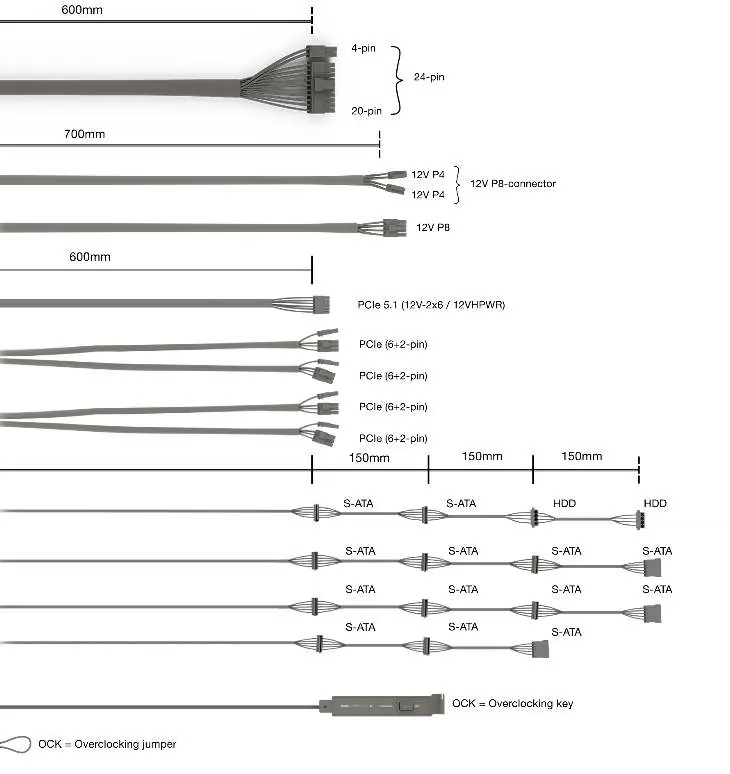
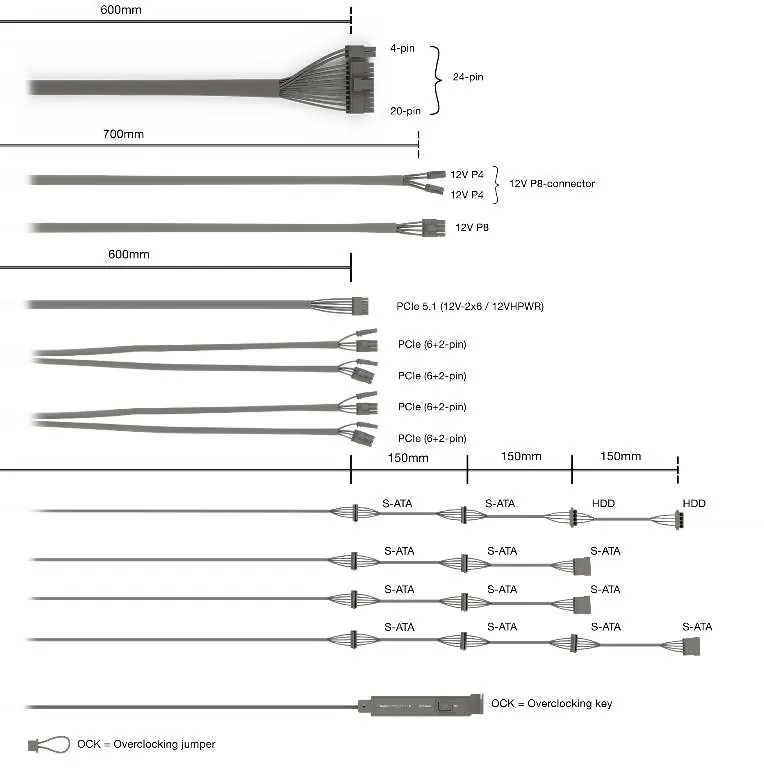
The Dark Power 13 series is compatible with Intel ATX12V Version 3.1, PCIe 5.1, and E-ATX Server Dual Motherboards. Detailed specifications, including voltage regulation, operating conditions, and cable lengths, are provided in the full manual.
Practical help
Common problems
Voltages displayed in BIOS/UEFI are too low or high.
This is typically caused by imprecise measurements by the motherboard and does not necessarily indicate a genuine problem.
PC crashes or fails to boot after installing a new graphics card.
The power supply may be inadequately dimensioned for your graphics card. Refer to the PSU calculator tool on www.bequiet.com to find the correct power supply.
Before use
- Read all safety instructions before beginning installation.
- Use only original be quiet! power cables.
- Ensure the PC is completely disconnected from power sources.
- Allow the PSU to warm up to room temperature for one hour if it was stored in a cold environment.
- Ensure the PC case has sufficient ventilation.
Images and diagrams
- The manual includes a PCI-E wiring diagram showing optimal connection for drives and motherboard.
- Connectivity and cable length diagrams are provided for 1000W and 850W/750W models.
Model compatibility
- Compatible with Intel ATX12V Version 3.1.
- Compatible with PCIe 5.1.
- Compatible with E-ATX Server Dual Motherboards via 8-Pin Connector.

Manual page author
David Miller
Documentation analyst
Organizes user manual content into clear summaries, with attention to model details, product context, and everyday usability.