Computers / PC Components
User Manual for be quiet! Straight Power 12 Power Supply
Quick guide for the be quiet! Straight Power 12 power supply. Includes installation steps, safety instructions, troubleshooting, and technical specifications for all wattage variants.
Table of contents
Manual images
Click an image to enlargeImportant Information
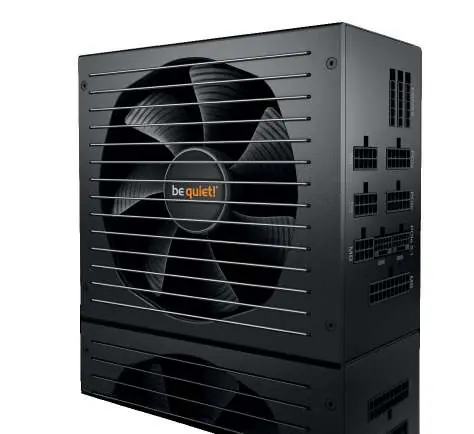
The be quiet! Straight Power 12 series power supplies are designed for high efficiency and quiet operation. This manual covers the 750W, 850W, 1000W, 1200W, and 1500W models. Before installation, ensure you have read the safety instructions carefully.
Safety Instructions
- Use only the supplied cable set. Using cables from older power supply series may lead to defects.
- Never open the power supply case. High-voltage components inside are dangerous even after disconnection.
- Do not handle the power supply with wet or damp hands.
- Ensure the power supply is used indoors in conditions without high levels of moisture.
- Before use, allow the power supply to warm up to room temperature for one hour to prevent condensation.
- Ensure your PC case has sufficient ventilation.
Installation
- Disconnect your PC from all power sources and unplug all cables.
- Open the PC case following the manufacturer's instructions.
- Disconnect all plugs from the motherboard and other components (FDD, HDD, optical drives).
- Remove the screws at the rear of the old power supply and carefully remove it.
- Place the new Straight Power 12 unit in the case and secure it with the four provided screws.
- Plug the 20/24-pin connector into the motherboard socket. If using a 24-pin connection, ensure the extra 4 pins are positioned correctly.
- Connect the 12V-P4 or P8 connector for the CPU to the motherboard.
Safety Functions
The Straight Power 12 series includes several safety safeguards:
- OCP (Over current protection): Switches off the power supply if the load on individual circuits exceeds the limit.
- UVP (Undervoltage protection): Switches off the power supply if voltage drops below a certain limit.
- OVP (Overvoltage protection): Deactivates the power supply if voltage in the circuits is too high.
- SCP (Short circuit safeguard): Prevents physical defects in the power supply and connected components.
- OTP (Temperature safeguard): Switches off the power supply in case of excessive heat build-up.
- OPP (Overload protection): Triggers if the total output exceeds the specified maximum load.
Troubleshooting
If the system does not work properly:
- Check that the mains cable is firmly plugged into the power supply and the wall socket.
- Verify that all connectors are correctly plugged in and polarity is correct.
- Check the connection between the case on/off switch and the motherboard.
- If the PC does not boot or crashes after installing a new graphics card, the power supply may be inadequately dimensioned. Use the PSU calculator at www.bequiet.com.
- If voltages displayed in BIOS/UEFI appear incorrect, this is often due to imprecise measurements by the motherboard and does not necessarily indicate a fault.
Technical Data
The power supply supports various standards including Intel ATX12V 3.1, PCIe 5.1, and EPS12V 2.92. Detailed specifications regarding AC input, DC output, voltage regulation, and dimensions are provided in the technical data section of the manual.
Disposal and Warranty
Used electrical and electronic devices must be collected separately and not disposed of as unsorted domestic waste. The product comes with a 10-year manufacturer's warranty for consumers, provided it was purchased from an authorized be quiet! dealer. Opening the device voids the warranty.
Official resources from the manual
Practical help
Common problems
PC does not boot or crashes after installing a new graphics card
The power supply may be inadequately dimensioned for the new hardware. Use the PSU calculator tool at www.bequiet.com to verify requirements.
Voltages displayed in BIOS/UEFI are too low or too high
This is typically caused by imprecise measurements by the motherboard and does not necessarily imply a genuine problem with the power supply.
Power supply does not switch on
Check the connection between the case on/off switch and the motherboard. Ensure the power switch on the PSU is set to 'I'.
Before use
- Ensure the PC is disconnected from all power sources.
- Use only the supplied cable set; do not use cables from older power supply units.
- Allow the power supply to warm up to room temperature for one hour before use to prevent condensation.
- Ensure the PC case has sufficient ventilation.
- Use a screwdriver to secure the PSU with the provided screws.
Specs in practice
- OCP (Over current protection)
- Automatically switches off the power supply if the load on individual circuits exceeds the specified limit.
- UVP (Undervoltage protection)
- Automatically switches off the power supply if the voltage on the circuits drops below a certain limit.
- OTP (Temperature safeguard)
- Automatically switches off the power supply in case of excessive heat build-up.
Images and diagrams
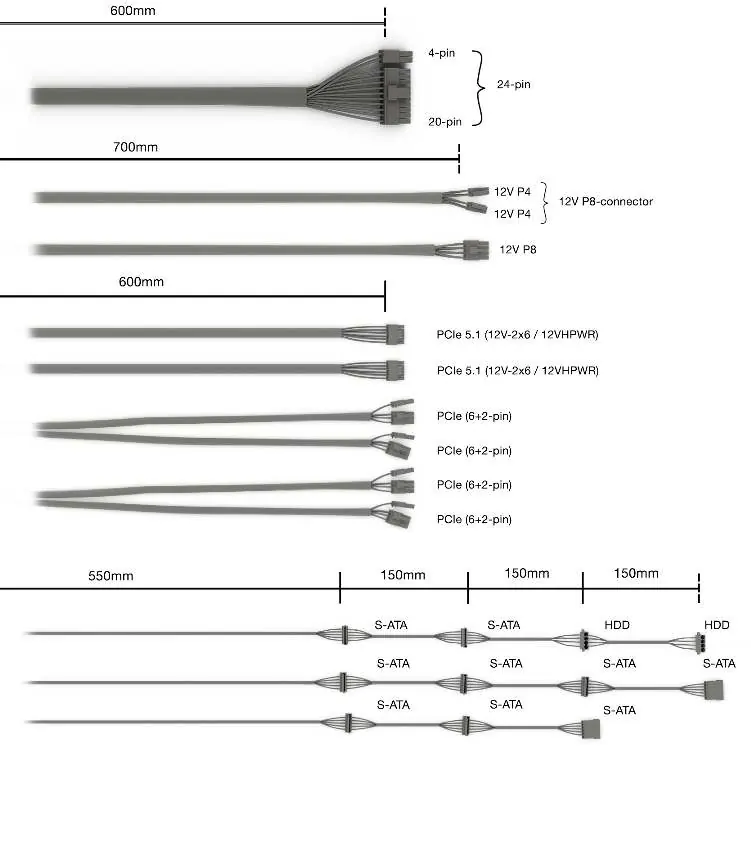
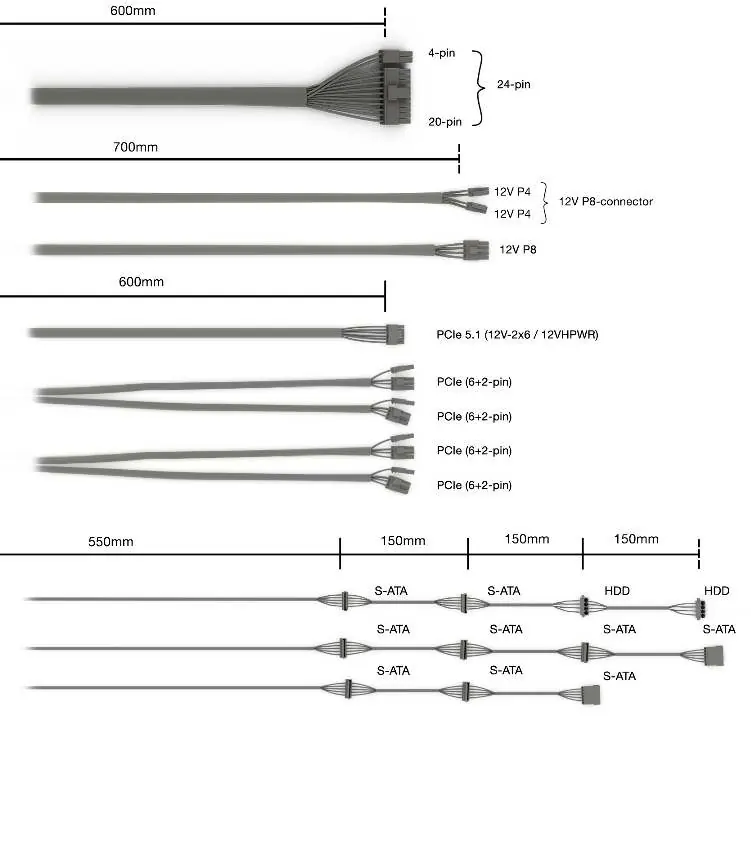
- Wiring diagrams are provided for 1500W-1200W and 1000W-750W models, detailing cable lengths and connector types.
- Dimensions diagram shows the depth of the unit: 160mm for 750-1000W models and 180mm for 1200-1500W models.
Model compatibility
- Compatible with Intel ATX12V 3.1 Power Supply Design Guide Revision 2.1.
- Compatible with PCIe 5.1 and EPS12V Version 2.92.
- Supports Intel C6/C7 status for new processor generations.

Manual page author
Emily Carter
User documentation editor
Prepares concise manual descriptions and highlights the most useful setup, operation, and maintenance information for readers.