Computers / PC Components
Gigabyte Graphics Card User Guide
Quick installation guide for Gigabyte graphics cards. Includes step-by-step hardware installation, connection instructions, and driver download information.
Table of contents
Manual images
Click an image to enlargeQuick guide from the manual
This document provides essential instructions for installing a Gigabyte graphics card into a computer system. It covers the physical installation process, connection of display cables, and software driver installation.
Hardware Installation
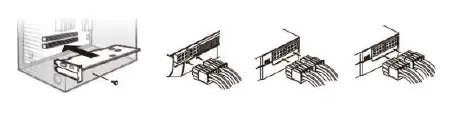

- Ensure the computer is turned off and the power cable is unplugged from the wall outlet.
- Open the computer chassis and locate the PCI Express x16 or AGP slot. If necessary, remove the metal bracket from the back of the chassis.
- Insert the graphics card firmly into the slot until it is securely seated.
- Secure the card's bracket to the chassis using screws and close the chassis cover.
- Connect the appropriate display cable (HDMI, DVI, D-SUB, or Display Port) to the graphics card and your monitor.
- Reconnect the power cable and turn on the computer.
Software Installation
After installing the hardware, you must install the necessary drivers and utilities. Download the latest software from the official Gigabyte website at http://download.gigabyte.us/FileList/Utility/VGA.zip.
Connector Types
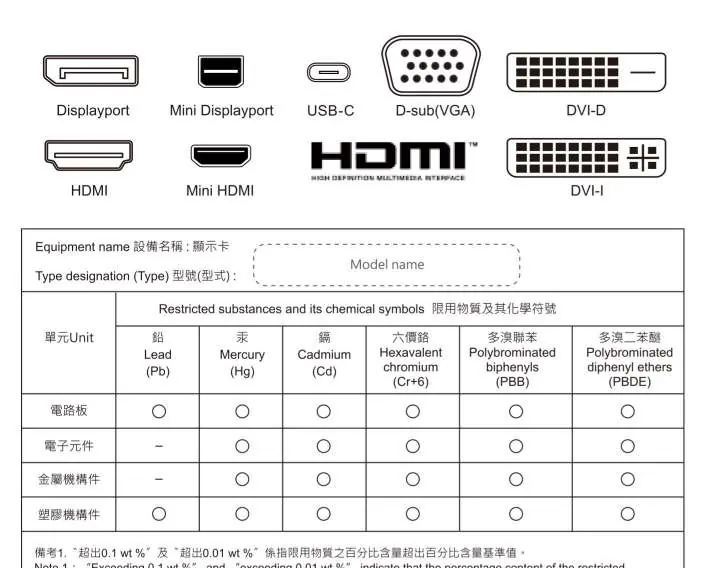
The graphics card supports various output interfaces, including Displayport, Mini Displayport, USB-C, D-sub (VGA), DVI-D, HDMI, Mini HDMI, and DVI-I.
Official resources from the manual
Manufacturer information
Gigabyte Technology Co., Ltd.
Practical help
Common problems
Card does not fit into the slot
Ensure you are using the correct PCI Express x16 or AGP slot and that any obstructing metal brackets on the chassis have been removed.
No image on the monitor
Verify that the display cable (HDMI, DVI, D-SUB, or Display Port) is securely connected to both the graphics card and the monitor.
Before use
- Power off the computer completely.
- Disconnect the power cable from the wall outlet.
- Ensure you have a screwdriver for the chassis bracket.
- Identify the correct PCI Express x16 or AGP slot on the motherboard.
Specs in practice
- PCI Express x16 / AGP
- The expansion slot interface used to connect the graphics card to the motherboard.
- Display Output
- The ports (HDMI, DVI, DisplayPort, etc.) used to connect the graphics card to your display device.
Images and diagrams
- The manual provides a visual reference for the installation process, showing the card being inserted into the motherboard slot and the bracket being secured.
Model compatibility
- Compatible with standard PCI Express x16 or AGP slots.

Manual page author
Emily Carter
User documentation editor
Prepares concise manual descriptions and highlights the most useful setup, operation, and maintenance information for readers.