Industrial / Access Control
Installation Manual for BEA EAGLE Family Accessories
Quick installation guide for BEA EAGLE family accessories, including ceiling mounts, rain covers, and spacers. Includes safety precautions and technical specifications for the EAGLE SPACER V camera.
Table of contents
Manual images
Click an image to enlargeQuick guide from the manual
This document provides installation instructions and safety precautions for the BEA EAGLE family of accessories, including the 10ECA Ceiling Accessory, 10ERC Rain Cover, 10ERA Rain Accessory, 10EMB Mounting Bracket, and the 10EAGLESPACER/10EAGLESPACERV. It also contains technical specifications for the camera integrated into the EAGLE SPACER V.
Precautions
- Maintain a clean and safe environment when working in public areas.
- Be aware of pedestrian traffic around the door area at all times.
- Always stop pedestrian traffic through the doorway when performing tests that may result in unexpected door reactions.
- Ensure compliance with all applicable safety standards (e.g., ANSI A156.10) upon completion of installation.
- Installers and service personnel should be AAADM-certified for pedestrian doors and IDA-certified for doors/gates.
- Perform a risk assessment following each installation or service.
Installation
The installation process varies by accessory. For the SPACER / SPACER V models, follow these steps:
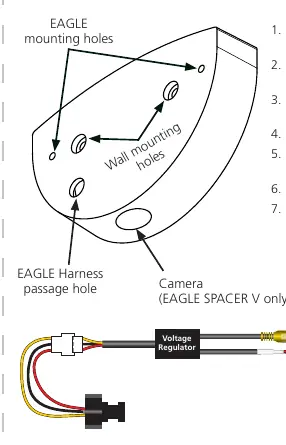
- Pre-drill the EAGLE Harness passage hole (1/4 inch for SPACER, 1/2 inch for SPACER V).
- Route the EAGLE Harness through the wall/header and then through the designated pass-thru on the spacer.
- For EAGLE SPACER V, route the camera harness through the wall/header and plug it into the SPACER V connector.
- Mount the spacer to the wall/header using self-drilling screws.
- Route the EAGLE Harness through the pass-thru on the sensor.
- Mount the sensor to the accessory.
- Wire the EAGLE Harness to the sensor.
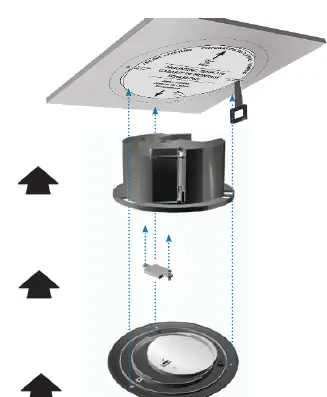
For the CEILING ACCESSORY (10ECA), use the provided mounting template to cut the ceiling aperture before installing the accessory.
Technical Specifications
The EAGLE SPACER V includes a camera with the following specifications:
- Voltage regulator: 6.6 – 36 VDC (±10%) or 6 – 28 VAC (±10%)
- Operating temperature: -30 to 60 °C (max. RH: 95%)
- Video output: 1.0 (Vp-p) / 75 Ohm
- Image Sensor: CMOS
- Horizontal resolution: 480 TVL
- Frame rate: 30 fps
- Min. illumination: 0.01 LUX
Manufacturer information
BEA Sensors
Practical help
Common problems
Unexpected door reactions during testing
Always stop pedestrian traffic through the doorway when performing tests.
Compliance concerns
Ensure all appropriate industry signage, warning labels, and placards are in place and perform a risk assessment after installation.
Before use
- Verify all appropriate industry signage, warning labels, and placards are in place.
- Ensure installation and service technicians are AAADM-certified for pedestrian doors.
- Perform a risk assessment following each installation or service.
- Stop pedestrian traffic through the doorway when performing tests.
Specs in practice
- Voltage regulator
- Built into the wire harness; supports 6.6–36 VDC or 6–28 VAC.
- Operating temperature
- Range is -30 to 60 °C with a maximum relative humidity of 95%.
- Horizontal resolution
- 480 TVL, indicating the quality of the camera output.
Images and diagrams
- Spacer installation diagram shows the correct routing of the EAGLE harness and camera harness through the wall/header.
- Ceiling accessory diagram illustrates the use of the mounting template for ceiling aperture preparation.
Model compatibility
- EAGLE SPACER V camera harness must be plugged into the specific SPACER V connector.
- Drill hole sizes differ: 1/4 inch for standard SPACER, 1/2 inch for SPACER V.

Manual page author
Emily Carter
User documentation editor
Prepares concise manual descriptions and highlights the most useful setup, operation, and maintenance information for readers.