Music / Instruments
User Manual for Behringer BA 19A and C-2 Microphones
Comprehensive user guide for Behringer BA 19A and C-2 condenser microphones. Includes setup instructions, phantom power requirements, usage tips, and technical specifications.
Table of contents
Manual images
Click an image to enlargeQuick Guide
This manual covers the operation of the Behringer BA 19A and C-2 condenser microphones. These microphones are designed for studio and stage applications. Ensure your audio interface or mixing console provides +48V phantom power, as it is required for operation.
Safety Instructions
- Do not use the apparatus near water.
- Clean only with a dry cloth.
- Do not block any ventilation openings.
- Do not install near heat sources such as radiators, stoves, or amplifiers.
- Use only attachments and accessories specified by the manufacturer.
- Do not install in confined spaces like bookcases.
- Do not place naked flame sources, such as candles, on the apparatus.
Microphone Setup
Phantom Power: Both microphones require +48V phantom power. Mute your playback system before connecting the microphone to the input of your mixing console. After activating phantom power, allow several seconds for the microphone to stabilize.
Installation: Use the included clamps to attach the microphones to standard microphone stands. Screw the clamp onto the stand before inserting the microphone.
Audio Connection
Use a balanced XLR microphone cable. The pin assignment is as follows:
- Pin 1: Shielding
- Pin 2: +
- Pin 3: -
Since the contact points are gold-plated, it is recommended to use microphone cables with gold-plated connectors for optimal signal integrity.
Usage and Settings
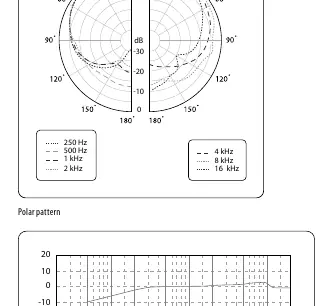
Polar Pattern: Both microphones feature a cardioid pickup pattern, which is most sensitive to sound from the front and rejects sound from the rear. This helps minimize background noise and feedback.
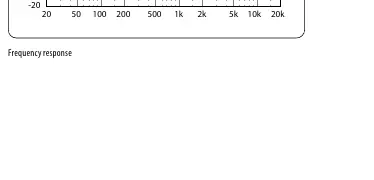
Proximity Effect: Typical of cardioid microphones, the proximity effect causes a boost in lower frequencies as the sound source gets closer to the microphone. Adjust the microphone position and angle to manipulate this effect.
Low-Cut Filter and Attenuation: The C-2 microphones feature a switchable low-cut filter to eliminate low-frequency disturbances (e.g., floor vibrations) and a -10 dB level attenuation switch for high sound pressure applications.
Technical Specifications
Transducer Type: Condenser, 16 mm (0.63")
Frequency Response: 20 Hz to 20 kHz
Polar Pattern: Cardioid
Connector: Gold-plated balanced XLR
Phantom Power: +48V
Max SPL: 140 dB (0 dB), 150 dB (-10 dB)
Signal-to-Noise Ratio: 75 dB
Manufacturer information
Behringer
Practical help
Common problems
Microphone produces no sound
Ensure +48V phantom power is enabled on your mixing console or audio interface.
Excessive low-frequency noise or rumble
Enable the Low-Cut filter on the microphone to reduce subsonic noise.
Distorted sound at high volumes
Enable the -10 dB attenuation switch on the microphone.
Before use
- Ensure your mixer or interface provides +48V phantom power.
- Mute your playback system before connecting the microphone.
- Use a balanced XLR cable.
- Check that the microphone is securely attached to the stand using the included clamp.
Specs in practice
- Phantom Power (+48V)
- Required voltage to operate the condenser microphone.
- Cardioid Pattern
- Sensitive to sound from the front, rejects sound from the rear.
- Low-Cut Filter
- Reduces low-frequency noise like floor vibrations.
Images and diagrams
- Polar Pattern: Shows the cardioid pickup area, indicating high sensitivity at the front and rejection at the rear.
- Frequency Response: Shows how the microphone captures different frequencies, with a boost or cut depending on the settings.
Model compatibility
- Requires +48V phantom power for operation.
- Designed for use with balanced XLR microphone cables.

Manual page author
Emily Carter
User documentation editor
Prepares concise manual descriptions and highlights the most useful setup, operation, and maintenance information for readers.