Music / Instruments
User Manual for Behringer V-TONE BASS BDI21 Bass Driver DI Pedal
Quick guide and user manual for the Behringer V-TONE BASS BDI21. Learn how to use the drive, EQ, and blend controls, connect your bass, and configure sample settings for different tones.
Table of contents
Manual images
Click an image to enlargeQuick Guide
The Behringer V-TONE BASS BDI21 is a high-quality bass driver designed for stage, recording, and rehearsal. It features integrated tube emulation, a 2-band EQ, and a dedicated drive control. The unit functions as a bass amp modeler and a transparent direct injection (DI) box.
Powering the unit: The BDI21 has no on/off switch. It is powered automatically as soon as you insert a plug into the INPUT jack. To prolong battery life, always disconnect the input when the driver is not in use.
Control Elements
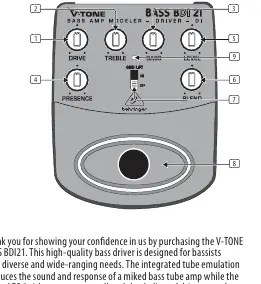
- DRIVE: Adjusts the overall gain and overdrive, simulating the output section of a tube amp.
- TREBLE: Controls the high-frequency range (±12 dB).
- BASS: Controls the low-frequency range (±12 dB).
- PRESENCE: Boosts upper harmonic content for a smoother high end and more attack.
- LEVEL: Adjusts the output volume of the BDI21.
- BLEND: Adjusts the amount of tube emulation.
- GND LIFT: Disconnects the ground connection between input and output to eliminate hum or ground loops.
- Footswitch: Activates or deactivates all tone functions (EQ, DRIVE, tube emulation). When deactivated, the BDI21 functions as a standard transparent DI box.
- LED: Illuminates when the effect is activated.
Connectors
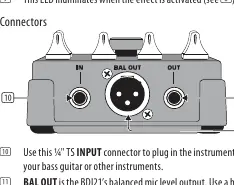
- INPUT: 1/4" TS connector for your bass guitar or other instruments.
- BAL OUT: Balanced XLR output for connecting to a mixing console.
- OUT: Unbalanced 1/4" TS connector for sending the signal to your bass amp.
- DC IN: Connection for a 9V power supply (not included).
Sample Settings
The manual provides several recommended settings for different tones:
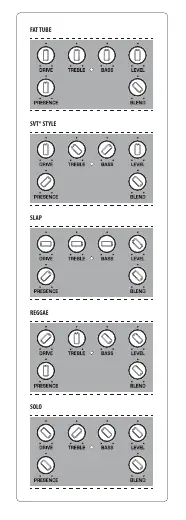
- FAT TUBE: High blend, moderate drive, boosted bass.
- SVT STYLE: Balanced settings for a classic tube amp sound.
- SLAP: Scooped mids, boosted treble and bass.
- REGGAE: High bass, low treble.
- SOLO: Increased level and drive for lead playing.
Battery Installation
The battery compartment is located on the bottom of the unit. Remove the lid to install or replace the 9V battery.
Specifications
- Input Impedance: 1 MΩ
- Output Impedance: 1 kΩ
- Balanced Output Impedance: 200 Ω
- Power Supply: 9V, >50 mA DC regulated (negative center)
- Battery: 9V type 6LR61
- Power Consumption: 25 mA
Manufacturer information
Behringer
Practical help
Common problems
Hum or ground loops
Activate the GND LIFT switch to disconnect the ground connection between input and output.
Unit not turning on
The BDI21 has no on/off switch. It powers on when a plug is inserted into the INPUT. Ensure a 9V battery is installed or a 9V power supply is connected.
Before use
- Ensure a 9V battery is installed or a 9V power supply is connected.
- Connect your bass guitar to the INPUT jack.
- Connect the output (BAL OUT or OUT) to your mixing console or bass amp.
- Ensure the GND LIFT switch is set correctly for your setup.
Specs in practice
- Input Impedance
- 1 MΩ - Standard for passive/active bass pickups.
- Balanced Output Impedance
- 200 Ω - Suitable for long cable runs to mixing consoles.
- Power Consumption
- 25 mA - Low power draw for battery operation.
Images and diagrams
- The front panel shows the 6 main control knobs (Drive, Treble, Bass, Presence, Level, Blend) and the footswitch.
- The rear panel shows the Input, Balanced Output (XLR), and Output (TS).
- The bottom panel provides access to the 9V battery compartment.
Model compatibility
- Requires 9V DC power supply (negative center) or 9V battery (6LR61).
- Compatible with standard 1/4 inch TS instrument cables.
- Balanced output requires an XLR cable.

Manual page author
David Miller
Documentation analyst
Organizes user manual content into clear summaries, with attention to model details, product context, and everyday usability.