Electronics / Audio
User Manual for Behringer FC600 Heavy-Duty Foot Pedal
Quick start guide for the Behringer FC600 Heavy-Duty Foot Pedal. Learn how to connect your guitar or keyboard, adjust volume and expression settings, and configure the pedal's tension and polarity.
Table of contents
Manual images
Click an image to enlargeQuick guide from the manual
The Behringer FC600 is a heavy-duty foot pedal designed for volume and expression control. This guide provides essential information on connecting the device, adjusting controls, and configuring settings for optimal performance.
Hook-up and connections
The FC600 features multiple 1/4 inch jacks for various applications:
- INPUT: Connect your guitar or other instrument using a 1/4 inch TS cable.
- OUTPUT: Connect to other effects pedals or an amplifier using a 1/4 inch TS cable.
- EXP: Connect to an effects pedal or keyboard using a 1/4 inch TRS cable.
- TUNER: Connect directly to a tuner pedal. This output is unaffected by volume changes.
Controls and settings
The pedal includes specific controls to tailor its operation:
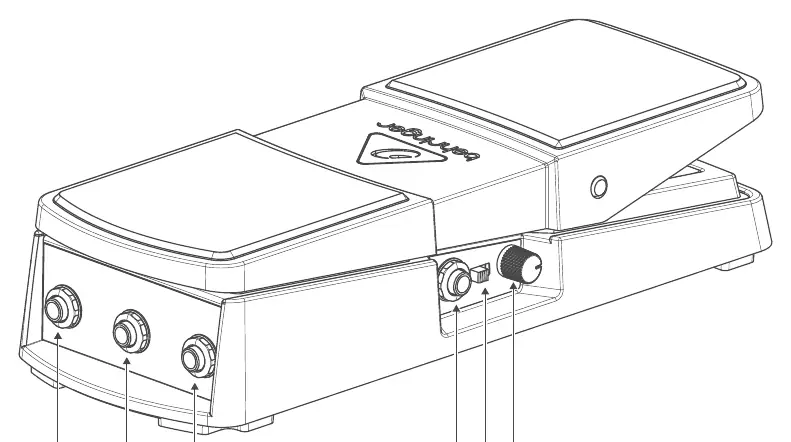
- POLARITY switch: Selects between TRS (tip-ring-sleeve) or RTS (ring-tip-sleeve) operation for the EXP jack, ensuring compatibility with a wide range of products.
- MIN VOL knob: Determines the minimum volume setting for the heel-down position. Rotating fully counterclockwise allows the pedal to completely mute the output.
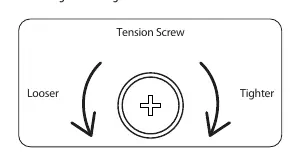
- Tension screw: Located on the bottom of the pedal, this screw adjusts the physical resistance. Turn left for a looser feel or right for a tighter feel.
Technical specifications
- Input Impedance: 250 kΩ to 750 kΩ (depending on Trim control position).
- Connectors: All jacks are 1/4 inch (TS for Input/Output/Tuner, TRS for Expression).
- Dimensions (max): 112 x 298 x 130 mm.
- Weight: 1.4 kg.
Important information
For product registration, warranty terms, and support, please visit the official website at community.musictribe.com. Before connecting the unit, ensure you are using the correct mains voltage for your specific model. If a fuse needs replacement, it must be replaced with one of the same type and rating.
Official resources from the manual
Manufacturer information
Behringer
Practical help
Common problems
Pedal feels too stiff or loose
Adjust the tension screw located on the bottom of the pedal. Turn left to loosen or right to tighten.
Expression pedal not working with keyboard
Check the POLARITY switch setting. It may need to be toggled between TRS and RTS modes to match your device.
No sound when pedal is fully back
Check the MIN VOL knob. If it is turned fully counterclockwise, the pedal will mute the output in the heel-down position.
Before use
- Ensure all cables are 1/4 inch TS or TRS as required by the specific jack.
- Verify the POLARITY switch matches the requirements of your connected expression device.
- Adjust the tension screw to your preferred resistance before playing.
- Check that the MIN VOL knob is set to your desired minimum volume level.
Specs in practice
- Input Impedance
- 250 kΩ to 750 kΩ, which varies based on the Trim control position.
- Tension Screw
- Adjusts the physical resistance of the pedal movement for a customized feel.
Images and diagrams
- Hook-up diagram illustrates connections for guitar to amp and keyboard to expression input.
- Controls diagram identifies the location of all jacks, knobs, and switches on the pedal.
- Tension screw diagram shows the direction to turn for looser or tighter pedal feel.
Model compatibility
- Compatible with guitars, keyboards, and other instruments using 1/4 inch jacks.
- POLARITY switch allows compatibility with various expression pedal standards (TRS/RTS).

Manual page author
Michael Turner
Technical manual editor
Reviews PDF manuals for structure, safety notes, and practical product details so readers can find the right information quickly.