Electronics / Audio
User Manual for Behringer 1047 Multimode Filter/Resonator Module
Quick start guide and user manual for the Behringer 1047 Multimode Filter/Resonator Module. Includes installation instructions, power connection, control descriptions, and technical specifications.
Table of contents
Quick Start Guide
The Behringer 1047 Multimode Filter/Resonator Module is a 2500 Series 12dB state variable filter designed for Eurorack systems. This guide provides essential information for installation, power connection, and operation.
Controls
The module features several controls for shaping your sound:
- COARSE: Sets the general frequency area for high-pass, low-pass, band-pass, and notch filter thresholds.
- FINE: Refines the frequency setting established by the COARSE knob.
- RESONANCE (NORM/LIM): A sliding switch to choose between normal resonance mode (NORM) and limiting mode (LIM). LIM prevents circuit overload when focusing on strong harmonics.
- RESONANCE (Q): Controls the width and sharpness of the filter curves. Higher Q settings create narrower, sharper curves.
- F CV 1 / F CV 2: Adjusts the strength of the control voltage signal for filter frequency.
- NOTCH FREQ/fc: Offsets the notch filter's center frequency. Set to '1' for standard behavior.
- INPUT: Adjusts the strength of the incoming audio signal.
- Q CV: Adjusts the strength of the Q control voltage signal.
Inputs and Outputs:
- INPUT: 3.5 mm jack for audio signals or keyboard gate signals.
- F CV 1 / F CV 2: 3.5 mm jacks for external control voltage or modulation signals.
- Q CV: 3.5 mm jack for external control voltage for resonance.
- LP, HP, NOTCH, BP: 3.5 mm jacks for low-pass, high-pass, notch, and band-pass outputs respectively.
Power Connection
Follow these steps to connect the module to a standard Eurorack power supply:
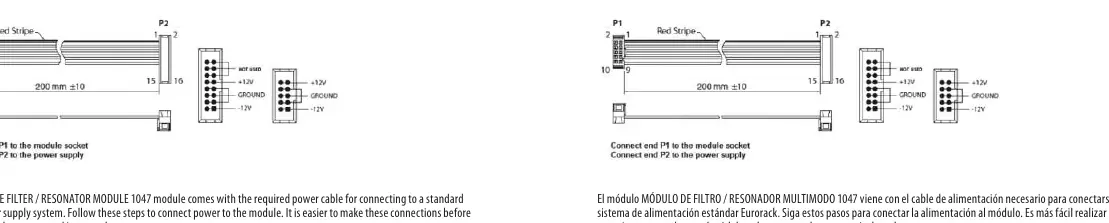
- Turn off the power supply or rack case and disconnect the power cable.
- Insert the 16-pin connector on the power cable into the socket on the power supply or rack case. Ensure the tab aligns with the gap in the socket. If the socket is not keyed, orient pin 1 (-12 V) with the red stripe on the cable.
- Insert the 10-pin connector into the socket on the back of the module, ensuring the tab aligns for correct orientation.
- Once both ends are securely attached, mount the module and turn on the power supply.
Installation
The module includes necessary screws for mounting in a Eurorack case:
- Ensure the power cable is connected before mounting.
- Align the module's mounting holes with the threaded rails or sliding threaded plates in your Eurorack case.
- Attach the screws partially to allow for small positioning adjustments.
- Once the final position is established, tighten the screws securely.
Specifications
The module operates within a 31 Hz to 8 kHz frequency range (Coarse) and requires a standard Eurorack power supply. It consumes 55 mA (+12 V) and 45 mA (-12 V). The module width is 16 HP.
Manufacturer information
Behringer
Practical help
Common problems
Low output signal
Switch RESONANCE (NORM/LIM) to NORM or turn down the INPUT attenuator.
Circuit overload
Switch RESONANCE (NORM/LIM) to LIM or reduce the INPUT level.
Notch filter not behaving as expected
Set the NOTCH FREQ/fc control to '1' on the scale for standard behavior.
Before use
- Ensure Eurorack power supply is turned off.
- Verify 16-pin connector is oriented correctly (red stripe to -12V).
- Check that 10-pin connector is securely attached to the module.
- Ensure mounting screws are aligned with Eurorack rails before tightening.
Specs in practice
- Coarse frequency
- 31 Hz to 8 kHz range.
Images and diagrams
- The front panel diagram shows the layout of all knobs and jacks, including CV inputs and audio outputs.
- The power connection diagram illustrates the 16-pin to 10-pin cable orientation.
Model compatibility
- Requires standard Eurorack power supply system.
- Uses 3.5 mm TS jacks for all audio and CV connections.

Manual page author
Michael Turner
Technical manual editor
Reviews PDF manuals for structure, safety notes, and practical product details so readers can find the right information quickly.