Power / Wireless Chargers
User Manual for M27 3-in-1 Foldable Magnetic Wireless Charger
Quick guide for the M27 3-in-1 Foldable Magnetic Wireless Charger. Learn how to fold, position devices for charging, and use the correct power adapter for optimal performance.
Table of contents
Manual images
Click an image to enlargeQuick Guide from the Manual
To ensure optimal charging performance, use a certified QC 3.0 or PD charging wall adapter. Do not connect the charger to a computer USB port or non-certified power sources. Ensure your Qi-enabled device is placed accurately in the center of the wireless charging area.
Product Specifications
- Interface: Type-C
- Material: Aluminum Alloy + ABS
- Input: 9V 3.33A
- Phone Output: 15W Max
- Apple Watch Output: 5W Max
- Earphone Output: 5W Max
Folding and Setup
The charger features a foldable design for portability and adjustable viewing angles:
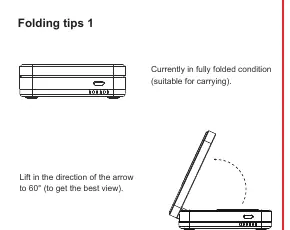
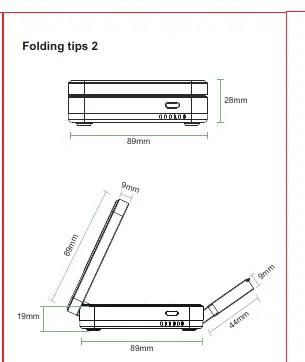
- Folding Tips 1: Lift the charging panel in the direction of the arrow up to 60 degrees to achieve the best viewing angle.
- Folding Tips 2: The device can be fully folded for easy carrying.
- Folding Tips 3: Note the cooling zones and the specific earphone charging position with non-slip silicone.
Charging Instructions
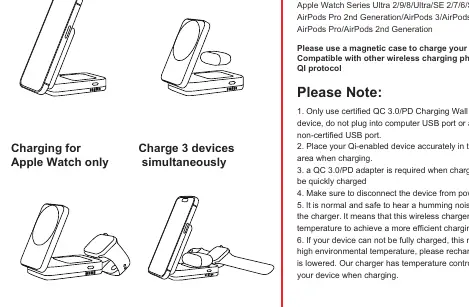
The charger supports simultaneous charging of a phone, watch, and earphones. Place each device in its designated charging area. If you hear a humming noise, this is normal and indicates the charger is adjusting its temperature for efficient charging.
Safety Instructions
- Do not store or use the device in high-temperature environments or near fire.
- Do not exceed the output rating to avoid fire or injury.
- Do not expose the charger to rain or snow.
- Do not attempt to modify, repair, or disassemble the unit.
- If your device does not charge fully, it may be due to high environmental temperature; allow it to cool down before attempting to charge again.
Manufacturer information
Belkin
Practical help
Common problems
Device not fully charging
High environmental temperature may be the cause. Allow the device to cool down and try recharging.
Humming noise during operation
This is normal and safe; it indicates the charger is adjusting its temperature to achieve efficient charging speed.
Before use
- Use a certified QC 3.0 or PD charging wall adapter.
- Do not plug into a computer USB port.
- Place the Qi-enabled device accurately in the wireless charging area.
- Ensure the device is disconnected from power before cleaning.
Specs in practice
- Phone Output
- 15W Max for compatible smartphones.
- Watch/Earphone Output
- 5W Max for each device.
Images and diagrams
- Folding tips 1: Shows how to lift the panel up to 60 degrees.
- Folding tips 2: Shows the dimensions of the device in the fully folded state.
- Folding tips 3: Identifies the cooling zones and the earphone charging position.
Model compatibility
- Compatible with iPhone 15/14/13/12 series.
- Compatible with Apple Watch Series Ultra 2/9/8/Ultra/SE 2/7/6/SE/5/4/3/2.
- Compatible with AirPods Pro 2nd Gen/3/Pro MagSafe/Pro/2nd Gen.
- Requires a magnetic case for phone charging.

Manual page author
Michael Turner
Technical manual editor
Reviews PDF manuals for structure, safety notes, and practical product details so readers can find the right information quickly.