Power / Batteries & Chargers
User Manual for Valore Multi-function 15W Wireless Charger AC101
Quick guide for the Valore Multi-function 15W Wireless Charger (AC101). Learn how to set up the alarm clock, use the foldable charging stand, and charge your devices safely.
Table of contents
Manual images
Click an image to enlargeQuick Guide
The Valore Multi-function 15W Wireless Charger (AC101) combines a Qi-compatible wireless charging pad with an alarm clock and a foldable mobile holder. This device supports fast wireless charging up to 15W when used with a compatible PD18W adapter.
Understanding the Product
The device features a wireless charging pad on top, a time display area on the front, and a touch button for LED light control. The rear of the unit contains the USB port and Type-C power input port.
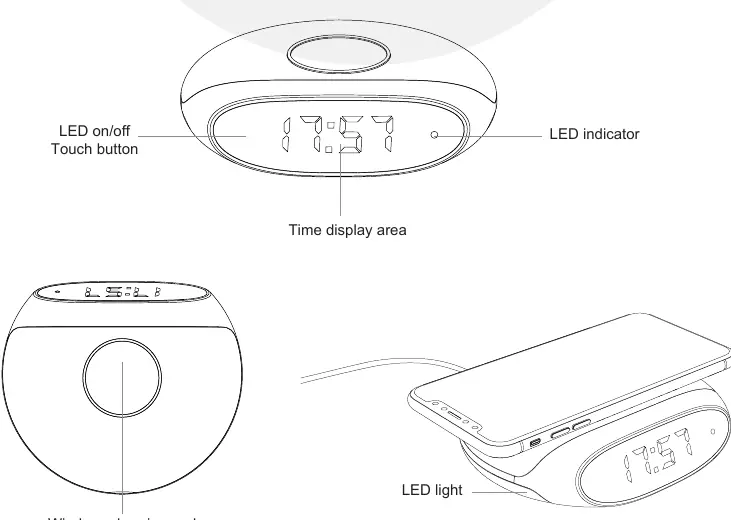
Setup and Connection
To begin using the charger:
- Connect the provided charging cable to a power adapter.
- Plug the cable into the Type-C port on the device.
- The wireless charging function will enter standby mode once the LED indicator is on.
- The LED light on the sides can be toggled on or off using the touch button.
Charging Modes
Wireless Charging: Place your Qi-enabled device directly onto the wireless charging area. Ensure the device is properly aligned for optimal charging.
Wired Charging: The device includes a USB port that supports charging via a standard USB charging cable.
Charging Stand Function
The device features a foldable stand. You can adjust the angle and height of the stand to charge your mobile device either horizontally or vertically, allowing for convenient viewing while charging.
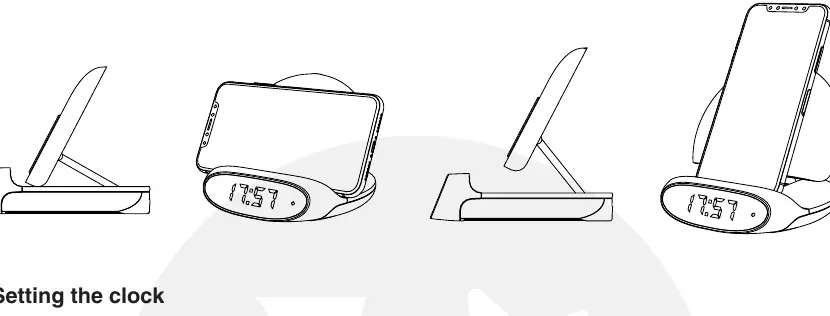
Setting the Clock
The clock is controlled by three buttons: "+", "-", and "M".
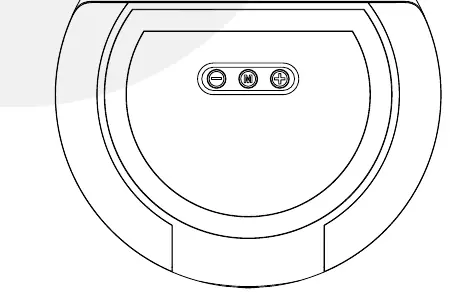
- Function Mode: Click the "M" button to enter the alarm clock setting mode.
- Time Setting: Double-click the "M" button to enter time setting mode.
- Adjustments: Use the "+" and "-" buttons to increase or decrease the time.
- Confirm: Click the "M" button again to return to the time display after completing your settings.
- Alarm Control: When the alarm rings, press any button or the touch on/off button to stop it. The alarm will ring every five minutes, with each cycle lasting 1 minute.
Safety and Maintenance
Follow these precautions to ensure safe operation:
- Do not store or use the product in high-temperature environments or near fire.
- Keep the product dry; do not submerge in liquid or expose to moisture.
- Use only the provided charging cable.
- Do not disassemble, repair, or modify the product.
- Supervise children when they are using the device.
- If the product shows signs of damage (dents, punctures, abnormal smell, or deformation), stop using it immediately and contact support.
For technical support, email [email protected]. For warranty registration, visit www.valore.sg.
Official resources from the manual
Practical help
Common problems
Alarm keeps ringing
Press any button or the touch on/off button to stop the alarm.
Device not charging wirelessly
Ensure your device is Qi-enabled and placed correctly on the charging pad. Verify the power adapter is connected properly.
Charging speed is slow
Ensure you are using a PD18W adapter to achieve the maximum 15W wireless charging output.
Before use
- Ensure you have a PD18W adapter for maximum charging performance.
- Verify your mobile device supports Qi wireless charging.
- Place the charger on a flat, stable surface.
- Connect the provided cable to the Type-C port.
Specs in practice
- Wireless charging output
- 15W (Max) with PD18W adapter, or 5W standard.
- Operating temperature
- -20°C to 45°C.
Images and diagrams
- The touch button on the front controls the side LED lights.
- The foldable stand can be adjusted for vertical or horizontal phone placement.
- The rear panel contains the USB output port and the Type-C power input port.
Model compatibility
- Requires Qi-enabled devices for wireless charging.
- Maximum 15W output requires a PD18W adapter.

Manual page author
David Miller
Documentation analyst
Organizes user manual content into clear summaries, with attention to model details, product context, and everyday usability.